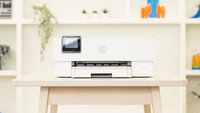
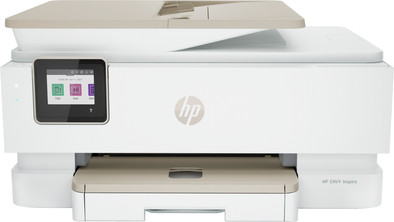
HP ENVY Photo Inspire 7924e All-in-One
Never available again
View alternatives in the sidebar
Choose this more energy-efficient printer that saves you money
HP Smart Tank 7305
Better model
View alternatives in the sidebar
Better model
Product number | 899081 | |
|---|---|---|
Manufacturer code | 349W0B#629 | |
Brand | HP | |
Warranty | 2 years | |
Processing of your defect | Via Coolblue |
Printer size | Medium | |
|---|---|---|
Width | 46 cm | |
Depth | 38,3 cm | |
Height | 23,4 cm | |
Color | White | |
Weight | 8,12 kg |
Printer type | All-in-one | |
|---|---|---|
Photo printer | ||
Print quality photos | Stand | |
Portable (mobile use) | ||
Recommended for use printers | Business printing, Printing at home |
Cartridge line | HP 303 | |
|---|---|---|
Usage costs for 1 page | 10 eurocents | |
Print technology | Inkjet | |
Type of ink | Cartridges | |
Number of cartridges/toner cartridges | 2 | |
Color printer | ||
Print speed black (ISO) | 15 ppm | |
Print speed color (ISO) | 10 ppm | |
First black page ready after | 16 seconds | |
Speed class | Good | |
Maximum print resolution height | 1200 dpi | |
Maximum print resolution width | 4800 dpi | |
Maximum print size | A4 | |
Automatic duplex printing | ||
Borderless printing | ||
Maximum print size duplex printing | A4 |
Scan functionality | ||
|---|---|---|
Automatic duplex scanning | ||
Maximum optical scan resolution width | 1200 dpi | |
Maximum optical scan resolution height | 1200 dpi | |
Scanner type | File scanner, Flatbed scanner | |
Maximum scan size | A4 (21x29.7cm) | |
Automatic document feeder (ADF) | ||
Maximum paper size ADF | A4 | |
Scan sizes | A4 | |
Scan speed (PPM) | 8 ppm | |
Color depth output | 24 bpp | |
Scan to | Cloud, Email, Email address, PC (local), PC (network), PDF | |
ADF capacity | 35 | |
OCR |
Copying functionality | ||
|---|---|---|
Copy speed black (ISO) | 13 ppm | |
Copy speed color (ISO) | 6 ppm | |
Maximum copy resolution height | 600 dpi | |
Maximum copy resolution width | 600 dpi |
Fax functionality |
|---|
Built-in screen | ||
|---|---|---|
Color screen | ||
Touchscreen |
Suitable for HP+ | ||
|---|---|---|
Suitable for HP Instant Ink | ||
HP Instant Ink included for a few months. | 6 | |
Suitable for Epson ReadyPrint |
Compatible with operating system | Android, ChromeOS, Linux, Windows, Windows Phone, iOS, macOS | |
|---|---|---|
Connection type | Wired, Wireless | |
Apple AirPrint | ||
Email print | ||
WPS (Wireless Protected Setup) | ||
Female standard USB-A port version | 2.0 | |
Ethernet port | ||
NFC | ||
Built-in WiFi | ||
WiFi frequency printers | 2.4GHz, 5GHz | |
WiFi direct | ||
Bluetooth | ||
USB port |
Manual input tray | ||
|---|---|---|
Photo paper drawer | ||
Output capacity output drawer | 60 | |
Input capacity photo paper tray | 15 | |
Maximum print size standard paper tray | A4 | |
Input capacity standard paper tray | 125 | |
Maximum print size photo paper tray | 13x18 | |
Number of standard paper trays | 1 |
Memory card reader |
|---|
Quality mark sustainable company | CDP A List, EcoVadis Platinum, Responsible Business Alliance, Science Based Targets initiative (SBTi) | |
|---|---|---|
Green production features | Environmentally-friendly package |
Print technology | Inkjet | |
|---|---|---|
Printer type | All-in-one | |
Color printer | ||
Automatic duplex printing | ||
Maximum print size | A4 | |
Automatic document feeder (ADF) | ||
WiFi direct |
According to our printer expert
You can print, scan, and copy with this all-in-one printer.
The inkjet technology lets you print colors and photos in high quality.
You can save paper thanks to the automatic duplex printing feature.
Because the cartridges for an inkjet printer are more expensive, you have higher printing costs per page.
5 stars
57
4 stars
61
3 stars
14
2 stars
4
1 star
4
Installation ease
Options
Print quality
We bought this printer because of its flexibility: you can print from Windows PCs, Apple, Android... print anything from anywhere... scan, copy, color print top, no stress... unfortunately... the printer works fantastic at times and not at all at other times. PCs or tablets regularly cannot find the printer in the network. This creates a lot of frustration in the family. In addition, in order to use all features, you are required to create an HP account and connect to the Internet. Why is an account or internet connection necessary for printing or scanning your own photos? A beautiful, very promising machine that for us has not kept the promises so far. The coolblue site was also not clear about whether or not there was a fixed Ethernet (RJ45 LAN) connection. This is not there, however, it might have solved connection and stability problems. Unfortunately. Because we wanted to use up the ink from our old printer before installing the new one, we left the new one in the box for a while, so the 30 days have passed and exchange for one with a better network connection is no longer possible otherwise we would have done right away.
KC
7 September 2022
Automatically translated from Nederlands
meets expectations
Jonas S
15 March 2022
Automatically translated from Nederlands
Good printer, but difficult installation
Alexander
8 December 2022
Automatically translated from Nederlands