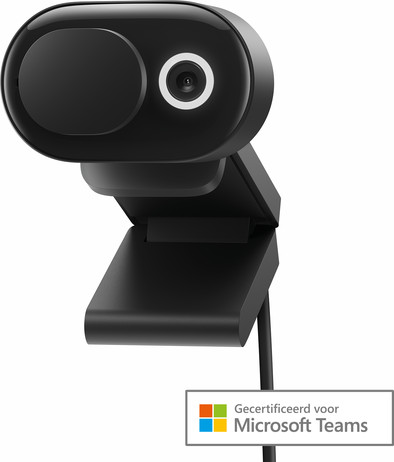
Microsoft Modern Webcam

Never available again
View alternatives in the sidebar
View alternatives in the sidebar
Product number | 906034 | |
|---|---|---|
Manufacturer code | 8L3-00002 | |
Brand | Microsoft | |
Warranty | 2 years | |
Processing of your defect | Via Coolblue |
Plug and Play | ||
|---|---|---|
Sharpness | Full HD (1080p) | |
Autofocus | ||
Wide-angle | ||
Automatic brightness adjustment | ||
Coverable lens |
Built-in microphone | ||
|---|---|---|
Microphone noise suppression | ||
Infrared (IrDA) | ||
Tiltable | ||
Type of webcam holder | Desk stand, Universal clip |
Width | 3,6 cm | |
|---|---|---|
Depth | 7,5 cm | |
Height | 5 cm | |
Weight | 0,088 kg | |
Color | Black | |
Material | Plastic | |
Finish | Matte and glossy |
Type of USB port | Standard USB-A | |
|---|---|---|
Connection type | Wired | |
Bluetooth | ||
Cable length | 1,5 m |
According to our webcam expert
You can connect a plug and play model webcam to your computer and start using it right away.
This webcam has a Full HD resolution, which is 2 times sharper than HD ready.
You always have a sharp recording thanks to the autofocus support of this webcam.
This webcam isn't suitable for laptops and desktops with the macOS operating system.
With the Microsoft Modern Webcam, you can make online calls in Full HD quality. This webcam has the Microsoft Teams Certified label. This means that the webcam is designed for use with Microsoft Teams. The camera automatically focuses on your face, so the image isn't blurred during the conversation. The 78-degree field of view ensures that you can see 2 people at the same time during a Microsoft Teams meeting. The built-in microphone allows you to start video calling right away and you no longer need a separate microphone. Are you done calling? Close the webcam with the privacy filter. This way, you can be sure that uninvited people aren't watching you. With the universal clip, you can attach this modern webcam to a tripod, your laptop or computer screen. This way, you always put yourself in the right angle in the picture.
5 stars
5
4 stars
3
3 stars
2
2 stars
0
1 star
0
Installation
Quality
Options
The Logitech webcams are quite touted here on this website, but this one can certainly be there, for a few tens less! I have a thin bezel computer screen, but the webcam's bezel isn't distracting, and still quite slim on its own. The housing itself is also quite slim, which appealed to me about this device. The image is very sharp. The webcam is adjustable via "Microsoft Accessories Center". Various color or exposure schemes are available, but only one of which actually gives a realistic representation. I turned off HDR myself, because I don't need to show my colleagues in detail. According to the same colleagues, I can also be heard well through the built-in microphone. The slider works fine and is ideal. As soon as the camera is turned on, a nice (not too distracting) white light is displayed around the camera. Furthermore, it seems as if there is some kind of wide-angle camera in it, so you don't have to worry that your face fills the entire frame, or that you have to lean back to get into the picture. Recommended!
Thijs van Went
19 July 2022
Automatically translated from Nederlands
Easy to install, even without further settings you can get started right away. But if you want, you can set many extra things via the Microsoft Center for Accessiores.
Annemarie
22 September 2022
Automatically translated from Nederlands
I was looking for a webcam with a slider and no further fuss. This webcam has a slide that can be easily moved with 1 finger. Because the software is already baked into Windows 10/11, you don't have to install anything else and you can use the Windows tools to fine-tune if necessary. The image is fine for a Full HD webcam.
Roderic Kreunen
22 September 2022
Automatically translated from Nederlands