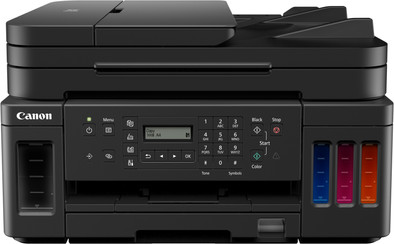
Canon PIXMA G7050
Never available again
View alternatives in the sidebar
View alternatives in the sidebar
Product number | 906221 | |
|---|---|---|
Manufacturer code | 3114C006AA | |
Brand | Canon | |
Warranty | 2 years | |
Processing of your defect | Via Coolblue |
Printer size | Medium | |
|---|---|---|
Width | 40,3 cm | |
Depth | 36,9 cm | |
Height | 23,4 cm | |
Color | Black | |
Weight | 9,6 kg |
Printer type | All-in-one | |
|---|---|---|
Photo printer | ||
Portable (mobile use) | ||
Recommended for use printers | Printing at home |
Print technology | Inkjet | |
|---|---|---|
Number of cartridges/toner cartridges | 4 | |
Color printer | ||
Print speed black (ISO) | 13 ppm | |
Print speed color (ISO) | 6,8 ppm | |
First black page ready after | 10 seconds | |
Maximum print resolution height | 1200 dpi | |
Maximum print resolution width | 4800 dpi | |
Maximum print size | A4 | |
Automatic duplex printing | ||
Borderless printing | ||
Maximum print size duplex printing | A4 |
Scan functionality | ||
|---|---|---|
Automatic duplex scanning | ||
Maximum optical scan resolution width | 2400 dpi | |
Maximum optical scan resolution height | 1200 dpi | |
Scanner type | File scanner, Flatbed scanner, Photo scanner | |
Maximum scan size | A4 (21x29.7cm) | |
Automatic document feeder (ADF) | ||
Maximum paper size ADF | A4 | |
Scan sizes | A4, A5, A6, A7 | |
Scan speed (PPM) | 3,5 ppm | |
Color depth output | 8 bpp | |
Scan to | App, Application, Cloud, Dropbox, Email, Email address, Email server, File, Folder with images, Image, Microsoft Excel, Microsoft Outlook, Microsoft PowerPoint, Microsoft SharePoint Connector, Microsoft Word, Network, PC (local), PC (network), PDF, PDF/A, Printer, Searchable PDF, Secured PDF, USB | |
ADF capacity | 250 | |
OCR |
Copying functionality | ||
|---|---|---|
Copy speed black (ISO) | 5 ppm | |
Copy speed color (ISO) | 20 ppm | |
Maximum copy resolution height | 300 dpi | |
Maximum copy resolution width | 300 dpi |
Fax functionality | ||
|---|---|---|
Color fax |
Built-in screen | ||
|---|---|---|
Color screen | ||
Touchscreen |
Compatible with operating system | Android, ChromeOS, Windows, Windows Phone, iOS, macOS | |
|---|---|---|
Connection type | Wireless | |
Apple AirPrint | ||
Email print | ||
WPS (Wireless Protected Setup) | ||
Female standard USB-A port version | 2.0 | |
Number of Ethernet ports | 1 | |
NFC | ||
Built-in WiFi | ||
WiFi direct | ||
Bluetooth | ||
USB port |
Manual input tray | ||
|---|---|---|
Photo paper drawer | ||
Output capacity output drawer | 100 | |
Input capacity photo paper tray | 20 | |
Maximum print size standard paper tray | A4 | |
Input capacity standard paper tray | 250 | |
Maximum print size photo paper tray | A4 | |
Number of standard paper trays | 1 |
Memory card reader |
|---|
anything for a smile
Print technology | Inkjet | |
|---|---|---|
Printer type | All-in-one | |
Color printer | ||
Automatic duplex printing | ||
Maximum print size | A4 | |
Automatic document feeder (ADF) | ||
WiFi direct |
According to our printer expert
The printer is a 4-in-1 printer, which means you can also scan, copy, and fax in addition to printing.
Thanks to the automatic document feeder (ADF), the printer scans and copies a stack of paper in 1 go.
The usage costs per page are low, so you spend little money on ink.
If you want to print more than 10 pages per minute in color, choose a printer with a higher print speed.
With the Canon PIXMA G7050 4-in-1 inkjet printer, you can print your documents affordably. Thanks to the large ink tank, you can print thousands of colored page with 1 color set. When you run out of ink, you can easily refill the tank with the useful ink bottles. You can find the ink tanks at the front of the printer, so you can easily see how much ink is left. The printer has WiFi Direct. So you send send your print jobs to the printer directly from your smartphone. This is a 4-in-1 printer, which means that you can print, scan, copy, and fax. With the automatic document feeder, you can copy up to 35 sheets of paper in one go. That's useful for large work reports. You can print photos without borders. And you can store your photo paper in a separate photo paper drawer.