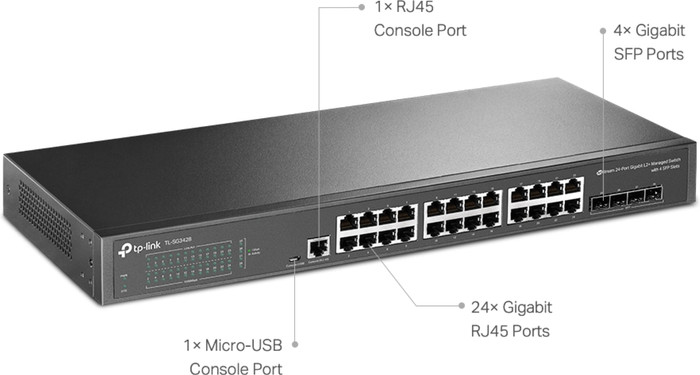
TP-Link Omada TL-SG3428



anything for a smile
24
203,-
Degelijkheid
Energy consumption
Speed
Installation & user friendliness
Options
I bought this switch because my T-mobile router only has 2 ethernet ports available (other 2/4 for TV for now) Looks solid and is nicely compact. Based on the website I thought I would get the "Easy Smart Switch", when the package arrived it turned out to be an "Unmanaged Pro" variant with the same model number (TL-SG105E) After some communication with Coolblue and the manufacturer, it turns out to be the same product. (other branding only) With me there was no CD (according to the description website CB) but you don't need that either. Any new(er) firmware can be found on the TP-Link website: https://www.tp-link.com/nl/support/download/tl-sg105e/ !Make sure you choose the correct hardware version! (it's on the sticker on the bottom of the switch) For me it was V4. (So don't automatically choose the last one!)
To configure the switch, you will have to make a direct (1on1) network connection with a PC/laptop. Default IP of the switch is then: 192.168.0.1 (default login: admin, admin) Put your PC (temporarily) in the same IP range, e.g. 192.168.0.2 (Network, change adapter options, Ethernet, Properties, Internet Protocol version 4 (TCP/IPv4), choose a manual IP)
if you place the switch directly in your network, it works like a switch, so you don't just get to the web interface. Network cables in and go.
rubber (adhesive) feet included (I have not used) I hung the switch on 1 of the 2 "Screw eyes" on the back.
All in all I am very satisfied with it.
F. Boersma
8 April 2020
Automatically translated from Nederlands
Smart switch cannot be configured via web browser. Supplied software for Windows only! So not for MacOS and Linux
Japie
6 February 2016
Automatically translated from Nederlands
Solid housing, easy installation. Good price. Fans do make a lot of noise, hang in the fuse box, with the door closed you could still hear it clearly, so I replaced the fans with quieter ones.
Thijs
31 July 2023
Automatically translated from Nederlands
Product number | 907994 | |
|---|---|---|
Manufacturer code | TL-SG3428 | |
Brand | TP-Link | |
Warranty | Lifetime | |
Processing of your defect | Via Coolblue |
Managed switch | ||
|---|---|---|
Fully managed | ||
Number of Ethernet ports | 24 | |
Ethernet speed | Gigabit Ethernet (1000Mbps) | |
Switching capacity | 56 Gbit/s | |
Performance options switch | IGMP Snooping, LACP Link aggregation, Quality of Service (QoS), VLAN support | |
SFP/GBIC ports | 4 | |
Quality of Service (QoS) | ||
LACP Link aggregation | ||
IGMP Snooping | ||
VLAN | ||
Maximum number of VLANs | 256 | |
Jumbo frame support | ||
Port mirroring | ||
Professional use | ||
Suitable for business use in | Large business network |
PoE support | ||
|---|---|---|
Highest PoE stand | No PoE |
Fan present | ||
|---|---|---|
Mounting possible | ||
Suitable for 19-inch rack mount | ||
Outdoor use | ||
Weight | 1930 g | |
Color | Black | |
Height | 4,4 cm | |
Width | 44 cm | |
Depth | 18 cm | |
Material | Metal | |
Guided collections test property | 1Gbps Ethernet speed | Suitable for a 19-inch rack |
Receive more coverage in case of damage than with your standard warranty. Coolblue takes care of everything: from taking out the insurance to repairs. Is a repair not possible? You receive the purchase price as CoolblueCredit.
XCover is allowed to arrange and process insurances on behalf of the insurer. The insurances are governed by Belgium law. If you have a complaint, you can contact the or our customer service.
First, add your network switch to your shopping cart. On the next page, choose the Protection Plan below. You always have a 30-day return window and pay no deductible in case of damage.
The insurance can be canceled every year, even if you have paid in advance. If you cancel earlier, you will receive a refund for the overpaid amount.

Our digital expert will help you, but it can sometimes make mistakes, like humans do.
According to our network switch expert
Many wired devices: with 24 Ethernet ports, you can connect 23 devices to the internet via a wired connection.
Set up your network yourself: with this managed switch, you can set up the router exactly how you want, and your network is extra secure.
Priority for important devices: thanks to Quality of Service, you can set it so your most important devices always have the best connection.
No PoE: because this switch doesn't have PoE, you'll connect at least 2 cables during the installation.
Less fast with large files: when you work with large files, the Ethernet speed can slow down.
203,-
Current product

No PoE
No PoE
PoE+
PoE+
PoE+
Gigabit Ethernet (1000Mbps)
2.5Gb Ethernet (2500Mbps)
Gigabit Ethernet (1000Mbps)
Gigabit Ethernet (1000Mbps)
Gigabit Ethernet (1000Mbps)
4
0
4
1
2
203,-
146,-
304,-
229,-
261,-
Delivered tomorrow
Delivered tomorrow