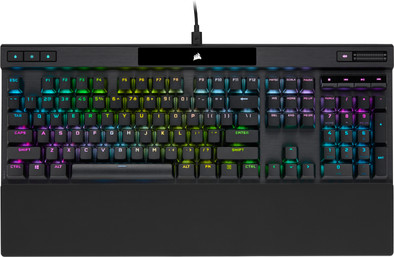
Corsair K70 Pro Optical-Mechanical Gaming Keyboard AZERTY Black
Never available again
View alternatives in the sidebar
View alternatives in the sidebar
Connection type | Wired | |
|---|---|---|
Backlit keyboard | ||
Keyboard composition | Keyboard | |
Bluetooth | ||
Geographic keyboard layout | BE layout | |
Ergonomic design | ||
Suitable for gaming | ||
Mechanical keyboard |
According to our keyboard expert
5 stars
2
4 stars
2
3 stars
0
2 stars
0
1 star
0
Very high quality keyboard for gaming and everyday use
skye
7 March 2023
Automatically translated from Dutch
First of all, I want to say that I am very satisfied with this keyboard. I chose it based on specifications and reviews. It is very solidly built and the keystrokes feel very pleasant. A big advantage for me is that this keyboard can be used as a standard keyboard. Plug it into any PC and get started right away. In addition, you also have 11 built-in lighting variants at your disposal immediately without having to install the iQUE software. But with that software, the floodgates are completely open. The table in the manual for using the built-in lighting does not work well for the Belgian AZERTY layout. For example, “FN + 1” does not work if you use the 1 of the numeric pad, it must be the 1 of the top row. It is not the print on the keys that is important, but the key itself. Refer to the American QUERTY layout to find the right keys. Another thing that was new to me is that the symbols on the keys are not from top left to bottom right on the keys, but at the top next to each other. That's no problem, with or without lighting all symbols are very visible. Only the & has a strange shape on the key. I'm not a gamer, but with this keyboard I type faster than on all my previous ergonomic keyboards. It does indeed take some getting used to the fast key response. The tapping sound of the keys is very acceptable to me, but of course I don't ram my keys through my keyboard. First of all I want to say that I am very satisfied with this keyboard. I chose it based on specifications and reviews. It is very solidly built and the keystrokes feel very pleasant. A big advantage for me is that this keyboard can be used as a standard keyboard. Plug it into any PC and get started right away. In addition, you also have 11 built-in lighting variants at your disposal without having to install the iQUE software. But with that software the floodgates are completely open. The table in the manual for using the built-in lighting does not work well for the Belgian AZERTY layout. For example. “FN + 1” does not work if you use the 1 of the numeric pad, it must be the 1 of the top row. It is not the printing of the keys that is important, but the key itself. Refer to the American QUERTY layout to find the right keys. Another thing that was new to me is that the symbols on the keys are not from top left to bottom right on the keys, but at the top next to each other. That is not a problem, with or without lighting all symbols are very visible. Only the & has a strange shape on the key. I am not a gamer, but with this keyboard I type faster than on all my previous ergonomic keyboards. It does indeed take some getting used to the fast key response. The tapping sound of the keys is very good for me, but of course I do not ram my keys through my keyboard. For me personally an absolute must. .
Johan
13 November 2024
Automatically translated from Dutch
First of all, I want to say that I am very satisfied with this keyboard. I chose it based on specifications and reviews. It is very solidly built and the keystrokes feel very pleasant. A big advantage for me is that this keyboard can be used as a standard keyboard. Plug it into any PC and get started right away. In addition, you also have 11 built-in lighting variants at your disposal immediately without having to install the iQUE software. But with that software, the floodgates are completely open. The table in the manual for using the built-in lighting does not work well for the Belgian AZERTY layout. For example, “FN + 1” does not work if you use the 1 of the numeric pad, it must be the 1 of the second top row. It is not the print on the keys that is important, but the key itself. Refer to the American QUERTY layout to find the right keys. Another thing that was new to me is that the symbols on the keys are not from top left to bottom right on the keys, but next to each other at the top. That's no problem, with or without lighting all symbols are very visible. Only the & has a strange shape on the key. I'm not a gamer, but with this keyboard I type faster than on all my previous ergonomic keyboards. It does indeed take some getting used to the fast key response. The tapping sound of the keys is very good for me, but of course I don't ram my keys through my keyboard. For me personally an absolute must.
Johan
20 November 2024
Automatically translated from Dutch
Receive more coverage in case of damage than with your standard warranty. Coolblue takes care of everything: from taking out the insurance to repairs. Is a repair not possible? You receive the purchase price as CoolblueCredit.
XCover is allowed to arrange and process insurances on behalf of the insurer. The insurances are governed by Belgium law. If you have a complaint, you can contact the or our customer service.
First, add your keyboard to your shopping cart. On the next page, choose the Protection Plan below. You always have a 30-day return window and pay no deductible in case of damage.
The insurance can be canceled every year, even if you have paid in advance. If you cancel earlier, you will receive a refund for the overpaid amount.
Product number | 920331 | |
|---|---|---|
Manufacturer code | CH-910941A-BE | |
Brand | Corsair | |
Warranty | 2 years | |
Processing of your defect | Via Coolblue |
Keyboard layout | AZERTY | |
|---|---|---|
Geographic keyboard layout | BE layout | |
Physical keyboard layout | ANSI | |
Typing comfort | Basic | |
Backlit keyboard | ||
Spill-resistant | ||
Number of colors lighting | 16.8 million | |
Brightness of backlight adjustable | ||
Programmable keys | ||
Multimedia shortcuts | ||
Flat keys | ||
Suitable for gaming | ||
Recommended for game genre | Action, Adventure, First Person Shooter, Indie, MMORPG, MOBA, Open World, RPG, Racing, Realtime Strategy, Simulation, Sports | |
Mechanical keyboard | ||
Mechanical key type | CORSAIR OPX Linear Optical-Mechanical key switch | |
Type of mechanical keyboard switch | Linear | |
Type of keycaps | High |
Connection type | Wired | |
|---|---|---|
Type of USB port | USB-C | |
Cable length | 1,8 m | |
Bluetooth |
Power supply type | USB port PC/laptop |
|---|
Keyboard size | 100% (Complete) | |
|---|---|---|
Keyboard composition | Keyboard | |
Ergonomic design | ||
Height | 4 cm | |
Width | 44,4 cm | |
Depth | 16,6 cm | |
Wrist rest | ||
Color | Black | |
Weight | 1,12 kg |