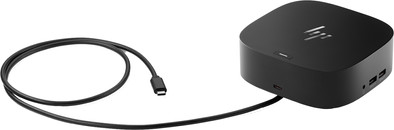
HP G5 USB-C Essential Docking Station
Never available again
View alternatives in the sidebar
Choose your dock:
HP G5 Essential 65W (784Q9AA)
Choose your dock
View alternatives in the sidebar
Choose your dock:
HP G5 Essential 65W (784Q9AA)
Choose your dock
Extra functionalities docking station | Charge MacBook via own charger, Charge laptop via docking station, Connect headphones, Connect wired network | |
|---|---|---|
Type of main connector | USB-C | |
Total available video outputs | 1x HDMI, 2x DisplayPort | |
Number of connectable monitors | 2 | |
Type of USB port | Standard USB-A, USB-C |
According to our dock for laptops expert
Expand your workplace with the HP G5 USB-C Essential Docking Station. You can connect 2 monitors to your Windows laptop with this dock. You can also connect peripherals like a mouse and keyboard to the USB-A ports. Connect an Ethernet cable in a workplace with poor wireless internet connection, so you can participate in online meetings with colleagues problem-free. The 3.5mm port supports sound and a microphone, so you can use your own headset while video calling. The HP G5 has a compact size, so it won't take up much space on your desk. If you're working at the office for a day, you can just bring it in your bag.
The HP G5 USB-C Essential Docking Station works on all Windows laptops with a USB-C port that can send a video signal. This is how you check whether your laptop has a suitable USB-C port.
5 stars
28
4 stars
31
3 stars
4
2 stars
3
1 star
6
User friendliness
Price-quality ratio
Durability
NB. With a MacBook, it is not possible to connect two screens with this docking station. Contrary to the coolblue text, this docking station has no display link. The HP USB-C/A Universal Dock G2 - Docking station does. Unfortunately, coolblue does not sell these.
Julia
15 July 2023
Automatically translated from Dutch
I already knew the brand and product by using the G2 variant and very satisfied with ...
Very handy for charging USB-C devices and not an ugly, conspicuous bake (somewhat similar to an Apple TV in terms of size).
Thanks to the DisplayLink technology, you can use it on any device (Linux, Mac, Windows) (download the drivers at https://www.synaptics.com/products/displaylink-graphics/downloads).
The device makes no noise and charges the laptop quite quickly.
A USB-A (laptop) / USB-C adapter (dock) would be useful. In this way you can also connect older non-USB-C devices (charging is not possible, but you can use all connected devices). I had such an adapter for a BlueBuilt USB hub, but this piece cannot be purchased separately from Coolblue. That would be handy...
But works fine!! Completely satisfied!
Peter J
16 July 2023
Automatically translated from Dutch
2 screens work but only 1920x1080 on Dell. 4K is not possible with 2 screens via DP.
PM
1 March 2024
Automatically translated from Dutch
Product number | 921855 | |
|---|---|---|
Manufacturer code | 784Q9AA#ABB | |
Brand | HP | |
Warranty | 2 years | |
Processing of your defect | Via Coolblue |
Made for laptop models | Windows laptop |
|---|
Laptop docking station suitable for | Connect 1 monitor, Connect 2 monitors and a Windows laptop | |
|---|---|---|
Extra functionalities docking station | Charge MacBook via own charger, Charge laptop via docking station, Connect headphones, Connect wired network | |
Type of main connector | USB-C | |
Supported video technology on Docking Station | Thunderbolt 3 | |
Number of USB ports | 4 | |
Type of USB port | Standard USB-A, USB-C | |
Number of female standard USB-A ports | 4 | |
Power standard USB-A port | 5 W | |
Power second standard USB-A port | 5 W | |
Power third standard USB-A port | 5 W | |
Power fourth standard USB-A port | 5 W | |
Number of USB-C ports | 1 | |
Protocol Female USB-C port | DisplayPort Alternative Mode, Thunderbolt Alternative Mode, USB, USB electricity | |
Power USB-C port | 15 W | |
Fast charging USB-C port | ||
Total available video outputs | 1x HDMI, 2x DisplayPort | |
Number of HDMI connectors | 1 | |
Female HDMI Type A port version | 2.0 | |
Number of Ethernet ports | 1 | |
Ethernet speed | Fast Ethernet (100Mbps) | |
Type of DisplayPort connector | standard DisplayPort | |
Number of Female Standard DisplayPort 1.4 ports | 2 | |
Version Female Standard DisplayPort port | 1.4 | |
Number of headphone jacks | 1 | |
Type of headphone connection | 3.5mm (TRS) | |
Memory card reader | ||
Number of connectable monitors | 2 | |
Maximum image resolution 1 monitor | 4K (3840x2160) | |
Maximum refresh rate 1 monitor | 60 Hz | |
Maximum refresh rate of 2 monitors | 60 Hz |
Color | Black | |
|---|---|---|
Height | 4,5 cm | |
Width | 12,2 cm | |
Depth | 12,2 cm | |
Weight | 0,68 kg |
Receive more coverage in case of damage than with your standard warranty. Coolblue takes care of everything: from taking out the insurance to repairs. Is a repair not possible? You receive the purchase price as CoolblueCredit.
XCover is allowed to arrange and process insurances on behalf of the insurer. The insurances are governed by Belgium law. If you have a complaint, you can contact the or our customer service.
First, add your dock for laptops to your shopping cart. On the next page, choose the Protection Plan below. You always have a 30-day return window and pay no deductible in case of damage.
The insurance can be canceled every year, even if you have paid in advance. If you cancel earlier, you will receive a refund for the overpaid amount.