HP 650 Wireless Keyboard and Mouse Set Black AZERTY

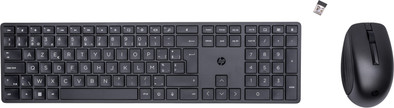
Never available again
View alternatives in the sidebar
View alternatives in the sidebar
Product number | 922896 | |
|---|---|---|
Manufacturer code | 4R013AA#AC0 | |
Brand | HP | |
Warranty | 2 years | |
Processing of your defect | Via Coolblue |
Mouse model | Standard | |
|---|---|---|
Input | Laser | |
Number of buttons | 3 | |
Ergonomic design | ||
Left or right-handed | Right-handed | |
Adjustable DPI | ||
Mouse controls | Buttons, Scroll wheel | |
Suitable for gaming | ||
Programmable buttons | ||
Horizontal scrolling | ||
Lighting peripherals |
Keyboard layout | AZERTY | |
|---|---|---|
Geographic keyboard layout | BE layout | |
Physical keyboard layout | ISO | |
Multimedia shortcuts | ||
Backlit keyboard | ||
Flat keys | ||
Mechanical keyboard | ||
Programmable keys | ||
Spill-resistant | ||
Wrist rest |
Connection type | Wireless | |
|---|---|---|
Type of wireless connection | USB | |
Nano receiver | ||
Type of USB port | Standard USB-A |
Power supply type | Rechargeable battery |
|---|
Keyboard composition | Keyboard, Mouse, Numpad | |
|---|---|---|
Height | 1,8 cm | |
Width | 11,5 cm | |
Depth | 4,3 cm | |
Color | Black | |
Weight | 520 g |
anything for a smile
Our digital expert will help you, but it can sometimes make mistakes, like humans do.
According to our keyboard and mouse set expert
Use it anywhere: because the set is wireless, you can use it anywhere.
Works on any surface: thanks to the laser sensor, you can use this mouse on any surface.
Type quickly and silently: you can type quickly and silently thanks to the low profile keys.
Always need a USB port: you always need a free USB port for the connection, because the set doesn't have Bluetooth.
Less suitable for long-term use: because the set isn't ergonomic, it's less suitable for long-term use.
Coolblue itself says "no ergonomic design". That's an understatement. This is not a professional product and it is strange that HP offers such a toy... If I had to use this for more than half an hour a day it would go straight back into the box.
Peter
25 May 2023
Automatically translated from Nederlands
The mouse keeps stuttering, which is really annoying! You think you've made a click, continue working, and then the cursor is still in a different place...
KD
12 February 2026
Automatically translated from Nederlands
Simple keyboard with a few drawbacks, mouse is OK
Jeroen
30 December 2024
Automatically translated from Nederlands