

anything for a smile
Black
Color: Black

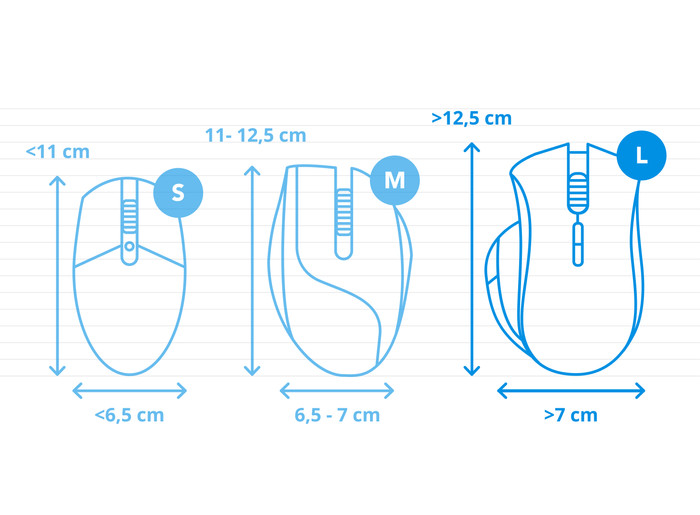
How large is a mouse exactly? It's often difficult to see on a photo. That's why we thought of the thumb rule below.
Choose a mouse that takes up more than half of the surface of the dimensions of your hand. You can find the dimensions of the mouse under the specifications.
Your hands are often 2 times longer from your wrist to the tip of your middle finger than that it's wide from your little finger to the knuckle of your thumb. The closer the length and width a mouse come to 60% of the length and width of your hands, the more likely it is that the mouse feels comfortable in your hand.

Product number | 953302 | |
|---|---|---|
Manufacturer code | 910-007029 | |
Brand | Logitech | |
Warranty | 2 years | |
Processing of your defect | Via Coolblue |
Mouse model | Standard | |
|---|---|---|
Input | Trackball | |
Number of buttons | 5 | |
Ergonomic design | ||
Type of ergonomics | Trackball | |
Left or right-handed | Right-handed | |
Mouse controls | Buttons, Scroll wheel, Trackball | |
Suitable for gaming | ||
Scroll fast | ||
Rechargeable | ||
Programmable buttons | ||
Number of programmable buttons | 3 | |
Lighting peripherals | ||
Silent mouse | ||
Horizontal scrolling | ||
Mouse surface | Any surface | |
Product family | Ergo |
Connection type | Wireless | |
|---|---|---|
Type of wireless connection | USB and Bluetooth | |
Bluetooth version | 5.0 | |
Nano receiver | ||
Number of devices that can be paired | 1 - 2 | |
Type of USB port | USB-C |
Plug and Play | ||
|---|---|---|
Compatible with operating system | ChromeOS, Windows, iPadOS, macOS |
Power supply type | Rechargeable battery | |
|---|---|---|
Rechargeable battery | ||
Battery level indicator | ||
Battery included |
Color | Black | |
|---|---|---|
Mouse size | Large | |
Width | 10 cm | |
Height | 4,8 cm | |
Depth | 13,4 cm | |
Material | Plastic | |
Finish | Matte | |
Weight | 145 g |
Inaccurate, prefers movement of the wrist rather than just the thumb.
Bert
11 March 2025
Automatically translated from Nederlands
This is already my third Logitech Trackball mouse. Once you get used to it and notice that it really reduces RSI (in my case, elbow pain), you can't live without it.
It's funny, the movements you used to make with your whole arm are now made with your thumb. And strangely enough, that doesn't cause any injuries.
Setting it up was really fun. I turned on the mouse and then removed the battery protection (yes, it has to be done in reverse order, I know), and then my Windows laptop asked if I wanted to use this mouse. So even faster than plugging in a USB cable!
I haven't installed the Logitech software yet. I don't really see the added value, and all the mouse buttons work the way I want them to by default.
Ernst
24 November 2025
Automatically translated from Nederlands
it works great, this is my 2nd. the 1st still works, it's going to my daughter!
Gemma
20 January 2025
Automatically translated from Nederlands
Our digital expert will help you, but it can sometimes make mistakes, like humans do.
According to our mouse expert
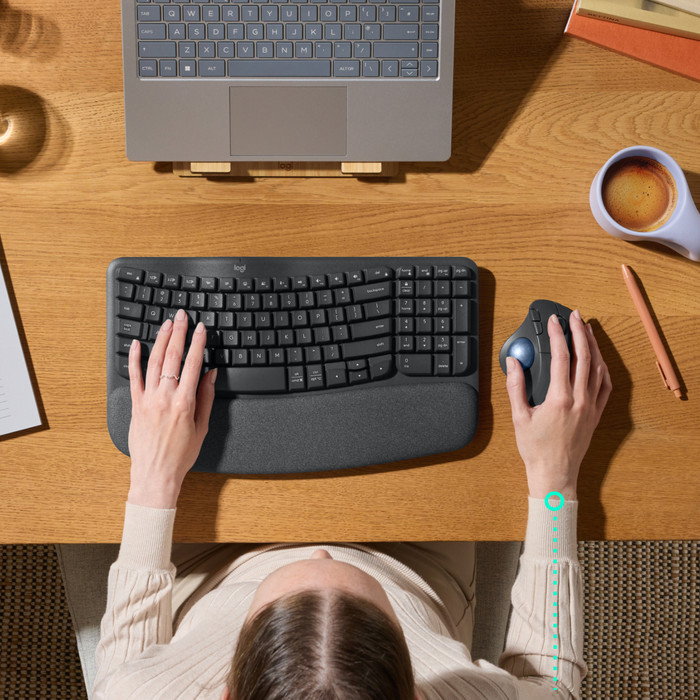
Work comfortably: the ergonomic design keeps your arm, hand, and wrist in a natural position.
More freedom of movement: because the mouse is wireless, you can use it anywhere.
Keep a USB port free: thanks to Bluetooth, you can connect the mouse to your computer without a USB dongle.
No quiet buttons: this means you'll hear more clicking sounds while you work.
No fast scroll wheel: scrolling through large spreadsheets and long pages takes more time.
47,99
47,99
Current product

Wireless
Wireless
Wireless
Wireless
Wireless
47,99
55,-
45,99
48,99
69,-
Delivered tomorrow
Delivered tomorrow