

anything for a smile
Black
Sound quality
Fit
Wearing comfort
Design
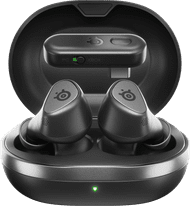
The SteelSeries Arctis GameBuds are handy gaming earphones with which I play my games with excellent sound. I easily connect the earphones to my PlayStation 5 and smartphone. I can also easily switch between channels. The sound of the earphones could be a bit louder in my opinion.
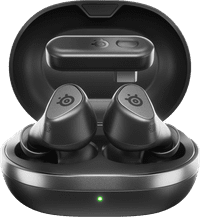
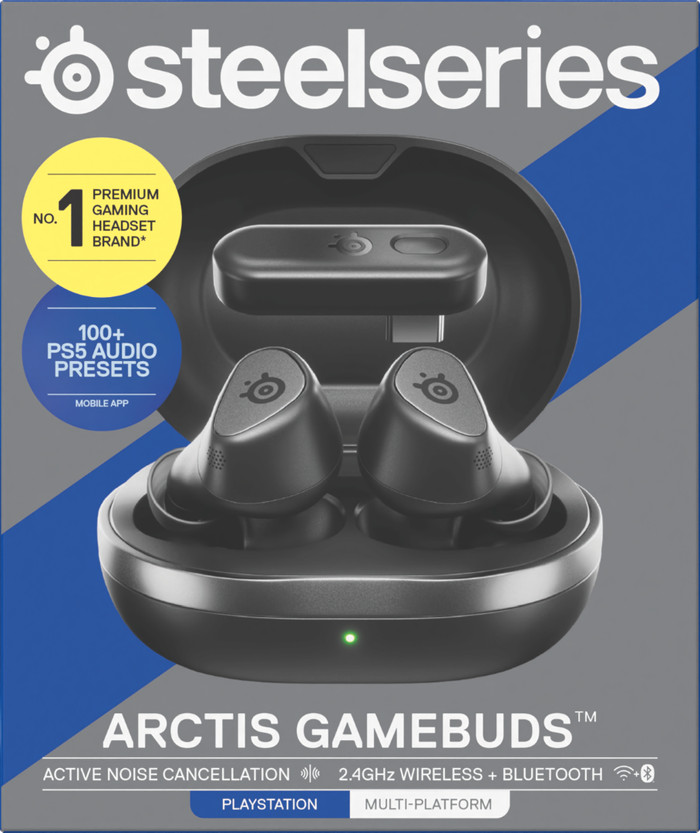
Easy to use When I take the earphones out of the box, I see the charging case with the GameBuds and USB C dongle in it, a USB C cable with which I charge the charging case, a USB A dongle and 2 different sizes of earplugs. I plug the USB C dongle into my PlayStation 5. I turn on the game buds and they immediately connect to my PlayStation. This goes smoothly and quickly. I can also easily connect the earphones to my smartphone via Bluetooth. The instructions are all in the box, which also makes this go quickly. The battery of the GameBuds lasts about 10 hours. That is long enough for a good gaming session. This also makes the GameBuds suitable for gaming on the go, for example on a Nintendo Switch or your smartphone.
Adjust settings In the SteelSeries Arctis Companion app, I adjust various settings of the GameBuds, such as noise cancelling and microphone volume. I also choose from various audio presets for different games. This way, I can quickly switch between the best audio settings for Call of Duty and Astro Bot, for example. When I tap the GameBuds 3 times, the channel switches from my smartphone to my PlayStation. This is quick and easy.
Good sound with excellent noise cancelling I play Call of Duty with an audio preset from the list in the Companion App. What I immediately notice is that the sound of the GameBuds is not very loud, which I am used to from a headset. This is less convenient for Call of Duty. Via the Companion App, I easily switch off the audio limiter, after which the sound is louder. The noise cancelling of the GameBuds is fine, but could be better. I also adjust this noise cancelling via the companion app. The microphone sounds clear and I also adjust it completely in the app. This way, I can always be heard by my teammates or friends in the PlayStation party.
These Arctis GameBuds are best suited if you like to game on the go or play more casual games. The earbuds are easy to use and I can adjust the settings to my liking. The sound level is a bit soft for competitive games, but loud enough for casual gamers. The microphone is of good quality and the charging case is very handy.
Sem. Gaming specialist.
7 November 2024
Automatically translated from Nederlands
As a gamer, I am always looking for accessories that enhance my experience. I recently tested the Steelseries Arctis Gamebuds, and I was pleasantly surprised. These earbuds are not only sturdy and comfortable, but also deliver an impressive sound. Whether it's explosions or subtle footsteps, everything sounds clear and powerful. This makes gaming feel much more immersive. an 8/10.
Thomas
10 January 2025
Automatically translated from Nederlands
I was able to test the gamebuds for a few weeks. I mainly did this on the PS and phone. The sound is incredibly good. Especially with the PS more than excellent sound reproduction/gaming experience and with the help of the app you can personalize the sound. With the app you can also set the microphone, read how much % the buds are still charged and how much % the battery has left. Talking to your gaming friends is excellent, both myself and the friends have clear sound, so the microphone also does its job well. When used in combination with your phone, switching between music and phone calls is easy to call. The entire set also comes with a dongle so that you can connect the dongle to devices without Bluetooth in order to still be able to use the buds. Super handy. Three sizes of caps are also supplied for the buds, so that the buds fit well in the ears. Except for me. And that is why I find that a minor point. When sitting still they stay in place, but when moving they fall out of my ears.
As long as they are on, they are comfortable to wear. The appearance of the gamebuds and the battery looks nice, sleek design and compact to carry. In short, a great product if you are looking for gamebuds. I think that is where they come into their own, at least that is what we experienced.
L. Haijtsma
13 January 2025
Automatically translated from Nederlands
Product number | 954780 | |
|---|---|---|
Manufacturer code | 61680 | |
Brand | SteelSeries | |
Warranty | 2 years | |
Processing of your defect | Via Coolblue |
Type of gaming headset | Gaming earbuds | |
|---|---|---|
Computer platform | PC (Windows), PlayStation 4, PlayStation 5 | |
Sound reproduction | Surround | |
Connection type | Wireless | |
Type of configuration software | Arctis Companion App |
Audio channels | 7.1 | |
|---|---|---|
Noise canceling | ||
Volume control speaker(s) | ||
Volume controls location | Ear cup | |
Speaker drivers | 6 mm | |
Driver type | Neodymium | |
Minimum frequency range | 20 Hz | |
Maximum frequency range | 20 kHZ | |
Impedance | 140 O | |
Sound quality according to Coolblue | Stand |
Microphone noise suppression | ||
|---|---|---|
Microphone mute function | ||
How to mute | Via the button on the ear cup | |
Type of microphone | Blocked |
Base station | ||
|---|---|---|
Bluetooth | ||
USB port | ||
Type of USB port | USB-C | |
Headphone jack |
Lighting peripherals |
|---|
Material | Plastic | |
|---|---|---|
Ear cups design | Closed design | |
Ear cushion material | Rubber | |
Foldable | ||
Color | Black | |
Weight | 62 g |
Receive more coverage in case of damage than with your standard warranty. Coolblue takes care of everything: from taking out the insurance to repairs. Is a repair not possible? You receive the purchase price as CoolblueCredit.
XCover is allowed to arrange and process insurances on behalf of the insurer. The insurances are governed by Belgium law. If you have a complaint, you can contact the or our customer service.
First, add your gaming headset to your shopping cart. On the next page, choose one of the Protection Plans below. You always have a 30-day return window and pay no deductible in case of damage or theft.
You can cancel a monthly insurance every month. You can cancel an annual insurance every year, even if you paid in advance. Want to cancel it earlier? You receive a refund for the years you're not insured anymore.

Computer platform | PC (Windows), PlayStation 4, PlayStation 5 | |
|---|---|---|
Connection type | Wireless | |
Sound reproduction | Surround | |
Microphone noise suppression | ||
Noise canceling | ||
Sound quality according to Coolblue | Stand |
According to our gaming headset expert
You can easily connect the GameBuds to your platform with the USB-C dongle or Bluetooth.
Thanks to the noise canceling microphone, your friends don't hear background noises.
With an 10-hour battery life, you can game for hours without having to charge in between.
Surround sound is only available on PC.
140,-
140,-
Current product

PC (Windows), PlayStation 4, PlayStation 5
PC (Windows), PlayStation 4, PlayStation 5, Xbox One, Xbox Series S, Xbox Series X
PC (Windows), PlayStation 4, PlayStation 5
PC (Windows), PlayStation 4, PlayStation 5
PC (Windows), PlayStation 4, PlayStation 5
Wireless
Wireless
Wired
Wireless
Wireless
140,-
155,-
180,-
148,-
149,-
Delivered on Saturday
Delivered on Saturday