anything for a smile

Are you a business customer? We're happy to offer you extra services such as:
Read more about Coolblue Business here or create a business account right away.

Product number | 983550 | |
|---|---|---|
Manufacturer code | 4XD1T60925 | |
Brand | Lenovo | |
Warranty | 3 years | |
Processing of your defect | Via Coolblue |
Noise cancellation type | Advanced hybrid active | |
|---|---|---|
Office headset suitable for device | PC, Smartphone | |
Suitable for type of communication software | Microsoft Communication, Universal Communication | |
Supported communication software | Microsoft Communications, Unified Communications | |
Pick up/hang up phone call | ||
Standby time | 300 hours | |
Spoken notifications |
Headphones wearing method | On the ear | |
|---|---|---|
Ear cushion material | Imitation leather | |
Number of ear cups | 2 | |
Rotatable ear cups | ||
Foldable | ||
Control buttons | ||
Control buttons location | Ear cup | |
Noise canceling via control buttons | ||
Adjust volume via control buttons |
Connection type | Wireless | |
|---|---|---|
Connect with USB dongle | ||
Bluetooth | ||
Bluetooth version | 5.3 | |
Optional wireless Bluetooth adapter | ||
Software compatibility | ||
USB port | ||
Type of USB port | USB-C |
Built-in microphone | ||
|---|---|---|
Microphone recording type | Stereo | |
Microphone mute function | ||
How to mute | Close the microphone boom | |
Collapsible microphone | ||
Detachable microphone | ||
Busy light |
Power source | ||
|---|---|---|
Battery life during conversation | 24 hours | |
Battery life while listening to music | 51 hours | |
Base station |
Weight | 153 g | |
|---|---|---|
Material | Metal, Plastic | |
Finish | Matte | |
Color | Gray |
Receive more coverage in case of damage than with your standard warranty. Coolblue takes care of everything: from taking out the insurance to repairs. Is a repair not possible? You receive the purchase price as CoolblueCredit.
XCover is allowed to arrange and process insurances on behalf of the insurer. The insurances are governed by Belgium law. If you have a complaint, you can contact the or our customer service.
First, add your office headset to your shopping cart. On the next page, choose the Protection Plan below. You always have a 30-day return window and pay no deductible in case of damage.
The insurance can be canceled every year, even if you have paid in advance. If you cancel earlier, you will receive a refund for the overpaid amount.

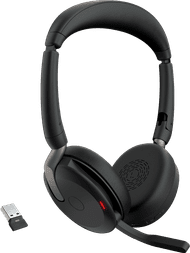
With the Lenovo ThinkPad X Bose 8550 Wireless Office Headset, I participate in online meetings, am clearly audible, and am hardly bothered by ambient noise. I also listen to music between meetings thanks to the good Bose speakers. The touch controls are located only on the left earcup, which I do have to get used to.
First impression The headphones are folded up in a neat storage case with a soft inner lining. I am happy with this, because it allows me to easily take them with me everywhere without my headset getting damaged. The case contains a small pocket for the included USB-C dongle. The matte finish gives the headset a luxurious look. The ear cushions and headband feel soft and sit comfortably on my ears, even when I wear the headset for a full workday. I wear earrings, but I don't feel them. I can easily adjust the headband until it fits to my liking.
Quick connection and adjusting settings I plug the USB-C dongle into my laptop and turn on the headphones. I select the headset in my laptop's sound settings, and the headset connects immediately. I have to get used to the touch controls, as they are only located on the left earcup. There is a handy sticker on the earcup that allows me to quickly see where each function button is located. I adjust other settings, such as the noise cancelling level, using the physical buttons on the headphones or via the Lenovo Accessories and Display Manager software. This software does not have a mobile version, and I only use it on my laptop. I am pleased with the long battery life, as I only notice that I need to charge it after 3 working days.
Different noise cancelling levels and foldable microphone My colleagues hear me clearly during Teams meetings thanks to the good noise cancellation in the microphone. Even if someone is sitting next to me talking, you can barely hear it. When I am not using the microphone, I easily fold it up so it doesn't get in the way. I set the automatic noise cancelling to 3 different levels. When the noise cancelling is turned all the way up, I hear no noise. I do hear loud sounds, however. This is due to the on-ear design. An over-ear headset naturally dampens sounds better.
Good Bose speakers Besides the clear sound during meetings, I find the sound quality for music to be fine. It cannot be compared to the quality of a standard headset, but you shouldn't expect that from an office headset.
Rowan. Office headsets specialist.
7 October 2026
Automatically translated from Nederlands
Sound quality is good, connects quickly to the PC. Easy to answer calls.
Glenn Lanckbeen
8 September 2026
Automatically translated from Nederlands
Our digital expert will help you, but it can sometimes make mistakes, like humans do.
According to our office headset expert
Tune out your surroundings better: the advanced hybrid active noise canceling powerfully reduces ambient noise, and you can adjust the level of noise canceling yourself.
Ready for Teams: this office headset is certified for Microsoft Teams, so you can work smoothly and use extra convenient features.
Great with glasses: on-ear headphones are suitable if you wear glasses.
Less comfortable for long listening sessions: the ear cushions of an on-ear headset press on your ears, so it feels less comfortable.
210,-
210,-
Current product

Advanced hybrid active
Hybrid active
Hybrid active
Hybrid active
None
Wireless
Wireless
Wireless
Wired, Wireless
Wireless
Imitation leather
Imitation leather
Imitation leather
Imitation leather
Imitation leather
210,-
200,-
269,-
211,-
207,-
Delivered tomorrow
Delivered tomorrow