Written by Rowan
Edited on
13 October 2025
·
14:59
Expert review Apple MacBook Pro M3 (2023)
On 31 October 2023, Apple announced the new 14 and 16-inch MacBook Pro. The MacBook Pro is the first model with the updated M3 series. You can now choose between the M3, M3 Pro, and M3 Max. The speed and power get a boost, but the appearance as well. For the first time, the MacBook Pro models are also available in Space Black. In this article, I'll tell you everything about the 14-inch MacBook Pro with the M3 Pro and the 16-inch MacBook Pro with the M3 Max.
Tested MacBook models
- MacBook Pro 16 inches M3 Max (2023)
The M3 Max chip is suitable for the most demanding processes, such as 3D design and gaming.
On the 16-inch Liquid Retina XDR display, you won't miss a single detail.
The M3 Max chip supports up to 4 extra screens.
The large size makes this MacBook model less suitable for on the go.
From
4.109,-
- MacBook Pro 14 inches M3 Pro (2023)
The M3 Pro chip is suitable for demanding tasks, such as 4K photo and video editing.
Thanks to the compact 14-inch size and light weight, this model easily fits in your bag.
The M3 Pro chip supports up to 2 extra screens.
If you edit 3D designs or develop apps, we recommend the M3 Max chip.
From
2.299,-



First impression of the MacBook Pro M3 (2023)
The MacBook Pro comes in a sturdy box. When I take my MacBook out of the box, I see a 140W USB-C power adapter, a 2m USB-C to MagSafe 3 cable, some booklets, and black Apple stickers. The cable is made of fabric, so it wears less quickly. The cable is Space Black like my MacBook, but the adapter remains white.
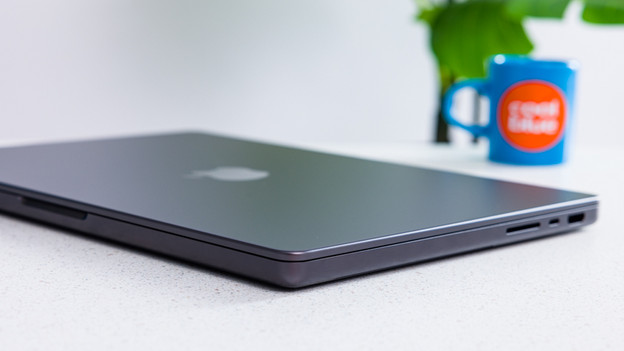
Sturdy, Space Black design with less fingerprints
The look of the MacBook Pro hasn't changed much compared to its predecessor, the MacBook Pro with M2 (2023). For example, the design and screen sizes are the same. The 14-inch model is great if you're often on the go thanks to its low 1.6kg weight. The 16-inch MacBook Pro is more difficult to carry due to its 2.1kg weight. The large screen is ideal for editing detailed files. So what's new? The luxurious, Space Black color. In addition, this MacBook has a special coating, so you hardly see dirty fingerprints anymore.
Processor

Apple M3 Max: 8K video editing, app design, and gaming
The M3 Max has up to 40 graphics cores. This makes it suitable for the most demanding tasks. This includes editing 8K footage, developing apps, creating complex 3D designs, and even playing games. The new M3 chips now also have ray tracing. This is a technology that makes everything you do even faster. The result? The most realistic images in games, such as light, shadows, and reflections. And for a complete overview, you can connect up to 4 extra screens.

Apple M3 Pro: 4K video editing and 3D design
The M3 Pro has up to 18 graphics cores, which allows you to edit demanding video files or create 3D designs. You can easily transfer raw photo and video files from your camera to your MacBook and get started right away. The M3 Pro is also suitable for gaming. This means that you can play light games like Fortnite or enjoy all Apple Arcade games. Want to perform many tasks at the same time? Easily connect up to 2 extra screens, so you can quickly switch between your tasks.

All the connectors you need
You'll find various connectors on the side of your MacBook. You can charge your MacBook with MagSafe. This magnetic charger has a light, so you know exactly when it's fully charged again. Easily and quickly transfer photos and videos from your SD card with the SDXE card slot. You can even connect your MacBook to a television with the HDMI connector. Do you still have wired headphones? Use the mini jack connector. You do need a docking station for an Ethernet connection.
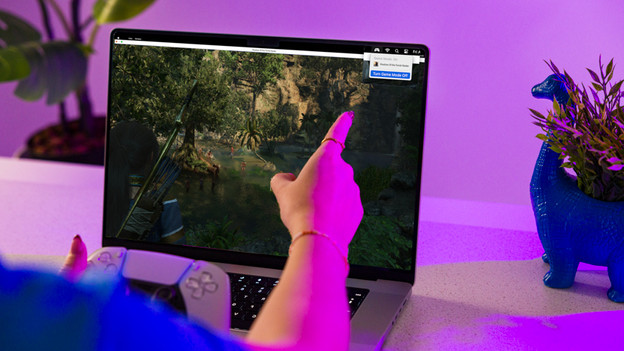
macOS Sonoma: gaming and more
It's the first time that you can actually play games with a MacBook. It was possible to play light games before, but your Apple laptop never had this many graphics cores or ray tracing. In addition, macOS Sonoma has a special Game Mode. This improves frame rates and refresh rate. The Game Mode works with any game and also supports all new and announced Mac games. In addition, you can even connect your PS5 controller to your MacBook via Bluetooth.
Conclusion
Want to use your MacBook for the most demanding tasks, such as 8K video editing, app development, or gaming? Choose a model with the M3 Max chip. Do you edit photo and video files? We recommend the M3 Pro chip. The 14-inch model is a good choice if you're often on the go. The 16-inch MacBook Pro is less easy to take with you, but it's ideal for editing detailed files.

2.199,-