Written by Rowan
Edited on
28 October 2024
·
16:22
Compare the MacBook Pro M3 Max to the MacBook Pro M2 Max
During the Apple event on 31 October 2023, Apple announced a new MacBook Pro. This Apple laptop is more powerful and faster than ever, thanks to the new M3 Max chip. It also gets a new look: you can now also choose the stylish Space Black color. Read everything about the new MacBook Pro here.
View the MacBook Pro with M3 Max and MacBook Pro with M2 Max
- Apple MacBook Pro 16 inches (2023) M3 Max (16-core CPU / 40-core GPU) 48GB / 1TB Space Black
You can smoothly edit complex 3D files and develop apps with the most demanding software.
You can store all your photos, movies, music, and documents on the 1TB SSD drive.
On the Liquid Retina XDR display, you can see lifelike colors and every detail.
If you take your MacBook with you daily, we recommend a 14-inch model.
The storage and RAM aren't expandable, because they're built into the chip.
From
4.049,-
- Apple MacBook Pro 16 inches (2023) M2 Max (12-core CPU / 38-core GPU) 64GB / 1 TB Space Gray
You can edit 3D files and develop apps with demanding programs like Xcode.
Thanks to the 64GB RAM, you can smoothly switch between the most demanding programs.
On the Liquid Retina XDR display, you can see lifelike colors and every detail.
If you take your MacBook with you daily, we recommend a 14-inch model.
Because this MacBook only has USB-C ports, you'll need a docking station sooner.
From
4.659,-
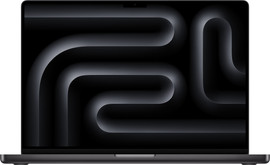

Comparison of the MacBook Pro with M3 Max and MacBook Pro with M2 Max
| MacBook Pro with M3 Max | MacBook Pro with M2 Max | |
|---|---|---|
| Processor | M3 Max | M2 Max |
| CPU | Up to 16 | Up to 12 |
| GPU | Up to 40 | Up to 38 |
| RAM | Up to 128GB | Up to 64GB |
| Storage | Up to 2TB | Up to 2TB |
| Size | 14.2 and 16.2 inches | 14.2 and 16.2 inches |
| Battery life | Up to 22 hours | Up to 22 hours |
| Color | Silver, Space Gray, and Space Black | Silver and Space Gray |
Processor and speed
Apple MacBook Pro with M3 Max: up to 20% faster than with M2 Max
The MacBook Pro gets its processing power from the new M3 Max chip. With this chip, everything you do goes even smoother and faster. That's thanks to the new 3-nanometer technology. Because the distances between the components in the chip are shorter, it takes less time to transmit signals. This means that programs boot faster and your MacBook won't slow down. You can choose a model with 14 CPU cores and 30 GPU cores or a model with 16 CPU cores and 40 GPU cores. With 40 graphics cores, your MacBook can handle everything.
Apple MacBook Pro with M2 Max: smooth, fast, and powerful
With the Apple M2 Max chip, your MacBook hardly slows down when you use apps. You can choose between a model with 12 CPU cores and 30 GPU cores or a model with 38 GPU cores. With 38 graphics cores, you can edit complex 3D files and develop apps with demanding programs like Xcode. These MacBook models still have the 5-nanometer technology. As a result, the components are slightly further apart and your MacBook may take a bit longer to charge.
Design and connectors

Apple MacBook Pro with M3 Max: stylish Space Black
The design of the 16-inch MacBook Pro hasn't changed much. It still has 3 Thunderbolt 4 ports, a MagSafe 3 port, an HDMI connector, and a memory card reader. Want to connect 4 screens so you can easily switch between programs? The powerful M3 Max chip allows you to do that. This MacBook also has a Liquid Retina XDR display with the ProMotion technology, so images look smooth. Logging in feels familiar and secure with Touch ID. Are you ready for a new color? Choose the Space Black version.
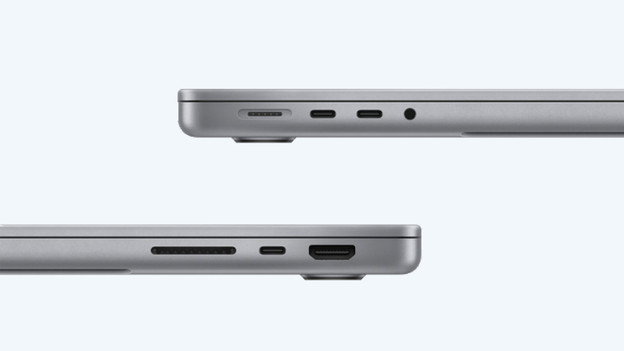
Apple MacBook Pro with M2 Max: silver and Space Gray
The Apple MacBook Pro has 3 Thunderbolt 4 ports, a MagSafe 3 port, an HDMI connector and a memory card reader. You can also connect up to 4 external screens to your MacBook. Images look smooth on the Liquid Retina XDR display with the ProMotion technology. You can log in with your fingerprint on the Touch ID. This MacBook is available in the classic colors Space Gray and silver.
Conclusion
The biggest difference between these models is the processor. The M3 Max chip works faster than its predecessor, thanks to the 3-nanometer technology. As a result, you can work even more smoothly. The chip also has more graphics cores, so you can edit even larger files. Both models are very powerful. If you want the best of the best, choose the MacBook Pro with M3 Max chip.