Written by Bob
Edited on
25 August 2026
·
09:04
Everything on Apple iOS 18
With the new updates in iOS 18, Apple is bringing Apple AI to your iPhone. You can have Apple Intelligence write texts for you, edit photos, or summarize your notifications. The improved digital assistant Siri helps you get the most out of AI. In addition, iOS 18 has some other smaller improvements like the new Password app. Read everything about it here.
iOS 26 available now
The successor to iOS 18 is now available for the Apple iPhone. This new software update has lots of new and improved functions. In the article below, you can read everything on iOS 26.

Smart functions of Apple Intelligence (AI)
With the smart AI functions, Apple takes on a lot of the work for you. You can have AI write a reply to an email or write a message for you, for example. Do you receive so many messages that you don't know which one to read first? AI summarizes the messages for you and puts them in order, so you see the most important ones first. Don't feel like reading long texts? Have AI make a summary for you. This works with texts, but also with recorded voice memos and even phone calls.

Siri
Siri helps you get the most out of the AI functions. It'll feel more natural to communicate with Siri, and you can use more difficult commands than before. Ask Siri to play the podcast your colleague Tim shared with you last week, for example. Siri will then play the right podcast for you. Or have Siri find, edit, and share the group photo of last night's dinner with your friends.
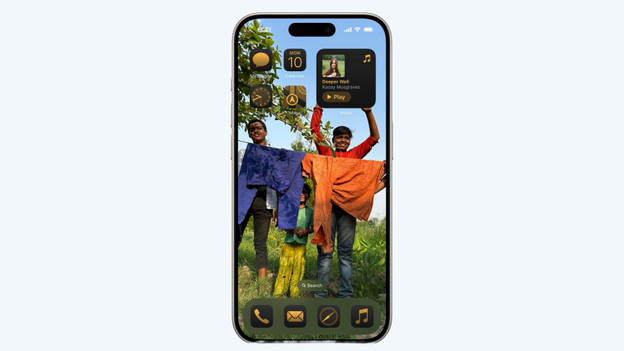
More control over your home screen
In iOS 18, you can easily adjust your home screen. App icons and widgets had to be placed inside a grid before, but you can now place them wherever you want. You can also adjust the color of the icons or enlarge them. The control panel and lock screen are also easier to adjust. You can now add buttons from apps by other brands as well. That way, you have quick access to all your favorite apps.

Better privacy with secured apps and Passwords
With the new Passwords app, you can store all your accounts and passwords securely in 1 place. The app works on all your Apple devices, and will also work on Windows computers later. This way, you'll always have your login information on hand and will never forget your password again. If you want to feel even safer, you can lock certain apps in iOS 18. You'll then have to unlock them with Face ID, for example. That way, you can be sure that no one reads your emails or messages.

Other new functions
In addition to these important improvements, there are other small adjustments:
- Your photos are divided into collections, and it's going to be easier to find the right photo.
- With the Clean Up function, you can easily delete unnecessary elements from photos you took.
- You can plan messages to be sent later and you'll get more options in the Messages app, such as extra emojis and layout options.
- You can create your own personal emojis with Genmoji.
Article by Bob
Apple iPhone Expert