Written by Dewy
Edited on
15 December 2023
·
15:26
How do you use the Walkie-Talkie function on the Apple Watch?
Perhaps you've heard of it, the Walkie-talkie app on the Apple Watch. Did you lose your friend in the supermarket and are they also wearing their Apple Watch? Contact your friend with one tap on the wrist. We'll explain how this function works.
Get started with Walkie-Talkie
Follow this step-by-step plan and you can start using Walkie-talkie on your Apple Watch right away.
- What do you need?
- Add a friend.
- Accept the invitation.
- Start a conversation.
- Switch 'Walkie-talkie' off again.
- Remove a friend.


What do you need?
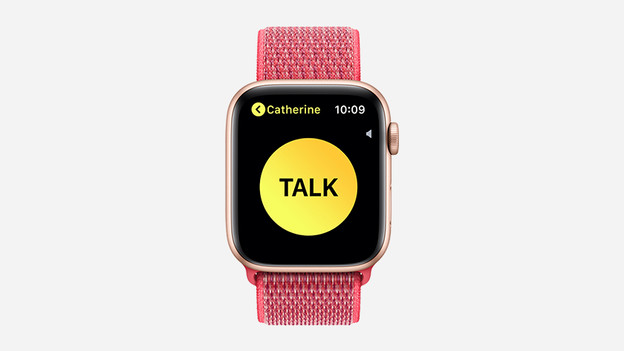
To use the Walkie-Talkie function, you need an Apple Watch. And so does the person you want to contact. The Walkie-Talkie function is available on every Apple Watch model, if you have updated it to watchOS 5 or newer. Don't see the yellow icon with TALK in the menu right away? You probably haven't set up the FaceTime app on your iPhone yet. You need to do this to use the function.

How do you add a friend?
After setting up FaceTime on your iPhone, you'll see the Walktie-Talkie app appear on your watch. It's a yellow icon that says TALK.
- Open the Walkie-Talkie app on your Apple Watch.
- Tap '+" and select the name of the friend you want so send a message to.
- All you have to do is wait for your friend to accept the invitation. When your friend accepts the invitation, the contact card becomes yellow. This means you can start talking.

How do you accept an invitation?
You've invited a friend for Walkie-Talkie, but you can also receive an invitation yourself. You can accept an invitation as follows:
- With your finger, touch and hold the top of the watch face and swipe down to open Notification Center.
- As soon as you get a notification from Walkie-Talkie, tap it.
- Tap Always Allow.
- If you can't find the invitation, check if Do Not Disturb is on. Do Not Disturb has to be turned off.
How do you start a conversation?
It's time to start a conversation.
- On your Apple Watch, open the Walkie-Talkie app.
- Tap the name of the friend you want to start a conversation with.
- Hold down the talk button while you talk. Does the screen say connecting? Wait until Walkie-Talkie has established a connection. When you release the button, your friend will hear your spoken message.
Is the sound very loud or soft? To change the volume, turn the Digital Crown.
How do you turn Walkie-Talkie off again?
The Walkie-Talkie app may be fun, but you probably don't want to receive unexpected messages from friends while you're at work. This could lead to some awkward situations. You can easily switch Walkie-Talkie off again.
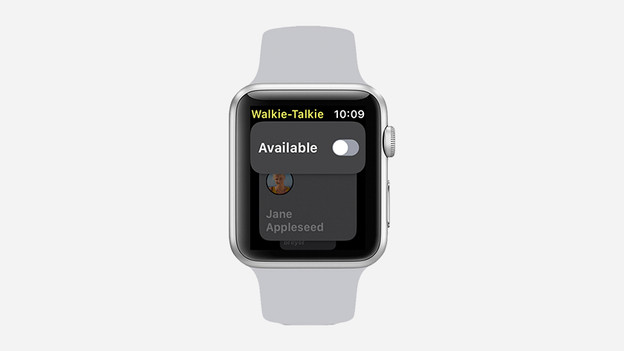
- Open the Walkie-Talkie app on your Apple Watch.
- Tap the Available card to turn it on or off. If someone sends you a message when you're not available, you'll receive a notification from Walkie-Talkie with a request to talk.
How do you remove a friend?
Some people really like the Walkie-Talkie app and want to send messages all day. If you're tired of a friend, you can (temporarily) remove them from your list.
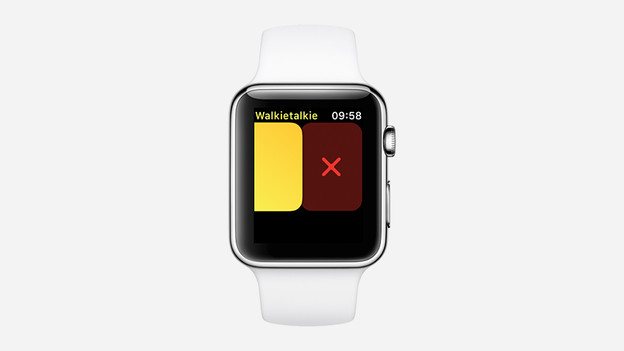
- Open the Walkie-Talkie app app and search for the friend you want to remove.
- Swipe left and tap the delete button.
When your friend isn't bothering you anymore, you can easily add them again.