Written by Frank
Edited on
27 January 2025
·
13:10
How do you install the BlueBuilt Swivel Wall Mount 32 - 43 inches?
You want to mount your television close to the wall with the BlueBuilt Swivel Wall Mount 32 - 43 inches. On this page, you can read how to do this step by step.
Before you start
| Estimated installation time | 45 minutes |
|---|---|
| Recommended number of people | |
| Suitable surface | Solid brick or solid concrete |
| Prior to drilling | Check if there aren't any cables or pipes behind the wall with the wall scanner |

What do you need?
In the box
- Bag with screws
- Screws and plugs for the wall
- Rings and spacers
- TV frame
- Wall mount
- Covers
- Template
- Velcro for your cables
What do you have to get yourself?
- Cross-head screwdriver
- Wall scanner
- 5mm drill bit
- 10mm drill bit
- Pencil
- Tape measure
- Hammer
- Impact drill or concrete drill
- Cup of coffee

Step 1: untighten the TV frame
Untighten the TV frame from the TV arm with the wrench. Place the TV frame (4) on your TV as shown on the photo. Find which screw from the M-A to M-H **(1) bags fits on your TV. You only need 1 set. Attach the frame to the TV with the screws.
Is there extra space? Put a ring (M-I) (3) or spacer (M-J or M-K) (3) between the frame and the screws.

Step 2: draw
Draw an X on the wall where the center of your TV should be. Place the template (7) on the wall and draw 2 drill holes with the spirit level (M-L).

Step 3: drilling
If you use the 5mm drill bit first and then the 10mm drill bit, you can drill more precisely. Drill as deep as the length of the screws (W-A) (2). Hammer the plugs (W-B) (2) into the holes.
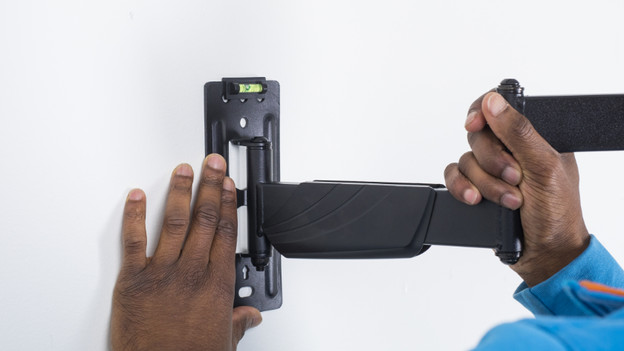
Step 4: mount the mount
Attach the wall mount to the wall level with screws. Click the covers (6) onto the wall mount.

Step 5: mount the TV
Ask someone to help you lift the TV. Then, attach the TV frame to the arm of the mount,

Step 6: fix the TV in place
Fix the TV in place with the small black screws you untightened during step 1. Tilt the mount to the desired position and tighten it with the hex key.
Article by Frank
Television Expert.