Written by Iris
Edited on
13 October 2025
·
14:50
How do you place the water filter in your De'Longhi PrimaDonna Soul ECAM 610.75.MB?
On this page, we'll show you how to install the water filter in your De'Longhi PrimaDonna Soul ECAM 610.75.MB. It's important that you do this, because the water filter prevents limescale. This prevents clogged pipes and ensures your coffee machine keeps functioning well. Make sure to replace the water filter every 2 months. The water filter by De'Longhi fits exactly into your De'Longhi coffee machine.
Get started with the water filter
Follow the video instructions to place the water filter in your De'Longhi correctly. As an overview, we've listed the steps here:
- Step 1. Prepare the water filter
- Step 2. Install the water filter
- Step 3. Repeat this every 2 months
You need:
- De'Longhi water filter
- 500ml container
How often should you replace the water filter?
To guarantee a proper operation, you have to replace the water filter every 2 months. The De'Longhi water filter fits perfectly in the water tank of your machine.
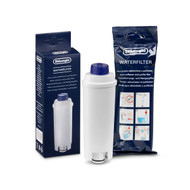
13,99

Step 1: prepare the water filter
- Remove the water filter from the packaging.
- Turn the round dial on the water filter 2 months ahead.
- Hold the water filter under the faucet until water flows sideways from the openings.
- Remove the water tank from the machine.
- Fill the water tank to the 'max' line.
- Dip the water filter into the full water tank. Hold the water filter at an angle so that all the air bubbles escape. When no more air bubbles come out, the water filter is ready to use.
- Place the water filter in the round opening in the water tank and press it firmly.
- Put the water tank back into the machine.

Step 2: install the water filter
- Press the top left menu button to go to settings.
- Press the arrow buttons until you reach 'Water filter' and confirm with 'OK'.
- Confirm hot water spout and then press 'OK'.
- Place a 500ml container under the hot water spout and press 'OK'.
- The coffee machine will briefly rinse itself with water. Afterwards, press 'OK'.
- Remove and empty the container.
- The water filter is now installed.
Get all the maintenance products you need
- De'Longhi Maintenance Package 0.5 Year
Maintain your machine for half a year.
Extends the lifespan and prevents defects.
More affordable to purchase than separate products.
From
54,-
- De'Longhi Maintenance Package 1 year
Maintain your machine for 1 year.
Extends the lifespan and prevents defects.
More affordable then 2 maintenance packs of half a year.
From
83,-