Written by Donato
Edited on
17 September 2024
·
07:56
How do you create a group of 2 or more Sonos speakers?
You have 2 or more Sonos speakers and want to connect them to each other. This way, you ensure that they play the same music. This option is useful when you throw a party or if you want to listen to the same music in multiple rooms at the same time. In the following steps, I'll explain how to quickly and easily connect multiple speakers in a group.

What do you need?
- 2 or more Sonos speakers that are set up to the same WiFi network. Still need to set up your Sonos speakers? Click below.
- The Sonos Controller app on your smartphone or tablet.
Step 1: open the Sonos Controller app
Grab your smartphone or tablet and open the Sonos Controller app. Make sure your device is connected to the same WiFi network as your Sonos speakers.

Step 2: open the settings
Tap the gearwheel icon in the bottom right corner to open the settings. Go to System and tap Groups.
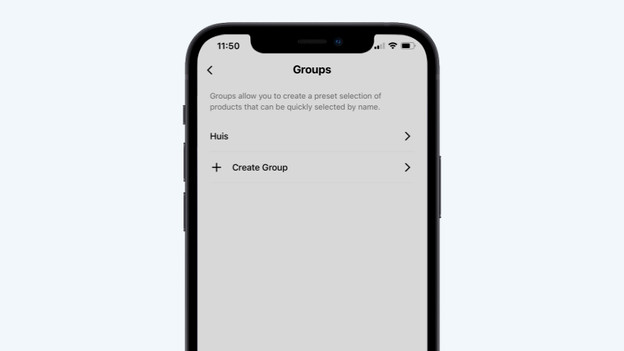
Step 3: tap 'Groups'
Tap Create Group to create a new group.

Step 4: select the speakers
You'll now see a list of available speakers for this group. If you tap the circle in front of the speaker, you add the speaker to the group or remove it. When you've selected the speakers you want to add, tap Save. The speakers have now been added to a group.

Step 5: play a song
We'll now test if the group works. Play a song in the Sonos Controller app and check if you hear music coming from all the speakers in the group.
You're done
You've created a group. When you select this group, you send the music to all speakers in this group. If you want to add or remove speakers from the group, you can easily change this. Tap the Group button again and check or uncheck the desired circles. If you want to adjust the volume of an individual speaker, tap the volume bar once in the playback menu. In the screen that follows, you can adjust the volume of each speaker individually. Do you want to know how to set up a stereo pair of 2 speakers? Click the button below.
Article by Donato
Audio Expert.