Asus ROG Swift PG348Q
Never available again
View alternatives in the sidebar
View alternatives in the sidebar
According to our monitor expert
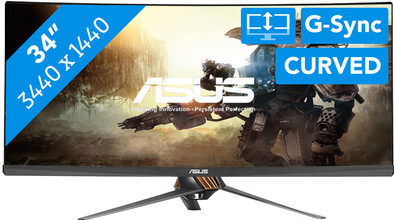
The Asus ROG Swift PG348Q is a 34-inch curved monitor for the real gamer. The curved shape of this UWQHD screen makes you feel like you're surrounded by your favorite game, while you're dominating online. On top of that, the NVIDIA G-Sync technology provides smooth gameplay without tearing or stuttering. Thanks to the 100Hz refresh rate, you can play games like Battlefield 1 in high quality on this monitor. Do you like playing first-person shooters? The GamePlus function lets you put a crosshair on your screen, so headshots become a piece of cake. A pointless, but extremely cool, extra feature is the LED light at the bottom of the monitor base, which projects the Republic of Gamers logo onto your desk.
Sharpness | Quad HD (1440p) | |
|---|---|---|
Curved | ||
Aspect ratio | Ultrawide (21:9) | |
Refresh rate | 100 Hz | |
Response time | 5 ms | |
Panel type | IPS panel | |
Color depth | 1 billion colors (10-bit) | |
Built-in speakers |
5 stars
32
4 stars
8
3 stars
0
2 stars
0
1 star
0
It is not a recommended product for couples. You have to argue every night for using the screen. Once your wife is on it, she stays awake until she has to go to work. You can also cancel the fitness subscriptions. Because you automatically eat less when you look at your bank account.
The advantage is that you finally have room in your own bed because your wife is sitting in front of the screen.
For that alone I would definitely recommend this screen.
Fung
27 February 2017
Automatically translated from Dutch
Why the ASUS PG348Q?
Ultrawide and 1440p were already fixed for me. Furthermore, it was only figuring out which of the approximately 30 models I wanted. Since at the time of purchase (the entire PC) there was no good AMD alternative for the 1070, I decided to buy a G-sync monitor. That leaves only 3 models to choose from. When I compare on the internet, this one often comes out as the best in the test. I think he just looks really tough. Unpacking
Once the box is handed over to you, you suddenly realize how big the monitor actually is. Although I immediately wanted to unpack the monitor, I managed to contain myself until the rest of the PC parts were finally available. The monitor is very well packaged. Opening the box already indicates how to put the box down. Then it is a matter of unfolding all the flaps and pulling out the polystyrene plus parts. at the very top the foot lies together with the rest of the stand. All necessary cables and paperwork (and a CD-ROM) are also located here.
If you then lift off the top layer of Styrofoam, the monitor comes into view. This lies with the screen down so that the back is exposed. Because I had already assembled the stand, it quickly became clear to me that I could click it into the back of the monitor, so that I could easily lift the entire monitor out of the box independently and then place it safely on the table.
Connect everything Then connect the wiring. An HDMI and DP cable is included. If you want to use the G-sync and 100 Hz you have to use the Display Port cable. A power brick for the monitor and a USB cable are also included to power the 4x USB 3.0 ports. A headphone jack is also available.
Image quality I am very sorry that there is backlight bleed in all corners. But when I look around on the internet I get the impression that I can't complain for a long time. Other than that, I think it's totally fine.
Sound Shall we skip this soon? Please just buy speakers. Gaming
Of course, after a few settings for the resolution, I immediately got to work. And WOW is that cool. You really get the feeling that you are completely in it. This is really something you have to experience for yourself. I have already tested many games and it is a real pleasure.
Movies Bought a new TV not long ago and almost regretted it. This monitor can almost replace my TV. It is of course not 4k, but the ultrawide gives a very unique experience very close. Netflix can go ultrawide with a chrome plugin, but I haven't found a solution for popcorn time movies yet. Unless you download it via popcorn time and watch it via another program.
Work Working on this screen is also a whole new experience. You have a lot of space. This is especially easy for video editing, but I don't have much experience with this myself. Haven't done a lot of work on this monitor yet, but found programs such as AutoCAD to work especially well because of the extra space. I think it is certainly an asset for SolidWorks for larger projects.
emiel wieggers
20 December 2016
Automatically translated from Dutch
The screen is superb in almost every aspect: juicy colours, design, handy menu, 100hz and G-Sync BUT everything spoils excessive IPS glow. In my case, the glow was visible even in daylight. I think that a screen of this price tag should undergo much stricter quality control and defective screens like mine shouldn't reach customers.
Mykola Koval
27 February 2018
Automatically translated from Dutch
Product number | 691844 | |
|---|---|---|
Manufacturer code | 90LM02A0-B01370 | |
Brand | ASUS | |
Warranty | 2 years | |
Processing of your defect | Carry-in warranty |
Recommended display resolution | 3440x1440 | |
|---|---|---|
Sharpness | Quad HD (1440p) | |
Aspect ratio | Ultrawide (21:9) | |
Refresh rate | 100 Hz | |
Response time | 5 ms | |
Panel type | IPS panel | |
Local dimming | ||
HDR support | ||
Contrast ratio | 1000 | |
Touchscreen | ||
Screen reflection | Glossy | |
Blue light filter | ||
Flicker-free technology | ||
Color space | sRGB | |
Color depth | 1 billion colors (10-bit) | |
G-sync | ||
G-sync Ultimate | ||
Adaptive Sync | ||
Resolution width | 3440 pixels | |
Resolution height | 1440 pixels | |
Anti-reflection type | Anti glare | |
Horizontal viewing angle | 178 ° | |
Vertical viewing angle | 178 ° |
Height | 55,8 cm | |
|---|---|---|
Width | 82,9 cm | |
Depth | 29,7 cm | |
Weight | 14,9 kg | |
Color | Black | |
Including stand | ||
Material | Plastic | |
Cable management | ||
Appearance | Gaming | |
Curved |
Number of HDMI connectors | 1 | |
|---|---|---|
Number of Female HDMI type A 1.4 ports | 1 | |
Number of Female Standard DisplayPort 1.2 ports | 1 | |
Number of female standard USB-A ports | 1 | |
Female standard USB-A port version | 3.0 | |
Number of USB ports | 4 | |
Type of USB port | Standard USB-A | |
Number of USB ports | 4 |
Adjustable in height | ||
|---|---|---|
Tiltable | ||
Pivotable stand | ||
Pivot function | ||
VESA mount option | ||
VESA mount | 100x100mm |
Energy consumption standby | 0,5 W | |
|---|---|---|
Energy consumption active | 100 W |
Built-in speakers | ||
|---|---|---|
Sound system | Stereo | |
Split screen | ||
Kensington lock | ||
Best tested |
Image quality according to customers | Excellent | |
|---|---|---|
Design according to customers | Very nice | |
Recommended for use | Business use, Gaming |
