Never available again
View alternatives in the sidebar
View alternatives in the sidebar
Product number | 704541 | |
|---|---|---|
Manufacturer code | 34UM88C | |
Brand | LG | |
Warranty | 3 years | |
Processing of your defect | Carry-in warranty |
Screen size | 34 inches | |
|---|---|---|
Recommended display resolution | 3440x1440 | |
Sharpness | Quad HD (1440p) | |
Aspect ratio | Ultrawide (21:9) | |
Refresh rate | 60 Hz | |
Response time | 5 ms | |
Panel type | IPS panel | |
Brightness | 300 cd/m2 | |
Local dimming | ||
HDR support | ||
Contrast ratio | 1000 | |
Touchscreen | ||
Screen reflection | Anti-glare | |
Blue light filter | ||
Flicker-free technology | ||
Color space | sRGB | |
sRGB color coverage percentage | 99 % | |
Color depth | 1 billion colors (10-bit) | |
Adaptive Sync | ||
Type of adaptive sync | FreeSync | |
Resolution width | 3440 pixels | |
Resolution height | 1440 pixels | |
Anti-reflection type | Anti glare | |
Horizontal viewing angle | 178 ° |
Height | 42,89 cm | |
|---|---|---|
Width | 82,99 cm | |
Depth | 25,24 cm | |
Weight | 8,4 kg | |
Color | Black | |
Including stand | ||
Material | Plastic | |
Cable management | ||
Appearance | Neutral | |
Curved |
Number of HDMI connectors | 2 | |
|---|---|---|
Number of Female HDMI type A 1.4 ports | 2 | |
Number of headphone jacks | 1 | |
Type of headphone connection | 3.5mm (TRRS) | |
Number of Female Standard DisplayPort 1.2 ports | 1 | |
Number of female standard USB-A ports | 2 | |
Female standard USB-A port version | 3.0 | |
Number of female standard USB-B (3.0 form) ports | 1 | |
Number of female 3.5mm TS Audio Jack ports | 1 | |
Number of female 3.5mm TRRS Audio Jack ports | 1 | |
Type of USB port | Standard USB-A | |
Number of USB ports | 3 |
Adjustable in height | ||
|---|---|---|
Tiltable | ||
Pivotable stand | ||
Pivot function | ||
VESA mount option | ||
VESA mount | 100x100mm |
Energy consumption standby | 1,2 W | |
|---|---|---|
Energy consumption active | 65 W |
Built-in speakers | ||
|---|---|---|
Sound system | Stereo | |
Split screen | ||
Kensington lock | ||
Best tested |
Recommended for use | Image editing and graphic design |
|---|
anything for a smile
Sharpness | Quad HD (1440p) | |
|---|---|---|
Curved | ||
Aspect ratio | Ultrawide (21:9) | |
Refresh rate | 60 Hz | |
Response time | 5 ms | |
Panel type | IPS panel | |
Color depth | 1 billion colors (10-bit) | |
Built-in speakers |
According to our monitor expert
With a super ultrawide monitor, you have 1.5 times the screen space of a 'regular' monitor.
This screen's blue light filter reduces the risk of strained eyes and sleeping problems.
Adjust the monitor in multiple ways and choose the best view and posture.
This monitor doesn't have a tiltable stand.
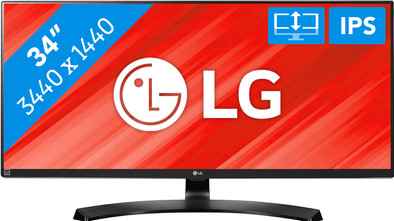
The LG 34UM88C is a 34-inch ultrawide monitor with 1.5 times more screen space than a regular monitor. On the large screen you work in different spreadsheets at the same time or you have a lot of space for your Photoshop project. The monitor is adjustable in height, so that you choose your ideal working posture and your neck or shoulders suffer less. The IPS panel ensures accurate color reproduction from every viewing angle. Handy when others watch your work or when you watch a movie. The blue light filter ensures a calm image, making your eyes less tired.
Bought the screen for work. Previously worked with 2 screens side by side, connected to my Macbook. But this works much better. The laptop also has to perform less work (less processor consumption). Super screen
Freek
14 November 2016
Automatically translated from Nederlands
This monitor is my main display for the X-Plane flight simulator. The 21:9 aspect ratio and high resolution make it possible to create a realistic view from the virtual cockpit, using only one monitor. I've considered an alternative setup with two or even three monitors, but I'm happy with this choice: no disturbing monitor edges in the picture.
The monitor is flawlessly recognized by my operating system (Linux with Xorg): no complex Xorg configuration is needed either; simply removing the old xorg.conf (from my previous monitor) was enough to drive the display in maximum 3440x1440 resolution at 60 Hz. By the way, I use one of the DisplayPort ports as a connection.
Are there any drawbacks? Yes, controlling all those pixels requires quite a bit from the flight simulator PC. If you want to keep the image smooth with such a beautiful monitor, then a snowball effect of upgrade wishes is lurking: video card, CPU, memory, motherboard... Know what you're getting yourself into :-)
Edwin
1 January 2017
Automatically translated from Nederlands
This non-curved 21:9 screen from LG is a real winner in terms of price performance. The image is sharp, but the factory calibration also accurately displays the color profile.
The width of the screen is conducive to productivity, not only because of the extra space for your apps, but also because the field of view is filled much better than with conventional screen sizes, which means less distraction.
The built-in speakers also provide extra focus because you are not easily tempted to play music over them. No, the speakers are far from fantastic, fine for a Skype call or notifications but nothing more. I myself am of the opinion that built-in speakers are really only intended for this kind of limited purpose and do not judge the screen on this. If you want immersive gaming or if you are an audiophile, you probably already have a lot better on your desk.
Of course there is also criticism, the screen is well adjustable in terms of height and tilt, but the construction sometimes makes it a bit wobbly. The panel can wobble a bit when you type, especially on a small and lying desk.
Actually, I don't even want to mention the OSD navigation, no it's not fantastic, but have you ever had an OSD that was good? Not me. It is not something you use every day.
Of course I can still mention the boring PC design of the screen, black, black, black, plastic, plastic. But then I remember what I paid for the screen, the sharp image and the fantastic calibration it came with from the factory. At the bottom of the line you have a very nice image from a screen with a more than reasonable price.
Thomas Cremers
29 May 2017
Automatically translated from Nederlands