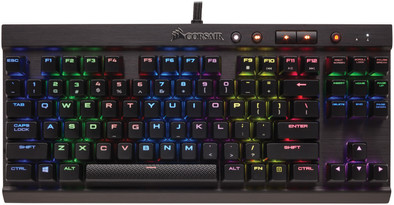
Corsair K65 LUX RGB Cherry MX Red AZERTY
Never available again
View alternatives in the sidebar
View alternatives in the sidebar
Product number | 716532 | |
|---|---|---|
Manufacturer code | CH-9110010-BE | |
Brand | Corsair | |
Warranty | 2 years | |
Processing of your defect | Carry-in warranty |
Keyboard layout | AZERTY | |
|---|---|---|
Geographic keyboard layout | BE layout | |
Typing comfort | Mid-range | |
Backlit keyboard | ||
Spill-resistant | ||
Number of colors lighting | 16.8 million | |
Brightness of backlight adjustable | ||
Programmable keys | ||
Multimedia shortcuts | ||
Flat keys | ||
Suitable for gaming | ||
Recommended for game genre | MOBA, RPG, [FPS] | |
Mechanical keyboard | ||
Mechanical key type | Cherry MX RGB Red | |
Type of keycaps | Highly recessed |
Connection type | Wired | |
|---|---|---|
Type of USB port | Standard USB-A | |
Cable length | 1,8 m |
Keyboard composition | Keyboard, Numpad | |
|---|---|---|
Ergonomic design | ||
Height | 3,8 cm | |
Width | 35,5 cm | |
Depth | 16,5 cm | |
Wrist rest | ||
Color | Black | |
Weight | 0,86 kg |
Power supply type | USB port PC/laptop |
|---|
anything for a smile
Connection type | Wired | |
|---|---|---|
Backlit keyboard | ||
Keyboard composition | Keyboard, Numpad | |
Ergonomic design | ||
Mechanical keyboard | ||
Geographic keyboard layout | BE layout | |
Suitable for gaming | ||
Spill-resistant |
According to our keyboard expert
Thanks to the responsive Cherry MX Red mechanical keyboard, you'll react faster than with a membrane keyboard.
Iluminate your keyboard with 1 or several out of 16.8 milion available colors, which comes in handy when playing late at night.
A compact Tournament Edition gaming keyboard requires less of your valuable bag space.
Although the photos suggest a QWERTY keyboard, this really is an AZERTY keyboard.
This keyboard doesn't have macro keys to assign your own functions and actions to.
In some cases, less really is more. When you regularly travel to LAN parties, loaded down with gaming hardware, for example. In this situation, a compact keyboard can really come in handy. The Corsair K65 LUX Cherry MX RGB Red is a full-fledged piece of gaming equipment, but without a numpad or Corsair G-keys. The result is a keyboard made for travel. Don't think Corsair has made any concessions beyond that, though. This K65 features programmable keys, 100% anti-ghosting, a USB pass-through port, and... Cherry MX RGB Red Switches. The switches have a transparent top, allowing the backlight to shine through the cracks between the keys. This really benefits the spectacular light show.
Top compact and colorful mechanical keyboard with a slightly more complicated software
I had been looking for a mechanical keyboard for a while, but because I use an azerty keyboard, this is not easy. My eye finally fell on the Corsair Gaming K65 RGB LUX. I chose this because it concerns a Belgian azerty (many other brands only offer a French azerty, which means that some of the characters are in a different place) and it is a so-called Tenkeyless keyboard (without NUMPAD keys), which saved me some space on my desk which gives me more room to move for my computer mouse
Design When removing the keyboard from the packaging, I immediately noticed the brushed aluminum, which provides a nice luxurious and finished look. A minus for some may be that the spacebar has a different texture compared to the rest of the keys, but this is a matter of taste. In the package you can also find a palm rest with a rubber texture, it easily clicks into the bottom of the keyboard, you can also place the keyboard even higher by unfolding the legs along the back. the cable is quite sturdy and thick in a braided sheath, although it is more difficult to handle, the cable is also not removable Installation
Connecting to the computer is easy, there are two USB connections on the cable, you have to plug both of these into the computer if you connect them to USB 2.0 ports, if you plug the keyboard into a USB 3.0 port (usually recognizable by the blue color) you just have to plug in the connector with the keyboard icon. the keyboard normally lights up immediately. if you want to be able to adjust the colors you have to download the corresponding Corsair Utility Engine (or CUE) from the corsair website
The keyboard The keyboard is a TenKeyLess keyboard, which means you don't have a numeric part to the right of the keyboard. You have to decide for yourself whether you use it a lot, I myself have not missed it for a single moment. The keys themselves use Cherry MX red mechanism, which are linear keys (meaning you don't hear or feel a click when pressed) but do make noise when fully pressed. this can be perceived as disturbing by bystanders, so this keyboard is not recommended for use in an environment where people work in silence. for a keystroke, the key does not have to be fully pressed. typing texts on this is very smooth and the gaming also goes well. I didn't expect to get used to it so quickly At the top of the keyboard, from left to right, are a key to adjust the brightness of the backlight or turn it off completely, a Mute button, two buttons to mute or will be disabled at the bottom, this can be especially useful with games so that you are not suddenly sent to the desktop when accidentally pressing it. The lighting itself is very present and fairly bright, but this was one of the reasons why I chose an RGB keyboard
The software You need the CUE software to make full use of the RGB LEDs that are located under each key. with the program you can assign different effects to the keyboard (just think of rainbow wave or spiral, rain effect or a ripple effect with every keystroke). You can also set it to use certain effects or colors when you open a specific program. Unfortunately, I don't always find the program clear or easy to use. for example, it is not always clear how you can assign static colors to the keys and how you can create different profiles, assign effects and colors to them and attach them to a program. You can get information through their own forum or Reddit page but this (just like the program itself) is not available in Dutch.
With CUE you can do other things like assign macros to keys , remap keys or set them up for media playback and more but this is also not so clearly stated . Once everything is set, the program should continue to run in the background, otherwise the keyboard will revert to a static color with no effects. the program in the background does not demand much from the computer and is therefore not noticeable
Conclusion This keyboard meets all my requirements. it is compact , well lit , types and games comfortably and looks good. only the software is sometimes a bit unclear and not available in Dutch, but all in all I can highly recommend this keyboard
Sven W
9 January 2017
Automatically translated from Nederlands
I've played on an Apple keyboard for years.... well don't ask me why, but I thought it was a good keyboard for gaming. Then my friend bought a Corsair K70 M.K 2 RapidFire, I have never heard of the Corsair brand before. so I tested his keyboard...... It was AMAZING!!!! But those keys were a bit too sensitive for me, the keys were also a bit too loud and because I never used a numeric keypad I went for the K65 LUX version, because they were a little less loud and also a little less sensitive. one it is highly recommended, 100%!!!! Don't be surprised if you suddenly see 2 USBs :)
BringMeBox Monika Borry
12 May 2019
Automatically translated from Nederlands
The mechanical switches make typing feel very good. The RGB works very well and there are plenty of options in the software. The lack of the numpad makes it very narrow and portable.
Sam Vanwelsenaere
6 January 2019
Automatically translated from Nederlands