NVIDIA SHIELD TV with Controller
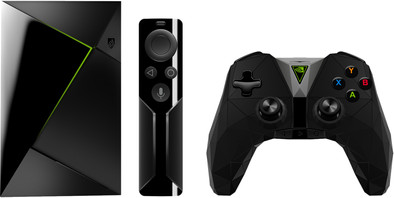
Never available again
View alternatives in the sidebar
View alternatives in the sidebar
Product number | 758844 | |
|---|---|---|
Manufacturer code | 945-12897-2505-001 | |
Brand | NVIDIA | |
Warranty | 2 years | |
Processing of your defect | Carry-in warranty |
Type of image definition support | Ultra HD (4K) | |
|---|---|---|
Parental controls | ||
Internal RAM | 3 GB | |
Built-in WiFi | ||
Operating system | Android | |
Android One | ||
Android OS version | Android 7.0 Nougat | |
Web browser |
Processor brand | NVIDIA |
|---|
Supports Netflix | ||
|---|---|---|
Supports Torrents | ||
Internet radio | ||
Streaming services | Apple Music, Kodi, NPO Uitzending Gemist, Netflix, Pathé Thuis, Plex, RTL Gemist, SBS Gemist, Spotify, Videoland, YouTube | |
Displays photos | ||
Photo file format | BMP, JPEG, PNG | |
Plays music | ||
Audio file format | M4A, MP3, MPEG 4, Ogg, Ogg vorbis, WMA, aac, aac+, amr, dd+, dts, eaac+, flac, pcm, wma pro | |
Plays videos | ||
Video file format | 3GP, ASF, AVCHD, AVI, DivX, DivX HD, H.263, H.264, H.265, MKV, MOV, MOV (H.264), MPEG-1, MPEG-2, MPEG-4, MTS, VC-1, VP8, VP9, WMV9, Xvid |
AirPlay | ||
|---|---|---|
DLNA | ||
SonosNet | ||
Spotify Connect | ||
Google Cast | ||
UPnP AV support | ||
Miracast | ||
Plex support |
Built-in hard drive | ||
|---|---|---|
SD card slot |
Headphone jack | ||
|---|---|---|
Microphone connector | ||
HDMI connector | ||
Network connector |
Height | 2,593 cm | |
|---|---|---|
Width | 15,9 cm | |
Depth | 9,8 cm | |
Weight | 250 g | |
Color | Black |
Controls via app | ||
|---|---|---|
Controlled via Apple app | ||
Controlled via Android app | ||
Smart home platform | Google Assistant |
anything for a smile
HDMI connector | ||
|---|---|---|
Type of image definition support | Ultra HD (4K) | |
Streaming services | Apple Music, Kodi, NPO Uitzending Gemist, Netflix, Pathé Thuis, Plex, RTL Gemist, SBS Gemist, Spotify, Videoland, YouTube | |
Supports Netflix | ||
Built-in hard drive | ||
Built-in WiFi | ||
Network connector |
According to our media player expert
Watch series and movies in 4K quality via Netflix, PLEX, Videoland, and Youtube.
Search your content with voice commands.
The media player supports Dolby Atmos and HDMI 2.0b.
You'll need stable WiFi or a network connection to stream games from your PC to your NVIDIA SHIELD without interruptions.
There's no HDMI cable included; take a look at our bundles.
Turn your TV into an all-in-one media center and game console with the NVIDIA SHIELD TV Pro. This smart mediacenter with built-in Chromecast allows you to watch your favorite Netflix series in 4K. You can also play your PC games on your TV, in HD quality. Stream games like Watch Dogs 2 and Overwatch from the special game collection from the NVIDIA super computer via GeForce NOW. With the Tegra X1 Quad-Core processor you can browse the apps quickly. If the 16GB of internal storage isn't enough to hold your files, it's easy to expand it by connecting a hard drive to 1 of the 2 USB 3.0 connectors.
Sound quality
User friendliness
Image quality
Design
Options
This review is a continuation of my previous one. In the meantime I have purchased 2 cases to solve some of the limitations of this Nvidia Shield.
No optical output has now been resolved: purchased the ''Fosmon 4K HDMI to HDMI + SPDIF Optical Toslink Stereo Audio Extractor Converter'' via Ebay and the sound now works DD 5.1 and DTS via this adapter. Awesome, for just US$17.99 including shipping!
Mediocre remote control solved by a ''Mele F10 DeLuxe'' remote control, again via Ebay. Keyboard on the back, a "Back key" / right mouse button and that works. Switching off the Shield now also works well, via the ''Power'' button on the Mele F10 the option ''Shut Down'' now appears. Look closely because you can hardly see which option is highlighted, almost invisible. In addition, the Mele F10 DeLuxe is also a so-called "Fly Mouse", by setting the remote control in ''Mouse Mode'', a mouse arrow appears and you control it by moving the remote control from your wrist. Works great after some practice! If you turn the AB around, the mouse disappears, great for using the keyboard. The web is full of reviews about the Mele.
Another well-functioning remote control option is the "Cetusplay" app. With this app you can mimic a remote control and it works almost flawlessly. Still, I prefer the "MeleF10 DeLuxe".
Before KODI I was used to just working with a mouse, now I have a Logitech M555 connected to the Shield and that also works fine as it should, including the right mouse button which then has the "Back" function. However, the right mouse button does not work in the standard Shield launcher.
The ''Sideloading'' of apps There are several ways to do that, I do it through my phone. There you download and install any app you want and with ES File Explorer you send it to the ES File Explorer on your Shield, once there you click on "Install" and voilà. Very easy.
Default Launcher issue. Virtually all "SideLoaded Apps" are not displayed in the default Launcher. There are several good alternative Launcher apps available, the simple ''mLauncher'' shows all installed apps, luckily mLauncher is displayed in the Nvidia Shield Launcher and so you can access all apps with 1 extra click. There are other good launchers, but this one was nice and simple.
Ziggo Go and iTV KPN Both apps work fine and excellent picture and sound. 1 disadvantage of the Ziggo app is that Ziggo thinks the Shield is a SmartPhone and starts up in "Portrait" ie upright image, but fortunately the image is in width when playing. KPN's iTV is not affected by this.
Conclusions The Shield now works with the extras the way I want it to. Optical out, nice remote control. Kodi 17 is running like a rocket, Ziggo Go and iTV are doing well; everything works satisfactorily.
Tip for CoolBlue: Mele F10 Deluxe and Fosmon HDMI Audio Extractor go on sale.
Mark
16 May 2017
Automatically translated from Nederlands
Bought the Shield as a media player and TV set-top box, KPN iTV, Ziggo Horizon and Netflix on it. We don't play games, so this review is only about the media player part. Pros: Fast delivery by Coolblue. Bought this device because the Shield is currently the best and fastest Android media player. Previously had a Minix Neo X8H and now also have a Minix Neo U1 in use. The Shield is faster in my opinion than the Neo U1. Playing movies in the HEVC with Kodi version 17 goes smoothly, does not falter, with both Minix boxes there are hiccups and freezes of image and sound. Excellent image quality. Beautiful design, solid, feels like a high-quality product. When switching on the mains power, the Shield starts up, great functionality.
Cons: Unfortunately no SP/DIF output, now I use a USB external sound card with an optical output, but the Shield and this box don't want to transmit DTS, but 5.1 ProLogic and stereo. An HDMI audio extractor with optical SP/DIF is on order, then all sound formats must be passed: ''Fosmon 4K HDMI to HDMI + SPDIF Optical Toslink Stereo Audio Extractor Converter''. The remote control is unfortunately the simple version with the button cells and without a headphone connection. Wasn't clear when ordering. The rechargeable one with a headphone jack is therefore still on the wish list. The volume control is often suddenly touched and that does not work well. Hope it just takes some getting used to. There is no on/off button on the Shield. Unfortunate. Disabling the Shield via the Power menu is unfortunately not possible, that option is not included. The two options are: Sleep and Restart. No turn off! To really turn it off, go to Settings->About->Power Off. Very strange. The voice search function on the Home screen works poorly. Either my Dutch is not good or there is something else wrong, but the assistant understands me very poorly. Then I use a BlueTooth keyboard, which works perfectly. Another remote control is on the way, go and see if the Mele F10 works better, it also has a keyboard at the bottom. Another disadvantage is the boarded up software. The Play Store is limited and doesn't let you install whatever you want. Everything could be installed on the Minix boxes from the Google Play store. You can 'Sideload' via detours, for example ES File Explorer .apk. I have put KPN iTV and Ziggo Go on it this way. What can't be found with the limited Google Play store, unfortunately doesn't appear in the Shield launcher either. Installing another launcher is also not easy because of the software limitations. Now use TVLauncher and mLauncher, they will see all apps. Another drawback of the Shield Launcher is that I don't like the recommendations on the Home screen. Fortunately, you can disable it, but the empty space left on the Home screen will now be filled with the message: "There are currently no recommendations available". Well, better this than recommendations that don't interest me. Hope Nvidia listens to these improvements, all in all, after adjusting the system to my needs here and there, I am satisfied with the Shield. Recommended!
Mark
8 May 2017
Automatically translated from Nederlands
After going through a lot of reviews, I finally bought the shield. It is really a very compact device and yet very fast. After a few days of use, the shield has received all the latest software updates. Nvidia therefore fulfills its promises to provide the shield with updates fairly quickly. Some manufacturers of smartphones can learn something from that. The possibilities are sublime in my opinion, but you have to get programs through other channels. Since I'm a Linux user, I don't mind this as I'm used to getting software through other ways. Due to its compact size, it is also easy to take the shield with you when traveling. Some complain about the remote, I personally have no problem with it. One downside is that it only has 16 gig. I initially solved this by using a USB stick, but it did not meet my expectations. In the end I opted for an external ssd and formatted it as internal memory. This makes the shield nice and fast. I personally also think that the shield has no on-off button is a minor drawback, but it is not a disturbing factor. For my own convenience, I also connected a mouse and keyboard to the shield. This also went without any problems. In the meantime, the shield has already partially replaced my 8-year-old PC in various domains. Kodi, Netflix, gaming, administration and the like, he has no problems with that either. So I am a satisfied user and hope to have a lot of fun with it. I can only say to people who have doubts about purchasing the shield that they can take the step without hesitation because it is really a very nice medium.
Patje
3 July 2018
Automatically translated from Nederlands