Never available again
View alternatives in the sidebar
View alternatives in the sidebar
Product number | 768376 | |
|---|---|---|
Manufacturer code | 0960C009 | |
Brand | Canon | |
Warranty | 2 years | |
Processing of your defect | Via Coolblue |
Printer size | Medium | |
|---|---|---|
Width | 46,3 cm | |
Depth | 39,4 cm | |
Height | 29,1 cm | |
Color | Black | |
Weight | 11,4 kg |
Printer type | All-in-one | |
|---|---|---|
Photo printer | ||
Portable (mobile use) | ||
Recommended for use printers | Business printing |
Cartridge line | Canon PGI-2500 | |
|---|---|---|
Print technology | Inkjet | |
Type of ink | Cartridges | |
Number of cartridges/toner cartridges | 4 | |
Color printer | ||
Print speed black (ISO) | 24 ppm | |
Print speed color (ISO) | 15 ppm | |
First black page ready after | 6 seconds | |
Speed class | Good | |
Maximum print resolution height | 600 dpi | |
Maximum print resolution width | 1200 dpi | |
Maximum print size | A4 | |
Automatic duplex printing | ||
Borderless printing | ||
Maximum print size duplex printing | A4 |
Scan functionality | ||
|---|---|---|
Automatic duplex scanning | ||
Maximum optical scan resolution width | 1200 dpi | |
Maximum optical scan resolution height | 1200 dpi | |
Scanner type | File scanner, Flatbed scanner | |
Maximum scan size | A4 (21x29.7cm) | |
Automatic document feeder (ADF) | ||
Maximum paper size ADF | A4 | |
Scan sizes | A4, A5 | |
Scan speed (PPM) | 23 ppm | |
Color depth output | 24 bpp | |
Scan to | Email address, PC (network), USB | |
ADF capacity | 50 | |
OCR |
Copying functionality | ||
|---|---|---|
Copy speed black (ISO) | 15,5 Hz | |
Copy speed color (ISO) | 600 Hz | |
Maximum copy resolution height | 1200 dpi | |
Maximum copy resolution width | 600 dpi |
Fax functionality | ||
|---|---|---|
Color fax |
Built-in screen | ||
|---|---|---|
Color screen | ||
Touchscreen |
Compatible with operating system | Android, Windows, iOS, macOS | |
|---|---|---|
Connection type | Wired, Wireless | |
Apple AirPrint | ||
Email print | ||
WPS (Wireless Protected Setup) | ||
Female standard USB-A port version | 2.0 | |
Number of Ethernet ports | 1 | |
NFC | ||
Built-in WiFi | ||
WiFi direct | ||
Bluetooth | ||
USB port |
Manual input tray | ||
|---|---|---|
Photo paper drawer | ||
Output capacity output drawer | 100 | |
Maximum print size standard paper tray | A4 | |
Input capacity standard paper tray | 250 | |
Number of standard paper trays | 1 |
Memory card reader |
|---|
Quality mark sustainable company | EcoVadis Gold |
|---|
Print technology | Inkjet | |
|---|---|---|
Printer type | All-in-one | |
Color printer | ||
Automatic duplex printing | ||
Maximum print size | A4 | |
Automatic document feeder (ADF) | ||
WiFi direct |
According to our printer expert
It's a 4-in-1 printer, so you can scan, copy, and fax in addition to printing.
The printer's black and white print speed is 24 pages per minute, so you don't have to wait long for your print.
Thanks to the automatic document feeder (ADF), the printer scans and copies a stack of paper in one go.
The print quality is mediocre and if you want sharper prints, a printer with a better quality is more suitable.
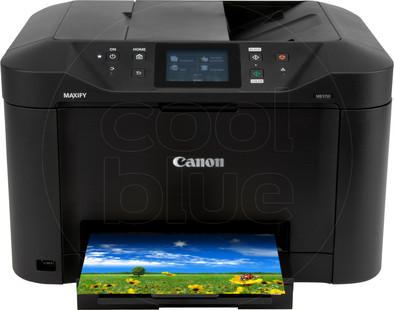
The Canon MAXIFY MB5150 is a business all-in-one inkjet printer that's suitable for a (home) office. Control the printer remotely and check the ink level or the amount of paper in the tray. So you know when to fill it. Or check the paper use per user and set limitations if necessary. Add text documents in the document feeder and automatically copy in duplex, so you don't have to turn the pages manually. Thanks to the Access Point mode, you can make direct contact with the printer with your Android smartphone by keeping it close to the printer. And with the 8.8cm color touchscreen, you can select attachments you want to print directly from your USB flash drive.
5 stars
14
4 stars
21
3 stars
2
2 stars
1
1 star
0
Installation ease
Options
Print quality
The printer is fine for normal printing and scanning. Once connected it is a piece of cake to print and scan, this usually goes well and quickly.
Scanning is done double-sided and in one go. So the paper goes through it once and is then scanned directly on both sides.
Connecting via WiFi is not as easy as indicated. In fact, I can't do that despite following the instructions step by step.
An important warning: if you want to use the online options such as scanning to Google Drive, Dropbox or other cloud services, you must give explicit permission that the service used becomes the owner of all scanned documents and that you no longer have rights to the documents. It won't run that fast, but if you want to scan sensitive documents to the cloud, this device is certainly not suitable.
Less problematic but worth mentioning is that I find the printer quite large compared to my previous printer that could also scan and print double-sided but was a lot smaller.
Rob Willemse
6 November 2018
Automatically translated from Nederlands
I was looking for a printer without unnecessary software. Pressing the button has received a scan on your PC, and you can make a copy without creating an account, downloading 3 software packages, a ritual blood sacrifice and being reminded 6 times about a subscription for your ink. I picked this one up and got what I wanted. The software is simple, little fuss, and very basic. You can download additional software, some of which are more luxurious in functions and implementation, and often work very pleasantly.
Some printers cause heart problems through frustration, but the canon does not. The printer does what you expect when you give the job, which is reassuring. It has many luxury features including; ADF up to 50 pages and double scanning (some difference with the 30 euro cheaper version, but very much worth it), double-sided printing, saving preferred profiles for scanning or copying and scanning in larger sheets. Faxing for the enthusiast is also an option, as well as sending directly to an email address without going through your PC.
The paper tray is large, but only alone and protrudes somewhat oddly at A4 size. This disappears when the print trap is unfolded, but there is always something sticking out at the front and it is never really cleaned up unless you empty the drawer and slide it in. Furthermore, the device is large (if you expect a compact printer, for the office it is quite compact), make no mistake about this. You have many functions, but they take volume and weight with them. Roughly 16 kilos and an overall operational space of 50x50x50 is not a bad thing on your desk. Next to it on a small table or in another room is better suited. On a personal note, I would have liked it if a piece of Ethernet cable was included, but on the other hand, it does come with a telephone cable with 3 different plugs.
All in all, it is a very pleasantly working printer, which whines little and gives a lot. You can do almost anything with it except bind and the UI on the device works pleasantly and logically. He's a bit bulky, but that's okay.
In terms of price, it is in any case special that these functions work so well when you look at the competitors. The software may seem old-fashioned and outdated, but it works when it's supposed to, and leaves you alone when you don't need it. In short, a simple printer, many functions, software as it should be and the price is strong.
Scott Breukel
19 March 2022
Automatically translated from Nederlands
Start up faster, print faster. Scan function is a huge improvement compared to previous canon (pixma mx925), both sides of the page are scanned in 1 movement.
Frederik Van Hecke
9 July 2018
Automatically translated from Nederlands