Samsung LC32HG70QQUXEN
Never available again
View alternatives in the sidebar
View alternatives in the sidebar
Sharpness | Quad HD (1440p) | |
|---|---|---|
Curved | ||
Aspect ratio | Standard (16:9) | |
Refresh rate | 144 Hz | |
Response time | 1 ms | |
Panel type | VA panel | |
Color depth | 1 billion colors (10-bit) | |
Built-in speakers |
According to our monitor expert
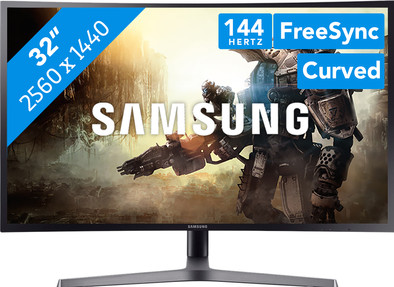
The Samsung LC32HG70QQUXEN is a 32-inch curved gaming monitor for true gaming fanatics. The curved screen produces a panoramic effect, giving you an intense, more immersive gaming experience. The FreeSync technology synchronizes the monitor with your AMD video card, so you won't have any issues with tearing and stuttering. The 144Hz refresh rate ensures smoother images in fast-paced situations like in Overwatch or Battlefield. This monitor displays vivid colors in your games, thanks to its 100% coverage of the sRGB color spectrum. Are you a gaming fanatic who spends hours on end playing games? Pivot, tilt, and rotate the height-adjustable LC32HG70QQUXEN to align it completely with your posture.
Note: For QHD gaming, you need a powerful video card, such as an NVIDIA GeForce RTX GPU or AMD Radeon RX 5000 series GPU, or an Xbox One X or S.
5 stars
21
4 stars
9
3 stars
2
2 stars
0
1 star
0
Installation ease
User friendliness
Image quality
Price-quality ratio
Design
Bought as a replacement for a Samsung C24FG70.
Beautiful colors, sRGB range, Freesync 2 so compatible NVidia G-Sync and modest but working HDR.
I am one of Samsung's VA panels. First tried a TN panel from Asus, but this could serve better as a sunlamp. The LC32HG70 is practically perfect out of the box. sRGB preset, brightness down to taste (c. 80 for me) and done. The 3 preset buttons are ideal for quickly activating your preferred setting.
I can easily switch from 144hz Freesync Ultimate / G Sync, to a more modest 120hz and Legacy 60hz mode without G-Sync. If I want to adjust one of the presets, it is a piece of cake in Samsung's user-friendly menu.
Last but not least, I am happy with the choice for a 32 inch 1440p panel. It is true that a 27 inch 1440p panel has a dot per inch, so a sharper image without visible pixels, I find the 93 ppi of this panel sufficient (equivalent to a 24 inch 1080p) and I prefer a larger image.
Fact I am almost 50 years old and my eyes are not what they once were.
Advice - look FOR YOURSELF and don't be guided by reviews alone in the 27-inch versus 32-inch debate.
PS. The competition had a few nice alternatives, but when choosing this Samsung, not only the excellent VA panel played a role, but also the more business-like design.
Ruy Horta
20 November 2019
Automatically translated from Dutch
I like the C32HG70 very much. The monitor is perfect for gamers who want AAA games at 1440p 144hz, but also want to see beautiful colors and experience the game even better.
Unlike the IPS monitors, the input layer is low and can even be reduced to 1ms. This also makes the monitor suitable for competitive gamers.
However, there are drawbacks. The HDR doesn't work (well) for example yet - but this is more of a Windows 10 problem, because the HDR works great on consoles. You still pay a premium for this, which makes the monitor more expensive. Furthermore, the stand is very large, and you have to sacrifice a lot of desk space to make room for your monitor.
E D
8 October 2017
Automatically translated from Dutch
In my opinion this is the best 32inch 1440p monitor you can have. It takes some getting used to when you get rid of a full HD 24-inch screen.
shayn
30 June 2019
Automatically translated from Dutch
Receive more coverage in case of damage than with your standard warranty. Coolblue takes care of everything: from taking out the insurance to repairs. Is a repair not possible? You receive the purchase price as CoolblueCredit.
XCover is allowed to arrange and process insurances on behalf of the insurer. The insurances are governed by Belgium law. If you have a complaint, you can contact the or our customer service.
First, add your monitor to your shopping cart. On the next page, choose the Protection Plan below. You always have a 30-day return window and pay no deductible in case of damage.
The insurance can be canceled every year, even if you have paid in advance. If you cancel earlier, you will receive a refund for the overpaid amount.
Product number | 779775 | |
|---|---|---|
Manufacturer code | LC32HG70QQUXEN | |
Brand | Samsung | |
Warranty | 2 years | |
Processing of your defect | Carry-in warranty |
Recommended display resolution | 2560x1440 | |
|---|---|---|
Sharpness | Quad HD (1440p) | |
Brand-specific image technology | Samsung QLED | |
Aspect ratio | Standard (16:9) | |
Refresh rate | 144 Hz | |
Response time | 1 ms | |
Panel type | VA panel | |
Brightness | 350 cd/m2 | |
Local dimming | ||
HDR support | ||
Contrast ratio | 3000 | |
Touchscreen | ||
Type of HDR | DisplayHDR 600 | |
Screen reflection | Anti-glare | |
Blue light filter | ||
Flicker-free technology | ||
Color space | sRGB | |
sRGB color coverage percentage | 100 % | |
Color depth | 1 billion colors (10-bit) | |
Adaptive Sync | ||
Type of adaptive sync | FreeSync | |
Resolution width | 2560 pixels | |
Resolution height | 1440 pixels | |
Anti-reflection type | Matte | |
Horizontal viewing angle | 178 ° |
Height | 62,2 cm | |
|---|---|---|
Width | 72,4 cm | |
Depth | 38,1 cm | |
Weight | 9,6 kg | |
Color | Black | |
Including stand | ||
Material | Plastic | |
Cable management | ||
Appearance | Gaming | |
Curved |
Number of HDMI connectors | 2 | |
|---|---|---|
Number of Female HDMI type A 1.4 ports | 2 | |
Number of headphone jacks | 2 | |
Type of headphone connection | 3.5mm (TRRS) | |
Number of Female Standard DisplayPort 1.2 ports | 1 | |
Number of female standard USB-A ports | 2 | |
Female standard USB-A port version | 3.0 | |
Number of female 3.5mm TS Audio Jack ports | 1 | |
Number of female 3.5mm TRRS Audio Jack ports | 2 | |
Type of USB port | Standard USB-A | |
Number of USB ports | 3 |
Included by default | DisplayPort cable, HDMI cable |
|---|
Adjustable in height | ||
|---|---|---|
Tiltable | ||
Pivotable stand | ||
Pivot function | ||
VESA mount option | ||
VESA mount | 100x100mm |
Energy consumption standby | 0,3 W | |
|---|---|---|
Energy consumption active | 64 W |
Built-in speakers | ||
|---|---|---|
Webcam | ||
Split screen | ||
Kensington lock | ||
Best tested |
Image quality according to customers | Good | |
|---|---|---|
Design according to customers | Neutral | |
Recommended for use | Gaming, Image editing and graphic design, Internet, email, and text processing, Watching movies in Full HD |
