

anything for a smile
Our choice for a conference cam for a small meeting room
Installation
Quality
Options
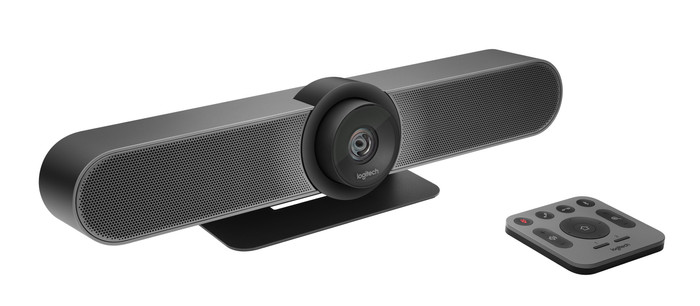
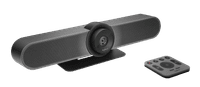
I think the Logitech MeetUp 4K Ultra HD Conference Camera is a stylish webcam that provides sharp images and clear sound. It is quite large and the picture and sound are tailored to smaller meeting rooms.
First impression When unpacking I find 2 boxes and of course the MeetUp. The boxes contain a power adapter, remote control, USB cable of 5 meters, a wall mounting bracket and mounting material. In addition, the package also contains 2 batteries for the remote control. The only thing that is not included is a USB 3.0 cable, which you need to achieve a 4K image resolution. For use, I only had to connect the power adapter and the USB cable. After that I was able to join my meeting immediately. This conference cam is best mounted under a large screen in the meeting room, as a kind of soundbar. This leaves enough space on the table for things you need during the meeting.
Adjust settings at the touch of a button What I find useful about the MeetUp is the included remote control. This allows me to easily operate the camera from a distance. There are some basic buttons that are always handy, such as muting the microphone, answering or ending a call, and adjusting the volume. Still, some other buttons stand out for me. There is a button for zooming in and out of your image and a button for tilting the camera. This gives me the best possible picture of everyone. Linking the camera via bluetooth is also possible via this remote control and works smoothly.
Clear picture and sound The highlight of this Logitech conference cam is the 4K image quality. Please note, because the necessary USB 3.0 cable that you need for this is not included. When you have connected the camera with a USB 3.0 cable, you immediately enjoy a beautiful image. The image is very sharp and detailed, so that everyone in the conference room is clearly visible. Due to the wide viewing angle of 120 degrees, colleagues can easily join a meeting. They are also clearly visible. In addition, Logitech has 3 sound-isolating microphones, so that everyone in the room can be heard clearly. My colleague who works from home hears every colleague in the room clearly speaking. Meanwhile, background noise is filtered out. The sound that comes from the speakers of the MeetUp is clear, so I can understand my conversation partners well. All in all, with this conference cam you can easily join even the most professional meeting.
Elaine. Webcam specialist.
13 July 2022
Automatically translated from Nederlands
Works great, good video quality, but for 1000 euros I expect it to work perfectly with e.g. Teams and that a USB3 cable is included.
Raimond
20 March 2020
Automatically translated from Nederlands
Good solution if you want something that works easily and quickly, without having to invest in an expensive video conferencing system.
Erik Vollebregt
10 September 2020
Automatically translated from Nederlands
Plug and Play | ||
|---|---|---|
Compatible with operating system | Windows, macOS | |
Autofocus | ||
Sharpness | 4K Cinema | |
Built-in microphone |
According to our webcam expert
Thanks to the wide viewing angle of 120 degrees, you can capture everything even in small spaces.
You can use different resolutions, such as 4K and Full HD, for a detailed image.
With the remote, you can adjust the camera from your desk chair.
No USB 3.0 cable is included to use the webcam in 4K resolution.
With the Logitech MeetUp Conference Cam, you'll be easy to hear and see during conference calls in small rooms. The camera has a wide 120-degree field of view. The image sensor supports different resolutions, including 4K, Full HD, and HD. You can choose the image quality that fits your use. The sound is tuned specifically for small meeting rooms. The 3 noise-isolating microphones and a voice-optimized speaker make sure everyone is clearly audible. And if it turns out that not everyone is clearly visible after all, you can use the included remote to control different functions like pan, tilt, and zoom from your seat.
619,-
619,-
Product number | 782581 | |
|---|---|---|
Manufacturer code | 960-001102 | |
Brand | Logitech VC | |
Warranty | 2 years | |
Processing of your defect | Via Coolblue |
Plug and Play | ||
|---|---|---|
Sharpness | 4K Cinema | |
Maximum fps in Full HD (1080p) | 60 fps | |
Maximum fps in Ultra HD (4K) | 30 fps | |
Autofocus | ||
Wide-angle | ||
Automatic brightness adjustment | ||
Coverable lens |
Built-in microphone | ||
|---|---|---|
Microphone recording type | Mono | |
Microphone noise suppression | ||
Infrared (IrDA) | ||
Tiltable | ||
Type of webcam holder | Desk stand |
Width | 400 mm | |
|---|---|---|
Depth | 85 mm | |
Height | 104 mm | |
Weight | 1,04 kg | |
Color | Black | |
Material | Plastic | |
Finish | Matte and glossy |
Type of USB port | USB-C | |
|---|---|---|
Connection type | Wired | |
Compatible with operating system | Windows, macOS | |
Cable length | 5 m |
Current product
4K Cinema
4K Cinema
Full HD (1080p)
Windows, macOS
Windows, macOS
Windows, macOS
619,-
804,-
599,-
Delivered tomorrow
Delivered tomorrow
Receive more coverage in case of damage than with your standard warranty. Coolblue takes care of everything: from taking out the insurance to repairs. Is a repair not possible? You receive the purchase price as CoolblueCredit.
XCover is allowed to arrange and process insurances on behalf of the insurer. The insurances are governed by Belgium law. If you have a complaint, you can contact the or our customer service.
First, add your webcam to your shopping cart. On the next page, choose one of the Protection Plans below. You always have a 30-day return window and pay no deductible in case of damage or theft.
The insurance can be canceled every year, even if you have paid in advance. If you cancel earlier, you will receive a refund for the overpaid amount.