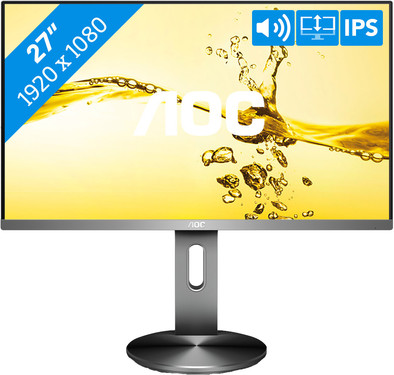
Never available again
View alternatives in the sidebar
View alternatives in the sidebar
Product number | 787838 | |
|---|---|---|
Manufacturer code | i2790PQU/BT | |
Brand | AOC | |
Warranty | 3 years | |
Processing of your defect | Via Coolblue |
Screen size | 27 inches | |
|---|---|---|
Recommended display resolution | 1920x1080 | |
Sharpness | Full HD (1080p) | |
Aspect ratio | Standard (16:9) | |
Refresh rate | 60 Hz | |
Response time | 4 ms | |
Panel type | IPS panel | |
Brightness | 250 cd/m2 | |
Local dimming | ||
HDR support | ||
Contrast ratio | 1000 | |
Touchscreen | ||
Screen reflection | Anti-glare | |
Blue light filter | ||
Flicker-free technology | ||
Color space | sRGB | |
Color depth | 17 million colors (8-bit) | |
Adaptive Sync | ||
Resolution width | 1920 pixels | |
Resolution height | 1080 pixels | |
Anti-reflection type | Matte | |
Horizontal viewing angle | 178 ° |
Height | 53 cm | |
|---|---|---|
Width | 61,26 cm | |
Depth | 20 cm | |
Weight | 5,8 kg | |
Color | Silver | |
Including stand | ||
Material | Plastic | |
Cable management | ||
Appearance | Neutral | |
Curved |
Number of HDMI connectors | 1 | |
|---|---|---|
Number of Female HDMI type A 1.4 ports | 1 | |
Number of headphone jacks | 2 | |
Type of headphone connection | 3.5mm (TRRS) | |
Number of Female Standard DisplayPort 1.2 ports | 1 | |
Number of female standard USB-A ports | 4 | |
Female standard USB-A port version | 3.0 | |
Number of female standard VGA ports | 1 | |
Number of female 3.5mm TS Audio Jack ports | 2 | |
Number of female 3.5mm TRRS Audio Jack ports | 2 | |
Type of USB port | Standard USB-A | |
Number of USB ports | 4 |
Not included by default | USB-C cable |
|---|
Adjustable in height | ||
|---|---|---|
Tiltable | ||
Pivotable stand | ||
Pivot function | ||
VESA mount option | ||
VESA mount | 100x100mm |
Energy label | E | |
|---|---|---|
Energy consumption standby | 0,5 W | |
Energy consumption active | 22 W | |
Energy consumption per 1000h | 19 kWh | |
Annual energy consumption | 27,74 kWh | |
Annual energy costs | 6,1 euros |
Built-in speakers | ||
|---|---|---|
Sound system | Stereo | |
Webcam | ||
Split screen | ||
Kensington lock | ||
Best tested |
Image quality according to customers | Good | |
|---|---|---|
Design according to customers | Nice | |
Recommended for use | Internet, email, and text processing, Office work, Watching movies in Full HD |
Sharpness | Full HD (1080p) | |
|---|---|---|
Curved | ||
Aspect ratio | Standard (16:9) | |
Refresh rate | 60 Hz | |
Response time | 4 ms | |
Panel type | IPS panel | |
Color depth | 17 million colors (8-bit) | |
Built-in speakers |
According to our monitor expert
This monitor is adjustable in several ways for a nice working posture.
The IPS panel provides true colors from any viewing angle.
You can connect peripherals, such as a keyboard or mouse, via the built-in USB hub.
Full HD isn't as sharp as QHD or 4K, so have a look at our collection for a sharper image.
This monitor has a large stand that doesn't fit on every desk.
The AOC i2790PQU/BT is a 27-inch IPS monitor with realistic color reproduction. With 100% coverage of the sRGB color space, this monitor is particularly suitable for editing vacation photos, videos, and other color-sensitive work. The monitor was designed in such a way that you can comfortably spend an evening or working day in front of it. The monitor comes with flicker-free technology, so your eyes won't be strained or irritated at the end of the day. Late night and still working? The blue light filter prevents sleeping problems and makes the light easier on your eyes. The monitor is fully adjustable, so you can use the screen with a comfortable posture at all times.
Note: this screen has an anti-reflective layer that prevents glare. Don't peel it off your monitor!
5 stars
129
4 stars
80
3 stars
5
2 stars
0
1 star
0
Installation ease
User friendliness
Image quality
Price-quality ratio
Design
I ordered 3 i2790PQU/BT screens for an Eyefinity setup for sim racing. For photography I use a Dell U2713H (WQHD resolution) which I hard-calibrate with the X-Rite i1 Display Pro. I chose these screens because I'm used to looking at 100% sRGB (and 99% AdobeRGB) display. It is then nice to have screens that also display 100% sRGB color space. And out of the box it doesn't seem that much of a difference with my Dell in terms of color.
The matte screen finish does its job very well and it's nice that it extends almost to the edge of the screen. If you prefer garish colors and bizarre contrasts, you may have to skip this one, but if you want a realistic color reproduction, this is definitely recommended. And although it is a 60Hz screen, with an Eyefinity setup you will usually look for a balance in your settings to arrive at around 60 fps. And with my RX470 with 4GB of memory it works quite well. As long as I don't apply bizarrely high anti-aliasing and I play with shadows and textures on medium settings, you will always get 60fps. Freesync would be nice against tearing, but you have to balance your game settings anyway to get to around 60fps. And as long as you're around 60fps, you won't be bothered by tearing. Except sometimes with a sudden outlier upwards. And as long as the frame rate doesn't drop below 30fps, I don't notice a stuttering image either. Something that is very noticeable with my Dell U2713H.
What is also very nice is that these screens together do not even reach the consumption of my Dell. This is also noticeable in the heat development. Or rather, lack thereof compared to my Dell. Since they are fairly close to my nose, that's nice. The screens are against each other in a corner, but that does not generate any extra heat either. What is striking is that the gray strip at the bottom of the screen protrudes about 1 or 2 millimeters. This leaves an open edge between the screens when they are angled. I personally don't find that disturbing because you are at all missing an inch between two screens in terms of image due to the very thin bezel. And it's nothing a strip of black foam can't fix.
The menu of the screen has a simple and well-arranged structure. Not too many options, but certainly not too few. Only to get into the menu and turn the screen on/off is just a bit too far away from the edge on the back. It would have been nice if it had been just a little above the edge of the bottom. In contrast, this screen also has a physical on/off switch that you can use if desired. This is located next to the power cord input. And I think there is no difference in consumption in standby and soft off mode. So once you've set up the screen, you don't actually need it anymore. So it's not a really big downside.
And finally the resolution. Full HD on a 27” is perfect for gaming. But for productivity I would personally go for a WQHD resolution or a 24” full HD screen. But for productivity applications I already have my Dell U2713H.
Patrick van der Meulen
20 September 2017
Automatically translated from Nederlands
Ordered a Samsung first, didn't really like it, went for the AOC on the advice of employee Coolblue. I had never heard of that brand, but I like it more than well, IPS screen shows very nice colors, screen is tiltable and can be set to the right height, all in all very satisfied so far
Bauke van Inge
6 September 2017
Automatically translated from Nederlands
I have 2 of these screens and I work with them and I like it just fine. Colors are good. The adjustability of the monitor is really great, so you can set it to the right height, that works fine.
J.H. Brakert
12 September 2017
Automatically translated from Nederlands
