Samsung LC49J890
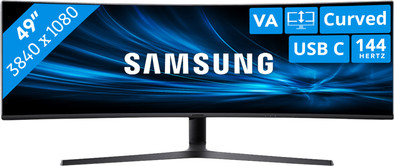
Never available again
View alternatives in the sidebar
Insure your monitor
Receive more coverage in case of damage than with your standard warranty. Coolblue takes care of everything: from taking out the insurance to repairs. Is a repair not possible? You receive the purchase price as CoolblueCredit.
What am I insured for?
- Fall and impact damage
- Water damage
- Manufacturing defects outside the warranty
What am I not insured for?
- Damage you deliberately cause
- Damage that doesn't affect the product functioning (such as scratches)
- Damage due to gross negligence
XCover insurace
XCover is allowed to arrange and process insurances on behalf of the insurer. The insurances are governed by Belgium law. If you have a complaint, you can contact the or our customer service.
How do I insure my monitor?
First, add your monitor to your shopping cart. On the next page, choose the Protection Plan below. You always have a 30-day return window and pay no deductible in case of damage.
XCover Protection without theft cover
- 5-year advance payment126,- one-time payment (25,20 per year)
- 3-year advance payment71,- one-time payment (23,67 per year)
The insurance can be canceled every year, even if you have paid in advance. If you cancel earlier, you will receive a refund for the overpaid amount.
Specifications
Product
Product number | 810653 | |
|---|---|---|
Manufacturer code | LC49J890DKRXEN | |
Brand | Samsung | |
Warranty | 2 years | |
Processing of your defect | Via Coolblue |
Screen
Screen size | 49 inches | |
|---|---|---|
Recommended display resolution | 3840x1080 | |
Sharpness | Full HD (1080p) | |
Brand-specific image technology | Samsung QLED | |
Aspect ratio | Super ultrawide (32:9) | |
Refresh rate | 144 Hz | |
Response time | 5 ms | |
Panel type | VA panel | |
Brightness | 300 cd/m2 | |
Local dimming | ||
HDR support | ||
Contrast ratio | 3000 | |
Touchscreen | ||
Screen reflection | Anti-glare | |
Blue light filter | ||
Flicker-free technology | ||
Color space | sRGB | |
Color depth | Less than 17 million colors (less than 8-bit) | |
Adaptive Sync | ||
Resolution width | 3840 pixels | |
Resolution height | 1080 pixels | |
Anti-reflection type | Matte | |
Horizontal viewing angle | 178 ° |
Physical properties
Height | 53 cm | |
|---|---|---|
Width | 120 cm | |
Depth | 38 cm | |
Weight | 15,1 kg | |
Color | Black | |
Including stand | ||
Material | Plastic | |
Cable management | ||
Appearance | Neutral | |
Curved |
Connectors and connections
Number of HDMI connectors | 1 | |
|---|---|---|
Number of Female HDMI type A 1.4 ports | 1 | |
Number of headphone jacks | 2 | |
Type of headphone connection | 3.5mm (TRRS) | |
Number of USB 3.0 Female USB-C ports | 3 | |
Number of Female Standard DisplayPort 1.2 ports | 1 | |
Number of female 3.5mm TS Audio Jack ports | 2 | |
Number of female 3.5mm TRRS Audio Jack ports | 2 | |
Type of USB port | USB-C | |
Number of USB ports | 3 | |
Suitable for daisy chaining | ||
USB-C dock | ||
Maximum USB-C dock power | 95 W |
Included
Included by default | DisplayPort cable, USB-C cable | |
|---|---|---|
Not included by default | HDMI cable |
Adjustability
Adjustable in height | ||
|---|---|---|
Tiltable | ||
Pivotable stand | ||
Pivot function | ||
VESA mount option | ||
VESA mount | 100x100mm |
Energy consumption
Energy label | G | |
|---|---|---|
Energy consumption standby | 0,5 W | |
Energy consumption active | 62 W |
Other properties
Built-in speakers | ||
|---|---|---|
Sound system | Stereo | |
Webcam | ||
Split screen | ||
Kensington lock | ||
Best tested |
Quality properties
Recommended for use | Internet, email, and text processing, Office work, Watching movies in Full HD |
|---|
