Acer Nitro XV272UPbmiiprzx
Never available again
View alternatives in the sidebar
View alternatives in the sidebar
According to our monitor expert
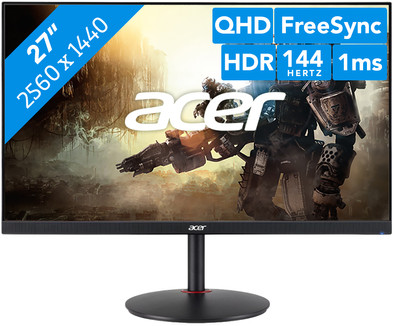
Feel free to play a game of Battlefield or Call of Duty with the 27-inch Acer Nitro XV272UPbmiiprzx. With its 1ms response time and a 144Hz refresh rate, you can play fast-paced shooters with fluently moving images. This monitor has Freesync and is G-sync compatible, which prevents you from interrupting both NVIDIA and AMD video cards. With the high Quad HD resolution and HDR support, you can enjoy sharp images in bright colors. Do you also edit videos? You can see your videos in true-to-life colors, thanks to the 95% support of the DCI-PR color space. The blue light filter reduces the tiredness and strain of your eyes, so you can keep gaming or editing for hours on end.
Note: for QHD gaming, you need a powerful video card, such as an NVIDIA GeForce RTX GPU or AMD Radeon RX 5000 series GPU, an Xbox One, Xbox Series X or S, or a PlayStation 5.
Sharpness | Quad HD (1440p) | |
|---|---|---|
Curved | ||
Aspect ratio | Standard (16:9) | |
Refresh rate | 144 Hz | |
Response time | 1 ms | |
Panel type | IPS panel | |
Color depth | 1 billion colors (10-bit) | |
Built-in speakers |
5 stars
22
4 stars
10
3 stars
0
2 stars
1
1 star
0
Installation ease
User friendliness
Image quality
Price-quality ratio
Design
Starting point: my current BenQ 120 HZ, 23.6', bought sometime in 2014. Fine screen, but TN panel (dull colors, less viewing angles as far as you use it), a bit small for the occasional Max Verstappen on your screen and I had some holiday money left. Because I didn't want to pay the top price for the 27-inch, 144HZ and QuadHD combination, a lot of screen brands dropped out. I don't think I can appreciate curved screens, so there wasn't much left. This is also a certain price segment where you can not go much lower than the current model.
My main use is gaming. Very competitive. Now the FPS expert will start cursing, because then I should have opted for TN for best performance and still have to stick to 24 inches due to Field of View. but despite my competitive drive I felt that a single zero point could be overcome through years of experience and reaction time. In addition, I just move the screen a little more to the back if I want to keep an overview; good for the eyes, but actually that argument no longer counts after all these years, because I lower the resolution of most games for a higher FPS, but hey, we digress.
The response time of different panels (which would make IPS bad) can also be nuanced, what Google work quickly shows that the gem. response time is very different from the minimum and maximum response time - tempting for the filters, but try to look up the averages of these as well.
I took the risk of the dreaded 'black light bleeding' with IPS for granted after a lot of examples from different brands, after all I have a TV with a Netflix button and generally use a higher brightness while gaming, so it is less noticeable . Only notice when turning off at night (completely black, in a dark room) that there is some BLB. As far as I have been able to find in my search, this is IPS-specific. You do get something in return. Moreover, the panels are often supplied by two suppliers; it just doesn't get much better.
So why should you go for IPS? Together with Quad HD, this panel is particularly sharp, I came from Full HD. Wonderfully clear browsing, even on 27 inches. The color reproduction of IPS is so much better vs. my BenQ. I don't do much with Photoshop etc. so your experience may be different, but I can't imagine this being disappointing.
144 HZ works great and I 'feel' the difference with 120 HZ. In certain games (eg CS:GO) I would lower or turn off the 'Xtreme overdrive' setting with the buttons on the screen. It is a kind of blur function (with fast movements), because he wants to present everything very smoothly, but that is precisely why you suffer from ghosting; luckily can be solved manually.
Being able to adjust the screen is nice, I doubted - after first overcoming my preconceptions about Acer - between this model and the Acer VG271UPbmiipx, but I'm glad I wasn't tied to a fixed height. It is slightly less flexible than the current BenQ, but sufficiently 'low' and tiltable for my separate sitting position during gaming sessions. The screen edge is not noticeable because it is black.
The foot is quite basic, at the same time easy to place my keyboard and mouse around. With the BenQ, the foot is tilted by default, because otherwise my keyboard has to overcome an unwanted slope.
Mounting the foot is quite simple, you click it directly on the screen. I didn't need any help with this as I did it on the floor with some cloths and the protective material in the box. Don't be tempted to unscrew the screws/plastic on the base, this is only necessary if you want to use the VESA mount. It can be clicked in directly as it is delivered.
The HDMI cable that was included was a bit too short, I think about 1.5m (I have a somewhat wider desk and the PC cabinet is hidden in the housing). Fortunately, I have these in abundance (or else you buy one), fairly easy to solve and only an accessory.
I don't use the other connections, so this one with its 'limited' number of connections is good enough for me.
I found it quite difficult from my first 'I want a new screen' thought, but I am very happy with my choice. I hope you can make your choice with this.
AdR
26 June 2019
Automatically translated from Dutch
By default, without having turned on any settings, the image quality with the IPS panel is super clear. No more dark image. I switched from 24" monitor and before this I was hesitating between a 27" or 32" monitor, but 27" is really big enough to play games and watch movies/series. ideal this monitor from Acer is definitely worth the money
SERKAN AKHAN
3 July 2019
Automatically translated from Dutch
Replaced my 10 year old monitor for this Nitro XV272. What a difference and what an asset... having to do years earlier. But now I appreciate my newest acquisition all the more.
R. Kool
24 August 2021
Automatically translated from Dutch
Product number | 829364 | |
|---|---|---|
Manufacturer code | UM.HX2EE.P01 | |
Brand | Acer | |
Warranty | 2 years | |
Processing of your defect | Via Coolblue |
Recommended display resolution | 2560x1440 | |
|---|---|---|
Sharpness | Quad HD (1440p) | |
Aspect ratio | Standard (16:9) | |
Refresh rate | 144 Hz | |
Response time | 1 ms | |
Panel type | IPS panel | |
Local dimming | ||
HDR support | ||
Contrast ratio | 1000 | |
Touchscreen | ||
Type of HDR | DisplayHDR 400 | |
Screen reflection | Anti-glare | |
Blue light filter | ||
Flicker-free technology | ||
Color space | DCI-P3 | |
Color depth | 1 billion colors (10-bit) | |
G-sync | ||
G-sync Ultimate | ||
Adaptive Sync | ||
Type of adaptive sync | FreeSync, G-Sync Compatible | |
Resolution width | 2560 pixels | |
Resolution height | 1440 pixels | |
Anti-reflection type | Anti glare | |
Viewing distance | 43 - 115 cm | |
Horizontal viewing angle | 178 ° |
Height | 40,1 cm | |
|---|---|---|
Width | 61,4 cm | |
Depth | 23,3 cm | |
Weight | 6,46 kg | |
Color | Black | |
Including stand | ||
Material | Plastic | |
Cable management | ||
Appearance | Gaming | |
Curved |
Number of HDMI connectors | 2 | |
|---|---|---|
Number of Female HDMI type A 2.0 ports | 2 | |
Number of headphone jacks | 1 | |
Type of headphone connection | 3.5mm (TS) | |
Number of Female Standard DisplayPort 1.4 ports | 1 | |
Number of female standard USB-A ports | 2 | |
Female standard USB-A port version | 3.0 | |
Number of female 3.5mm TS Audio Jack ports | 1 | |
Number of USB ports | 2 | |
Type of USB port | Standard USB-A | |
Number of USB ports | 2 |
Included by default | HDMI cable | |
|---|---|---|
Not included by default | USB-C cable |
Adjustable in height | ||
|---|---|---|
Tiltable | ||
Pivotable stand | ||
Pivot function | ||
VESA mount option | ||
VESA mount | 100x100mm |
Energy label | G | |
|---|---|---|
Energy consumption standby | 0,5 W | |
Energy consumption active | 39 W | |
Energy consumption per 1000h | 33 kWh | |
Annual energy consumption | 48,18 kWh | |
Annual energy costs | 10,6 euros |
Built-in speakers | ||
|---|---|---|
Sound system | Stereo | |
Webcam | ||
Split screen | ||
Kensington lock |
Image quality according to customers | Good | |
|---|---|---|
Recommended for use | Gaming, Image editing and graphic design, Internet, email, and text processing, Watching movies in Full HD |
