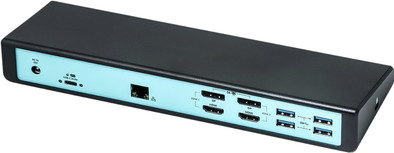
i-tec USB 3.0 / USB-C / Thunderbolt 3 5K Universal Dual Display
Never available again
View alternatives in the sidebar
View alternatives in the sidebar
Product number | 834226 | |
|---|---|---|
Manufacturer code | CADUAL4KDOCKPD | |
Brand | I-tec | |
Warranty | 2 years | |
Processing of your defect | Via Coolblue |
Made for laptop models | Apple MacBook, Chromebook, Microsoft Surface, Windows laptop |
|---|
Laptop docking station suitable for | Connect 1 monitor, Connect 2 monitors and MacBook, Connect 2 monitors and a Windows laptop | |
|---|---|---|
Extra functionalities docking station | Charge laptop via docking station, Connect headphones, Connect wired network | |
Type of main connector | USB-A, USB-C | |
Supported video technology on Docking Station | DisplayLink | |
Number of USB ports | 7 | |
USB function | Data transfer, Power source | |
Type of USB port | Standard USB-A, USB-C | |
Number of female standard USB-A ports | 5 | |
Female standard USB-A port version | 3.0 | |
Power standard USB-A port | 4,5 W | |
Number of USB-C ports | 2 | |
Protocol Female USB-C port | USB | |
USB version Female USB-C port | 3.0 | |
Number of USB 3.0 Female USB-C ports | 2 | |
Power USB-C port | 4,5 W | |
Fast charging USB-C port | ||
Total available video outputs | 2x HDMI | |
Number of HDMI connectors | 2 | |
Female HDMI Type A port version | 2.0 | |
Number of Ethernet ports | 1 | |
Ethernet speed | Gigabit Ethernet (1000Mbps) | |
Type of DisplayPort connector | standard DisplayPort | |
Number of Female Standard DisplayPort 1.2 ports | 2 | |
Version Female Standard DisplayPort port | 1.2 | |
Number of headphone jacks | 2 | |
Type of headphone connection | 3.5mm (TS) | |
Memory card reader | ||
Number of connectable monitors | 2 | |
Maximum image resolution 1 monitor | 5K (5120x2880) | |
Maximum refresh rate 1 monitor | 60 Hz | |
Maximum image resolution 2 monitors | 4K (3840x2160) | |
Maximum refresh rate of 2 monitors | 60 Hz |
Cable length | 0,9 m | |
|---|---|---|
Color | Black | |
Height | 24,5 cm | |
Width | 9,5 cm | |
Depth | 3 cm | |
Weight | 330 g |
anything for a smile
Extra functionalities docking station | Charge laptop via docking station, Connect headphones, Connect wired network | |
|---|---|---|
Type of main connector | USB-A, USB-C | |
Total available video outputs | 2x HDMI | |
Number of connectable monitors | 2 | |
Type of USB port | Standard USB-A, USB-C | |
Cable length | 0,9 m |
According to our dock for laptops expert
With this dock, you connect 2 extra monitors to your laptop.
Charge a laptop with this dock via the USB-C port.
Via the Ethernet port on this dock, you can make use of a stable, wired internet connection.
You can't collect information from a memory card via this dock.
The i-tec USB 3.0 / USB-C / Thunderbolt 3 5K Universal Dual Display works on all Windows laptops and MacBook models with a USB-C port which sends a video signal. This is how you can check if your laptop has a suitable USB-C port.
5 stars
9
4 stars
16
3 stars
2
2 stars
2
1 star
1
Bought this one to connect my 2 4K 27" AOC screens to my 2017 Macbook Pro and got rid of all those extra cables but was a bit disappointed with the performance. First off, you already have to install drivers and/or software, something that you are not used to a Mac as it is usually plug and play.After that the performance was also disappointing.A lot of "lag" on my mouse movements and stuttering scrolling in all my windows.Especially if you have multiple Spaces (extra virtual desktops) Switching between HDMI or DisplayPort cables didn't help, it's partly due to the software and the fact that you only connect 1 usb-c cable between the laptop and the docking station, which then has to send all the data and you're not using the full power of your graphics card. My solution was to buy 2 extra cables (usb-c <> male displayport) and connect them directly to the usb-c/thunderbolt 3 ports of the Macbook. Then your Mac will recognize all screens and you can fully enjoy top performance. But now I'm back with multiple cables on my Mac, this docking station is now rather a glorified and expensive dongle.
Gregory Van Looy
8 November 2020
Automatically translated from Nederlands
Have the product for a few weeks now. Very happy with all monitors internet audio and USB connected to my laptop via one cable.
Julia
28 November 2020
Automatically translated from Nederlands
Fast delivery, neatly packaged. I needed drivers and they were a bit more difficult to find on the iTec website.
LeoD
1 January 2021
Automatically translated from Nederlands