Never available again
View alternatives in the sidebar
View alternatives in the sidebar
According to our monitor expert
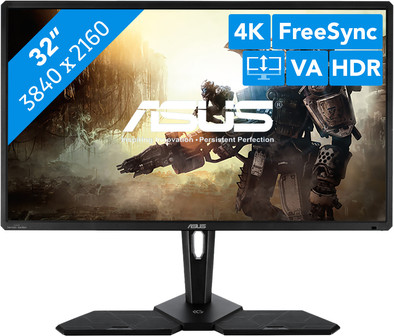
The ASUS Console CG32UQ is a 32-inch monitor for enthusiastic console gamers. With this screen, you'll get the most out of your Playstation, Xbox, or Nintendo Switch. Do you have a Playstation 4 Pro or an Xbox One X? You can even play games in 4K. Landscapes and characters will look sharp down to the smallest detail. Thanks to the HDR600 certification, you'll experience realistic colors and a high brightness. Local dimming creates a rich contrast, so black will be truly black and white truly white. In addition, the CG32UQ displays a wide range of colors by covering 95% of the DCI-P3 color space. The refresh rate of 60Hz ensures you'll reach the maximum speed your console can handle. FreeSync will also reduce image stutter if you have an Xbox one.
Note: Make sure you have an NVIDIA RTX 2080 Super or 2080 Ti for 4K gaming.
Sharpness | 4K (UHD) | |
Curved | ||
Aspect ratio | Standard (16:9) | |
Refresh rate | 60 Hz | |
Response time | 5 ms | |
Panel type | VA panel | |
Color depth | 17 million colors (8-bit) | |
Built-in speakers |
5 stars
1
4 stars
3
3 stars
2
2 stars
0
1 star
0
In itself, this is a great gaming monitor for people who want to game on the current generation of consoles. It is less suitable for the new generation of consoles; only a 60Hz panel and no HDMI 2.1/VRR support. The firmware must be updated first to prevent freesync flickering. After the update, this issue has largely been resolved.
A fairly bizarre problem is that it is not possible to adjust the settings of brightness etc. when HDR is on. This is purely a limitation of the interface, the monitor itself can easily handle this. An absurd solution is to create custom presets in SDR mode, which you can then switch to in HDR mode. This way you get the settings that you cannot make via the OSD itself. ASUS states that they are not going to fix this problem. Very remarkable for a +-E800 monitor.
In the end I have mixed feelings about it. The image quality itself is excellent in this class. Razor-sharp, and you won't get a better HDR experience without full-array local dimming on an LCD screen. The 'ambilight'-esque feature is also much nicer than I expected. But if you look at the limited 'forward compatibility', the bizarre interface and the high purchase price, it becomes a different story. In brief:
-Great choice for people who want a top-quality 32" LCD screen for current-gen consoles.
-Bad choice for people planning to move to next-gen consoles.
Since I don't fall into the first category, I sent it back and it will soon be exchanged for an LG 48CX.
Arjen S.
9 June 2020
Automatically translated from Dutch
Great monitor.
I am a monitor freak myself and had several benq for console. From 144hrz screen to 4k 60hrz tn panel.
This is a VA Panel. After a lot of research I chose the Asus CG32UQ. I'm happy with my choice compared to all my other monitors, this one pops out 100%!
For all hardcore gamers don't hesitate don't look at that 60hrz etc... a console monitor is high brightness high contrast and beautiful colors!
There were some issues with HDR bug. Install firmware over it and you're done.
Roel
16 June 2020
Automatically translated from Dutch
Top game monitor
Sarah Van Bossele
25 January 2020
Automatically translated from Dutch
Product number | 841088 | |
Manufacturer code | 90LM04F0-B01170 | |
Brand | ASUS | |
Warranty | 2 years | |
Processing of your defect | Via Coolblue |
Recommended display resolution | 3840x2160 | |
Sharpness | 4K (UHD) | |
Aspect ratio | Standard (16:9) | |
Refresh rate | 60 Hz | |
Response time | 5 ms | |
Panel type | VA panel | |
Local dimming | ||
HDR support | ||
Contrast ratio | 3000 | |
Touchscreen | ||
Type of HDR | DisplayHDR 600 | |
Screen reflection | Anti-glare | |
Blue light filter | ||
Flicker-free technology | ||
Color space | DCI-P3 | |
Color depth | 17 million colors (8-bit) | |
G-sync | ||
G-sync Ultimate | ||
Adaptive Sync | ||
Type of adaptive sync | FreeSync | |
Resolution width | 3840 pixels | |
Resolution height | 2160 pixels | |
Anti-reflection type | Anti glare | |
Viewing distance | 51 - 136 cm | |
Horizontal viewing angle | 178 ° |
Height | 43,02 cm | |
Width | 73,04 cm | |
Depth | 7,82 cm | |
Weight | 9,1 kg | |
Color | Black | |
Including stand | ||
Material | Plastic | |
Cable management | ||
Appearance | Gaming | |
Curved |
Number of HDMI connectors | 3 | |
Number of Female HDMI type A 2.0 ports | 3 | |
Number of headphone jacks | 1 | |
Type of headphone connection | 3.5mm (TS) | |
Number of Female Standard DisplayPort 1.2 ports | 1 | |
Number of female standard USB-A ports | 4 | |
Female standard USB-A port version | 3.0 | |
Number of female 3.5mm TS Audio Jack ports | 1 | |
Type of USB port | Standard USB-A | |
Number of USB ports | 4 |
Included by default | HDMI cable | |
Not included by default | USB-C cable |
Adjustable in height | ||
Tiltable | ||
Pivotable stand | ||
Pivot function | ||
VESA mount option | ||
VESA mount | 100x100mm |
Energy label | G | |
Energy consumption standby | 0,5 W | |
Energy consumption active | 50 W | |
Energy consumption per 1000h | 41 kWh | |
Annual energy consumption | 59,86 kWh | |
Annual energy costs | 23,94 euros |
Built-in speakers | ||
Webcam | ||
Split screen | ||
Kensington lock | ||
Best tested |
Recommended for use | Gaming, Internet, email, and text processing, Photo editing, Video editing, Watching movies in 4K |
