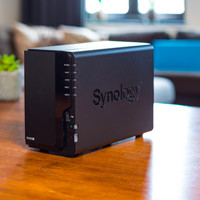
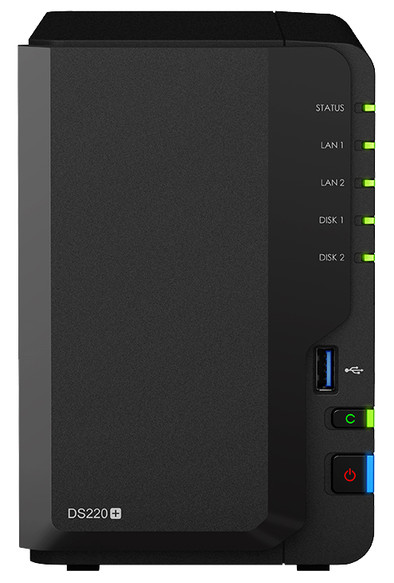
Synology DS220+

Never available again
View alternatives in the sidebar
View alternatives in the sidebar
Product number | 866316 | |
|---|---|---|
Manufacturer code | DS220+ | |
Brand | Synology | |
Warranty | 2 years | |
Processing of your defect | Via Coolblue |
Built-in hard drive | ||
|---|---|---|
Number of hard drive slots | 2 | |
Suitable for hard drive size | 2.5-inch HDD, 2.5-inch SSD, 3.5-inch HDD | |
RAID | Basic, JBOD, RAID 0, RAID 1, Synology Hybrid RAID | |
Internal RAM | 2 GB | |
Total number of RAM slots | 1 | |
Expandable memory | ||
Maximum internal memory | 6 GB | |
Memory type | SO-DIMM DDR4 |
Connection type | Wired | |
|---|---|---|
LACP Link aggregation | ||
Thunderbolt connector | ||
Bluetooth | ||
Number of Ethernet ports | 2 |
NAS functions | Backup server, Download server, FTP server, Mail server, Photo server, Surveillance station, VPN server, Web server, iTunes server | |
|---|---|---|
NAS application center | ||
Maximum number of shared folders | 256 | |
Maximum number of local users` | 2048 | |
Plex support | ||
Type of Plex support | HD Ready (720p) | |
Number of IP camera licenses included | 2 | |
DLNA | ||
UPnP AV support | ||
FTP server | ||
On/off switch | ||
Automatic switch on/off | ||
Kensington lock | ||
Apple Time Machine support | ||
Chromecast support | ||
Suitable for IFTTT | ||
Recommended for use | Making a backup, Media streaming, Personal cloud |
Processor brand | Intel | |
|---|---|---|
Processor family | Celeron | |
Processor code name | Gemini Lake Refresh | |
Processor cores | Dual-Core (2) | |
Clock speed | 2 GHz |
Depth | 14 cm | |
|---|---|---|
Width | 11 cm | |
Height | 17 cm | |
Type NAS | Upright | |
Color | Black | |
Weight | 1,3 kg |
Number of hard drive slots | 2 | |
|---|---|---|
Suitable for hard drive size | 2.5-inch HDD, 2.5-inch SSD, 3.5-inch HDD | |
Internal RAM | 2 GB | |
Processor cores | Dual-Core (2) | |
Built-in hard drive |
According to our NAS expert
The powerful Dual-Core processor and 2GB RAM make this a fast NAS.
Via Plex, you can watch every movie from your NAS in HD on your smartphone, tablet, PC, or smart TV.
Thanks to the 2 Gigabit Ethernet ports, the NAS has a fast internet connection.
Internal hard drives not included, check out our bundles.
Save and stream your multimedia files with the Synology DS220+. This compact NAS has room for 2 hard drives. Create a RAID 0 or RAID 1 setup to save your files extra quickly and extra safely. Make backups of your photos, movies, and documents, and access these files whenever you want. Even if you're not at home. While its predecessor the DS218+ only has 1 Ethernet port, the DS220+ has 2. This way, you double the gigabit internet speed. In addition, this powerhouse has a Dual-Core processor with a clock speed of up to 2.9GHz. The 2GB RAM makes this NAS both fast and suitable for multitasking. For example, you can unpack a folder with photos while you stream an HD movie via Plex. You can even stream some movies in Full HD quality.
5 stars
96
4 stars
93
3 stars
5
2 stars
1
1 star
1
Installation
Energy consumption
Speed
Software
The DS220+ replaces my trusty old DS215j that I used for years and was a budget NAS. The DS220+ really feels a lot smoother and the somewhat meager standard 2GB internal memory can be expanded to a total of 18GB internal memory. Officially, this is only possible up to 6GB with a very expensive 4GB module from Synology itself, but a 16GB SODIMM from Crucial also appears to work fine after some searching on the Internet. So I simultaneously ordered a Crucial 16GB 2666MHz DDR4 SODIMM Dual Rank (1x16GB) SODIMM and it works fine with the DS220+ and it now sees 18GB of internal memory. After running a memory test, no problems were found.
Ruud Wilschut
21 June 2022
Automatically translated from Nederlands
I chose a + series NAS from Synology because of the possibility to use Docker and Virtual Machine Manager so that you can turn the NAS into a PC in a NAS. The support of Docker with which you can use, for example, Pi-Hole (ad blocker) or HomeAssistant (home automation) makes the NAS very versatile. Of course, the basic function, saving files, is also very good on this NAS. What is a must, especially if you want to run Docker or Virtual Machine Manager, is a memory upgrade of 8 or 16GB. Fortunately, you can use standard DDR4 2400mt/PC4-19200 laptop memory for this.
Despite its higher price compared to other 2 bay NAS, it is well worth its price.
Mark Evers
6 April 2021
Automatically translated from Nederlands
Since the DS220+ is my first NAS, it is difficult for me to compare it with other NAS systems. So far, after a week of use, the system has not disappointed me and the ease of use has been much better than the experiences and reviews I had encountered. You do have to study the available guides and the various articles on the internet to make the right choices. A certain knowledge of network systems is required. The information on the Synology website and the DSM manual are fairly detailed and clearly written. In particular, a good understanding of the capabilities and limitations of what the various packages and associated directories can do is necessary for optimal use. Fortunately, YouTube and the various forums offer a lot of explanation and step-by-step plans for the beginner and the more advanced.
Jaap Laméris
2 December 2020
Automatically translated from Nederlands