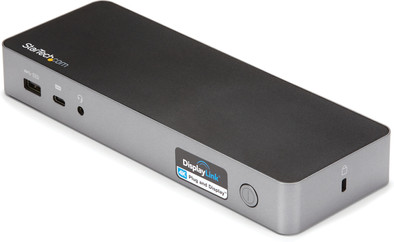
StarTech Hybride Universeel USB-C & USB-A Dock with Dual HDMI/DP and 60W PD
Never available again
View alternatives in the sidebar
View alternatives in the sidebar
According to our dock for laptops expert
The StarTech Hybrid Universal USB-C & USB-A Dock with Dual HDMI/DP and 60W PD functions on all Windows laptops and MacBook models with a USB-C port which sends a video signal This is how you can check if your laptop has a suitable USB-C port.
Extra functionalities docking station | Charge phone via docking station, Connect headphones, Connect wired network | |
Type of main connector | USB-A, USB-C | |
Number of connectable monitors | 2 | |
Type of USB port | Standard USB-A, USB-C | |
Cable length | 1 mm |
5 stars
3
4 stars
4
3 stars
1
2 stars
1
1 star
0
Plug and play
Robin Mars
1 July 2021
Automatically translated from Dutch
Perfect to add 2 extra monitors to my new Macbook Pro M! to link
Jelle H
28 January 2021
Automatically translated from Dutch
This dock is equipped with almost all connections you could need. Although it is quite large (especially in width), and therefore seems to be enough space for it, it only lacks an SD card slot. That's no problem for me, because I never actually use it.
The build quality is also fine, and the design is also quite sleek. It comes with a large power brick, luckily with a long cable, so you can place it somewhere out of sight. Unfortunately, the USB-C cable you use to connect the laptop to the dock is not that long (1 meter according to the spec), and rather inflexible. So you have to stay pretty close to the dock.
With Windows 10, this dock works out of the box, of course only after Windows has downloaded some drivers. But I didn't have to install anything else for it. Gigabit Ethernet, DisplayPort, and loop-through USB work just fine.
With a Mac, however, it was a different story, specifically with regard to DisplayPort porting. An external screen is not automatically recognized after connecting. Unfortunately, you have to install a piece of software called "DisplayLink Manager" for this, with the necessary caveats. On older versions of macOS this also requires a kernel extension, and on newer versions of macOS (Catalina and above) you even have to grant the app "Screen recording" permission!
In short, I think this is unacceptable for most Mac users. This is also why I immediately returned this dock, because it should just work plug and play.
Dimitry Andric
4 March 2021
Automatically translated from Dutch
Product number | 874166 | |
Manufacturer code | DK30C2DPPDUE | |
Brand | Startech | |
Warranty | 2 years | |
Processing of your defect | Via Coolblue |
Made for laptop models | Apple MacBook, Chromebook, Microsoft Surface, Windows laptop |
Laptop docking station suitable for | Connect 1 monitor, Connect 2 monitors and MacBook, Connect 2 monitors and a Chromebook, Connect 2 monitors and a Windows laptop | |
Extra functionalities docking station | Charge phone via docking station, Connect headphones, Connect wired network | |
Type of main connector | USB-A, USB-C | |
Supported video technology on Docking Station | DisplayLink, Thunderbolt 3 | |
Number of USB ports | 5 | |
USB function | Charging an external device, Data transfer, Device connection, Play media, Record audio | |
Type of USB port | Standard USB-A, USB-C | |
Number of female standard USB-A ports | 3 | |
Female standard USB-A port version | 3.0 | |
Power standard USB-A port | 4,5 W | |
Amperage standard USB-A port | 0,9 A | |
Power second standard USB-A port | 4,5 W | |
Amperage second standard USB-A port | 0,9 A | |
Power third standard USB-A port | 7,5 W | |
Amperage third standard USB-A port | 1,5 A | |
Number of USB-C ports | 2 | |
Protocol Female USB-C port | USB | |
USB version Female USB-C port | 3.2 | |
Power USB-C port | 7,5 W | |
Amperage USB-C port | 1,5 A | |
Fast charging USB-C port | ||
Power second USB-C port | 0 W | |
Amperage second USB-C port | 0 A | |
Fast charging second USB-C port | ||
Number of Ethernet ports | 1 | |
Ethernet speed | Gigabit Ethernet (1000Mbps) | |
Type of DisplayPort connector | standard DisplayPort | |
Number of Female Standard DisplayPort 1.2 ports | 2 | |
Version Female Standard DisplayPort port | 1.2 | |
Number of headphone jacks | 1 | |
Type of headphone connection | 3.5mm (TS) | |
Memory card reader | ||
Number of connectable monitors | 2 | |
Maximum image resolution 1 monitor | 4K (3840x2160) | |
Maximum refresh rate 1 monitor | 60 Hz | |
Maximum image resolution 2 monitors | 4K (3840x2160) | |
Maximum refresh rate of 2 monitors | 60 Hz |
Cable length | 1 mm | |
Color | Black | |
Height | 3 cm | |
Width | 8 cm | |
Depth | 22 cm | |
Weight | 0,25 kg |