MSI MEG 342C QD OLED

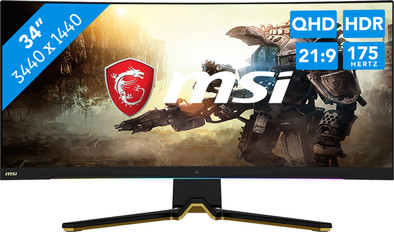
Never available again
View alternatives in the sidebar
View alternatives in the sidebar
Product number | 925647 | |
|---|---|---|
Manufacturer code | MEG 342C QD OLED | |
Brand | MSI | |
Warranty | 3 years | |
Processing of your defect | Via Coolblue |
Screen size | 34 inches | |
|---|---|---|
Recommended display resolution | 3440x1440 | |
Sharpness | Quad HD (1440p) | |
Aspect ratio | Ultrawide (21:9) | |
Refresh rate | 175 Hz | |
Response time | 0,1 ms | |
Panel type | OLED | |
Brightness | 250 cd/m2 | |
Local dimming | ||
HDR support | ||
Contrast ratio | 1000000 | |
Touchscreen | ||
Type of HDR | DisplayHDR 400 | |
Screen reflection | Anti-glare | |
Blue light filter | ||
Flicker-free technology | ||
Color space | Adobe RGB, DCI-P3, sRGB | |
Adobe RGB color coverage percentage | 97,8 % | |
sRGB color coverage percentage | 139,1 % | |
Color depth | 1 billion colors (10-bit) | |
Adaptive Sync | ||
Type of adaptive sync | Freesync Premium Pro | |
Resolution width | 3440 pixels | |
Resolution height | 1440 pixels | |
Anti-reflection type | Anti glare | |
Horizontal viewing angle | 178 ° |
Height | 37,5 cm | |
|---|---|---|
Width | 81,4 cm | |
Depth | 14,3 cm | |
Weight | 9,3 kg | |
Color | Black | |
Including stand | ||
Material | Plastic | |
Cable management | ||
Appearance | Gaming | |
Curved | ||
Screen curve | 1800 R |
Number of HDMI connectors | 2 | |
|---|---|---|
Number of Female HDMI type A 2.1 ports | 2 | |
Number of headphone jacks | 1 | |
Type of headphone connection | 3.5mm (TRS) | |
Number of USB-C ports | 1 | |
Number of female standard USB-A ports | 4 | |
Female standard USB-A port version | 3.2 | |
Number of female 3.5mm TRS Audio Jack ports | 1 | |
Number of female standard USB-B (3.0 form) ports | 1 | |
Type of USB port | Standard USB-A, Standard USB-B (3.0 form), USB-C | |
Number of USB ports | 6 | |
Suitable for daisy chaining |
Included by default | DisplayPort cable, HDMI cable, USB-C cable |
|---|
Adjustable in height | ||
|---|---|---|
Tiltable | ||
Pivotable stand | ||
Pivot function | ||
VESA mount option | ||
VESA mount | 100x100mm |
Energy label | G | |
|---|---|---|
Energy consumption standby | 0,5 W | |
Energy consumption per 1000h | 50 kWh | |
Annual energy consumption | 73 kWh | |
Annual energy costs | 45,63 euros |
Built-in speakers | ||
|---|---|---|
Split screen | ||
Kensington lock |
Recommended for use | Gaming, Image editing and graphic design, Internet, email, and text processing, Photo editing, Video editing, Watching movies in Full HD |
|---|
anything for a smile
Sharpness | Quad HD (1440p) | |
|---|---|---|
Curved | ||
Aspect ratio | Ultrawide (21:9) | |
Refresh rate | 175 Hz | |
Response time | 0,1 ms | |
Panel type | OLED | |
Color depth | 1 billion colors (10-bit) | |
Built-in speakers |
According to our monitor expert
Thanks to the 175Hz refresh rate and 1ms response time, you can game with smooth images even in the most demanding situations.
You can synchronize your AMD video card with the monitor with the FreeSync Premium technology which prevents screen tearing while you game.
You can game in Full HD or QHD at 120Hz when you connect your console, like the PlayStation 5 or Xbox Series X|S.
The PlayStation 5 and Xbox Series X | S don't support ultrawide settings, so you can't fill the complete screen of the monitor.
Enjoy razor-sharp graphics, vibrant colors, and extra realistic light effects with the MSI MEG 342C QD OLED 34-inch Ultrawide Curved OLED 175Hz QHD gaming monitor. Thanks to the 175Hz refresh rate and 0.1ms response time, this monitor is suitable for the most demanding games. Images looks smooth on your screen, so you can game at the highest settings. In addition, you won't have any problems with screen tearing with your AMD video card. That's because your GPU works together excellently with the monitor, thanks to FreeSync Premium. As the name suggests, this monitor has an OLED panel. The pixels in the screen create the light they need on their own, so you can see realistic differences in the tiniest details. Combined with the QHD resolution and high coverage within the DCI-P3 color space, this ensures a movie theater-like experience. You can also have a more immersive gaming experience thanks to the curved screen. It looks like you're right in the middle of the action that way, like in a cockpit or racing car. More of a console gamer? Connect an Xbox Series X, Series S, or PlayStation 5 via HDMI 2.1 and enjoy 120Hz gaming in Full HD or QHD. You can also tilt, turn, or adjust the monitor in height to create an ergonomic sitting position. This prevents neck and back complaints after a long day of gaming. Do you use the monitor for more than just gaming? Connect the laptop via USB-C and combine 3 tasks. This ports transfers image signals and data, and it charges your device with a 65W power. This way, you'll always have a full battery when you game.
Note: you need a powerful video card for QHD gaming, like an NVIDIA GeForce RTX 3070 Ti or AMD Radeon RX 6000 series GPU, or an Xbox Series X.
I bought this monitor for Christmas with the aim of improving my gaming experience. I already have an OLED TV at home and was very satisfied with the image quality. Now I used a 32 inch 1440p 144Hz VA panel from Samsung. Because this was a budget monitor, I was never very satisfied with the colors of the monitor. They were a bit washed out and the pixel response times were downright poor.
Image quality Thanks to the QD OLED pixel technology, this is the biggest advantage of the monitor. Because the pixels themselves emit light (instead of a large backlight), they can be turned off one by one. This way you get perfect black levels and therefore technically infinite contrast. In addition, the HDR display is really great. For example, with a game like Ori and the Will of the Wisps it is breathtaking. The brightness and saturation of the colors, while retaining detail in the dark parts of the screen. The 21:9 ultrawide aspect ratio really draws you into the game, which I experience less quickly with a 16:9. The colors are also almost perfect in demo videos on YouTube in HDR. You will also receive a calibration report for the monitor upon delivery. It is calibrated from the factory so that the colors match properly. Due to the DeltaE value of less than 2 (on my specific unit itself less than 1!), the colors are so accurate that it is indistinguishable from the "Artists Intent". However, I do not experience this good HDR display with everything. And this is not the fault of MSI or Samsung themselves, fortunately. Some games such as Forza Motorsport do not have good support for HDR display, which makes it look way too bright, leaving no contrast. HDR display on streaming apps such as Netflix and Disney+ also does not work over DisplayPort, only the HDMI 2.1 port. And if you use the HDMI connection, you will be limited to 120Hz, and not the smooth 175Hz. I'll stick with DisplayPort, because SDR playback is also very good on the monitor, and HDR can still be used in many games.
Appearance The design is not to everyone's taste. The base is partly gold, which won't suit everyone. For example, if you have a wooden desk, this can look nice. Furthermore, the bezel at the bottom and the rest of the foot are a bit dark gray. They are not really black, which I would have liked better and less disturbing. What is also very nice is the so-called "MSI Spectrum Bar" that sits under the panel and shines on your desk. This can work as an RGB strip on the bottom of your monitor. This then goes through all the colors in a "wave" pattern. It can also be used as a kind of Ambilight on Philips TVs. This makes the different zones of the bar take on the color shown on the screen. This really doesn't work that well. The colors of the bar are very pale and do not match the color shown on the image. A nice gimmick, but it doesn't work very well. In addition, the foot is also very deep. This makes the monitor stable on your desk, but it takes up a lot of space. So make sure you have a reasonably deep desk to keep enough distance from the screen.
Functions The most important additional feature I want to discuss is the KVM switch. This ensures that you can use your mouse and keyboard on different devices. You connect your keyboard and mouse to 1 of the 4(!) USB ports on the monitor. You can then, for example, connect a laptop via the USB-C connection (I will come back to that later) or a desktop with the USB-B upstream port. In my situation, I have a work laptop that I connect to the monitor with Thunderbolt. With this one USB-C cable I connect an extra screen, a mouse and a keyboard. The USB-C port can also supply 65 watts of power (it is turned off by default, why??) so that your laptop is also charged. So I have everything I need via 1 USB-C cable to my laptop. When I have finished working, the monitor automatically jumps back to DisplayPort to which my PC is connected. The KVM switch also does its job, so I now use the same mouse and keyboard for my PC.
All in all, an excellent monitor for a very high price (1500 euros). At that price I don't recommend any monitor. It is now on sale for 900 euros and if you have that much money for a monitor, this is the most complete monitor for the price.
Mitchel
10 January 2024
Automatically translated from Nederlands
Great screen. Very nice image, really perfect. However, the box where your Vesa mount must be connected is a little different, so you will have to use the supplied standoff if you want to use a different arm.
mick
22 November 2023
Automatically translated from Nederlands
If you are looking for a 34' inch ultra wide OLED display, this is the best option, good colors out of the box.
Keem
9 April 2024
Automatically translated from Nederlands
