BlueBuilt 8-in-1 HDMI Docking Station with USB-C

Never available again
View alternatives in the sidebar
View alternatives in the sidebar
BlueBuilt products have the best price-quality ratio because we've put them together ourselves. Based on product data, feedback from customers, and our own product knowledge. In other words, good products. We are so confident, that we'll even give you an extra long warranty. Read everything on BlueBuilt.

Product number | 933693 | |
|---|---|---|
Manufacturer code | BBDS8IN1 | |
Brand | BlueBuilt | |
Warranty | 5 years | |
Processing of your defect | Via Coolblue |
Made for laptop models | Apple MacBook, Chromebook, Microsoft Surface, Windows laptop |
|---|
Laptop docking station suitable for | Connect 1 monitor | |
|---|---|---|
Extra functionalities docking station | Charge laptop via own charger, Charge phone via docking station, Connect headphones, Connect wired network | |
Type of main connector | USB-C | |
Supported video technology on Docking Station | MST, SST | |
Number of USB ports | 1 | |
USB function | Charge, Charging an external device, Data transfer, Device connection, Play media, Power source, Record audio | |
Type of USB port | USB-C | |
Number of USB-C ports | 1 | |
Protocol Female USB-C port | USB, USB electricity | |
USB version Female USB-C port | 3.0 | |
Power USB-C port | 100 W | |
Fast charging USB-C port | ||
Total available video outputs | 1x HDMI | |
Number of HDMI connectors | 1 | |
Female HDMI Type A port version | 2.0 | |
Number of Ethernet ports | 1 | |
Ethernet speed | Gigabit Ethernet (1000Mbps) | |
Number of headphone jacks | 1 | |
Type of headphone connection | 3.5mm (TRRS) | |
Memory card reader | ||
Memory card | SD | |
Number of connectable monitors | 1 | |
Maximum image resolution 1 monitor | 4K (3840x2160) | |
Maximum refresh rate 1 monitor | 60 Hz |
Color | Gray | |
|---|---|---|
Height | 13,25 cm | |
Width | 4,3 cm | |
Depth | 1,52 cm | |
Weight | 0,078 kg |
anything for a smile
Extra functionalities docking station | Charge laptop via own charger, Charge phone via docking station, Connect headphones, Connect wired network | |
|---|---|---|
Type of main connector | USB-C | |
Total available video outputs | 1x HDMI | |
Number of connectable monitors | 1 | |
Type of USB port | USB-C |
According to our dock for laptops expert
With this docking station, you can connect 1 extra 4K monitor to your laptop with a USB-C connector.
You can charge your laptop with this dock via the USB-C port.
Via the Ethernet port, you can ensure a stable wired internet connection.
You can't connect this docking station to more than 1 monitor at the same time.
With this dock, you can't wirelessly charge your phone or smartwatch.
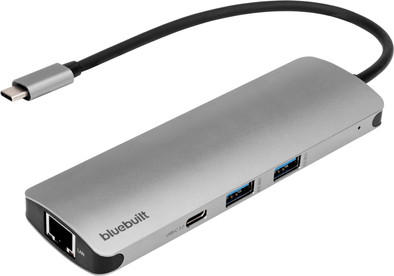
With the BlueBuilt 8-in-1 HDMI Docking Station with USB-C, you can expand your laptop with an extra monitor and accessories. When you connect a monitor, you get a maximum resolution of 4K at 60Hz. This way, you can enjoy a razor-sharp screen. You also have enough connectors for your peripherals, such as a mouse and keyboard. This docking station is small and doesn't weigh much, so you can easily take it with you from your home office to the office. Does your laptop support Power Delivery? Connect your own laptop charger to the dock, so you don't have to look for a socket while you're working. The dock also has an Ethernet port. This means you don't have to worry about a lagging internet connection. The BlueBuilt 8-in-1 Docking Station with USB-C works on all Windows laptops and MacBook models with a USB-C port that transmits a video signal. This is how you check if your laptop has a suitable USB-C port.
The docking station does exactly what you expect it to do and is ideal as an extension for an extra screen on your desk. You only need to plug in one cable, so your second screen, keyboard and ethernet connection are directly connected to your laptop in one go.
Gaston
16 October 2024
Automatically translated from Nederlands
To use to connect some usb devices to your computer. For screen I have only had problems with it, can not select the right drivers so always works on the standard drivers. Also network speed is 10mb/s slower via the docking station
Niels
11 September 2024
Automatically translated from Nederlands
The new MacBook only has USB-C connections, while much of the equipment that I connect to my laptop every day still has an old-fashioned USB connection. This docking station solves that problem! An additional advantage is that I can now easily connect the laptop to a large screen via the docking station. Also room for a memory card, fixed internet cable and headphones, for example. Can easily be carried in the bag.
Maaike
20 March 2024
Automatically translated from Nederlands