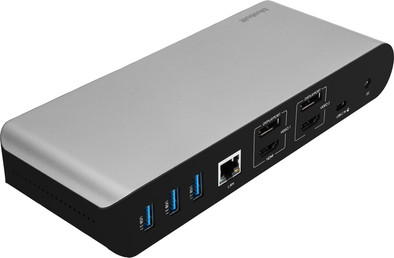
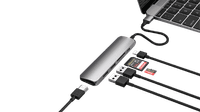
With this dock, you can connect 2 extra 4K monitors to your laptop via DisplayPort or HDMI.
You can charge your laptop or MacBook with this dock if your laptop supports Power Delivery.
You can work with accessories like a keyboard and an ergonomic mouse, which you can connect via the USB-A ports.
You have to install DisplayLink software before you can use this docking station.
This docking station isn't suitable for gaming on your extra screen.
Description
Note: the docking station works best if you install the DisplayLink driver before use. You can easily download it from the DisplayLink website.
You can easily expand your workplace with the BlueBuilt DisplayLink Docking Station Pro with USB-C. With this docking station, you can connect up to 2 monitors via DisplayPort or HDMI. You can get a maximum resolution of 4K at 60Hz. This allows you to create more space for all your windows. You also have enough USB ports for peripherals and memory cards. You can easily and quickly connect your mouse, keyboard, and USB flash drive. Does your laptop support Power Delivery? You can charge your laptop with this BlueBuilt Pro dock. This way, you don't have to look for a socket. Via the Ethernet port, you can also connect a cable for a stable wired internet connection. The BlueBuilt DisplayLink Docking Station with USB-C works on all Windows laptops and MacBook models with a USB-C port that transmit a video signal. This is how you check if your laptop has a suitable USB-C port.
What can you do with this docking station?
Connect up to 2 monitors
Charge a laptop with Power Delivery up to 100W (if your laptop supports Power Delivery)
Work with wired internet
Connect a mouse and keyboard
Charge a phone
Read a memory card
Connect headphones
If you connect 1 monitor to this docking station, you have a maximum resolution of 4K at 60Hz.
If you connect 2 monitors to this docking station, you have a maximum resolution of 4K at 60Hz.

Recommended, but be careful if you want to do cable manageme
Well finished
Feels solid
Correct distribution of ports
Clumsy adapter
The docking station is well finished and feels very solid, the use of metal probably has something to do with it. The design is quite neutral and therefore fits in practically all setups. The ports are correctly divided between the front and back. The adapter is clumsy and large if you want to store it in a cable drawer, in my case I have to tilt the distribution plug. The USB-C cable is very short, especially if you want to do cable management.
Ben
3 December 2023
Automatically translated from Dutch
Review is 4,0 out of 10.
4,0/10 ()
Faltering image.
Good build quality
Lots of ports
Image stutters during video.
Works fine, but with video the image stutters very slightly. Not noticeable during normal use, but when playing video you see some very slight stuttering. Too bad because it does what it's supposed to do. Tested with MacBook M2 and Windows, both same problem.
Simon
12 February 2024
Automatically translated from Dutch
Review is 8,0 out of 10.
8,0/10 ()
install Displaylink on a Macbook Pro 2020
robust
design, looks good to the eye
many exits
install display link driver via 3rd party
Today I received the BlueBuilt DisplayLink Docking Station Pro with USB-C. I was unable to connect my Macbook Pro M1, 2020 to an external display. Only after I installed the DisplayLink driver did it connect (just google it and then download it). Don't forget to do this!
Zach Lee
2 March 2024
Automatically translated from Dutch
Similar and better products
Current product
BlueBuilt DisplayLink Docking Station Pro with USB-C
Receive more coverage in case of damage than with your standard warranty. Coolblue takes care of everything: from taking out the insurance to repairs. Is a repair not possible? You receive the purchase price as CoolblueCredit.
What am I insured for?
Fall and impact damage
Water damage
Manufacturing defects outside the warranty
What am I not insured for?
Damage you deliberately cause
Damage that doesn't affect the product functioning (such as scratches)
Damage due to gross negligence
XCover insurace
XCover is allowed to arrange and process insurances on behalf of the insurer. The insurances are governed by Belgium law. If you have a complaint, you can contact the or our customer service.
First, add your dock for laptops to your shopping cart. On the next page, choose the Protection Plan below. You always have a 30-day return window and pay no deductible in case of damage.
XCover Protection without theft cover
3-year advance payment
16,99 one-time payment (5,66 per year)
2-year advance payment
10,99 one-time payment (5,50 per year)
The insurance can be canceled every year, even if you have paid in advance. If you cancel earlier, you will receive a refund for the overpaid amount.
What is BlueBuilt?
BlueBuilt products have the best price-quality ratio because we've put them together ourselves. Based on product data, feedback from customers, and our own product knowledge. In other words, good products. We are so confident, that we'll even give you an extra long warranty. Read everything on BlueBuilt.
Specifications
The list with properties are filtered when you type
Product
Product number
933696
Manufacturer code
BBDS14IN1
Brand
BlueBuilt
Warranty
5 years
Processing of your defect
Via Coolblue
Suitable for laptop type
Made for laptop models
Apple MacBook, Chromebook, Microsoft Surface, Windows laptop
Ports of docking statio
Laptop docking station suitable for
Connect 1 monitor, Connect 2 monitors and MacBook, Connect 2 monitors and a Chromebook, Connect 2 monitors and a Windows laptop
Extra functionalities docking station
Charge laptop via docking station, Charge laptop via own charger, Charge phone via docking station, Connect headphones, Connect wired network
Type of main connector
USB-C
Supported video technology on Docking Station
DisplayLink, MST, SST
Number of USB ports
6
USB function
Charge, Charging an external device, Data transfer, Device connection, Play media, Power source, Record audio