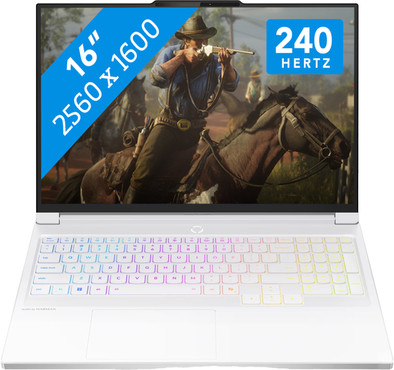
Lenovo Legion 7 OLED 16IAX10 83KY003FMB AZERTY
Never available again
View alternatives in the sidebar
View alternatives in the sidebar
If you purchase of a laptop or desktop, you receive 1 year of Norton 360 Deluxe for free. One day after purchase, you'll receive an email with a personal voucher code. Go to the promotional Terms and Conditions for more information.

Product number | 963837 | |
|---|---|---|
Manufacturer code | 83KY003FMB | |
Brand | Lenovo | |
Warranty | 2 years | |
Processing of your defect | Via Coolblue |
Screen size | 16 inches | |
|---|---|---|
Screen quality: laptops | High-end | |
Touchscreen | ||
Panel type | OLED | |
Sharpness | WQXGA | |
Resolution width | 2560 pixels | |
Resolution height | 1600 pixels | |
Refresh rate | 240 Hz | |
Screen reflection | Glossy | |
Color space | DCI-P3 | |
Adaptive Sync | ||
Type of adaptive sync | G-Sync | |
Brightness | 500 cd/m2 | |
Blue light filter | ||
HDR support | ||
Type of HDR | DisplayHDR 1000 |
Processor | Intel Core Ultra 9 | |
|---|---|---|
Processor number | 275HX | |
Processor generation | Series 2 | |
Processor code name | Arrow Lake | |
Processor cores | Tetracosa-Core (24) | |
Threads | 24 | |
Clock speed | 5,4 GHz | |
Turbo speed | 5,4 GHz | |
Cache memory | 36 MB | |
Speed class laptops | Best | |
Intel Evo laptop |
Neural Processing Unit (NPU) | Intel AI Boost | |
|---|---|---|
TOPs | 13 | |
Microsoft Copilot+ PC | No |
Internal RAM | 32 GB | |
|---|---|---|
Memory composition | 2x 16GB | |
Memory slot 1 | 16 GB | |
Memory slot 2 | 16 GB | |
Total number of RAM slots | 2 | |
Maximum internal memory | 32 GB | |
RAM type (DDR type) | DDR5 | |
Memory speed | 5600 MHz | |
Number of replaceable RAM slots | 0 | |
Number of free RAM slots | 0 | |
Total graphics power | 115 W | |
RAM expandable up to | 32 GB |
Total storage capacity | 1 TB | |
|---|---|---|
Storage type | SSD | |
SSD storage capacity | 1 TB | |
Hard drive type | NVMe |
Video card | NVIDIA GeForce RTX 5070 | |
|---|---|---|
Video card brand | NVIDIA | |
Type of video card | Dedicated | |
Video card RAM | 8 GB |
Operating system | Windows | |
|---|---|---|
Windows OS version | Windows 11 Home | |
Operating system language | Multiple languages can be configured |
Recommended for use | Gaming, Music production and DJing, Photo editing, Render 3D models, School, Software development, Video editing |
|---|
Build quality laptops | High-end | |
|---|---|---|
Laptop model | Laptop | |
Color | White | |
Material | Metal | |
Metal type | Aluminum | |
Material top of laptop | Metal | |
Material keyboard casing laptop | Metal | |
Material bottom of laptop | Metal | |
Height | 1,79 cm | |
Width | 36,17 cm | |
Depth | 26,34 cm | |
Weight | 2 kg |
Mobile data connection | No | |
|---|---|---|
WiFi standards | Wireless A (WiFi 2), Wireless AC (WiFi 5), Wireless AX (WiFi 6), Wireless AXE (WiFi 6E), Wireless B (WiFi 1), Wireless BE (WiFi 7), Wireless G (WiFi 3), Wireless N (WiFi 4) | |
Bluetooth | ||
Bluetooth version | 5.4 |
USB port | ||
|---|---|---|
Number of USB ports | 4 | |
Type of USB port | Standard USB-A, USB-C | |
Protocol Female USB-C port | DisplayPort Alternative Mode, Thunderbolt Alternative Mode, USB electricity | |
Video output via USB-C possible | Yes | |
Number of female standard USB-A ports | 2 | |
Female standard USB-A port version | 3.2 | |
HDMI connector | ||
Number of HDMI connectors | 1 | |
Female HDMI Type A port version | 2.1 | |
DisplayPort connector | ||
VGA connector | ||
Network connector | ||
Thunderbolt connector | ||
Headphone jack | ||
Memory card reader |
Keyboard layout | AZERTY | |
|---|---|---|
Physical keyboard layout | ANSI | |
Numeric keypad | ||
Spill-resistant | ||
Backlit keyboard | ||
Color keyboard lighting | RGB | |
Mechanical keyboard | ||
Programmable keys | ||
Copilot test |
Built-in microphone | ||
|---|---|---|
Number of speakers | 2 | |
Sound reproduction | Stereo | |
Integrated computer speakers brand | Harman Kardon |
Built-in camera | ||
|---|---|---|
Image definition webcams | 5MP (1920p) | |
Camera slider |
Battery capacity laptop | 84 Wh | |
|---|---|---|
Battery technology | Lithium-ion | |
Power connector input type (female) | Other brand/product specific | |
Laptop wattage | 245 W | |
Charger included | ||
Charging cable included | ||
Power charger | 245 W |
Manufacturer's warranty |
|---|
TPM (Trusted platform module) | ||
|---|---|---|
TPM type | Firmware TPM | |
Kensington lock | ||
Windows Hello | ||
Fingerprint identity sensor | ||
Infrared camera | ||
Security class laptops | Basic | |
Built-in privacy screen |
Extra installed software | ||
|---|---|---|
ISV certification |
Recommended for use
Gaming, Music production and DJing, Photo editing, Render 3D models, School, Software development, Video editingOur digital expert will help you, but it can sometimes make mistakes, like humans do.
According to our laptop expert
You can play demanding games in Full HD with the RTX 5070 video card, the Intel Core Ultra 9 processor, and 32GB RAM.
You can enjoy a sharp, smooth, and colorful image thanks to the WQXGA OLED display with 240Hz refresh rate.
You can set your favorite colors on the RGB backlit keyboard with 4 adjustable zones, so that you can continue gaming in the dark in style.
If you want to play demanding games in Quad HD, we recommend at least an RTX 5070 Ti video card.
Due to the 2kg weight, this laptop is less easy to take with you in your backpack or laptop bag.
Don't miss any details during fast games and adjust the 16-inch Lenovo Legion 7 OLED 16IAX10 83KY003FMB gaming laptop to your liking. You can smoothly play large and demanding games at 60 fps in Full HD resolution, even without DLSS. You can also stream your gameplay and edit large video files in demanding programs. The NVIDIA GeForce RTX 5070 video card, Intel Core Ultra 9 Series 2 processor, and 32GB DDR5 RAM are powerful enough for that. Store games and other files on the 1TB SSD. While you game, you can see fast enemies sharply and smooth movements thanks to the WQXGA resolution and 240Hz refresh rate. Colors look vibrant and realistic thanks to the OLED panel. Got to a dark scene in your game? You won't miss any details thanks to the DisplayHDR True Black 1000 color technology. You can continue gaming at night in style, as you can easily adjust the RGB backlit keyboard per key.
Note:
always connect the charger while gaming, or your performance won't be as good and the battery will run out in a few hours.Receive an email with a personal voucher code for 1 free year of Norton 360 Deluxe antivirus 24 hours after purchase, worth € 94.99.
Recommended for use
Gaming, Music production and DJing, Photo editing, Render 3D models, School, Software development, Video editing5 stars
0
4 stars
0
3 stars
0
2 stars
0
1 star
0
The Lenovo Legion 7 16IAX10 is a gaming laptop that lets me play all my games smoothly in Full HD and Quad HD. I play all my games without any stuttering at a minimum of 60 frames per second, with and without DLSS. The laptop also feels sturdy and light, and the RGB keyboard gives it a gaming look.
Powerful NVIDIA RTX 5070 graphics card I play all my games smoothly on this laptop thanks to the NVIDIA RTX 5070 graphics card. I try out various games, from Fortnite to Microsoft Flight Simulator. I play all my games without any problems between 80 and 120 frames per second. I also don't experience any stuttering in Quad HD. I enable DLSS in Microsoft Flight Simulator for a better gaming experience, but even without it, I play the game smoothly in Full HD. In Quad HD, I play all my games at a minimum of 60 frames per second. This way, I not only enjoy smooth gameplay but also all the details in the games.
Sharp OLED panel with a high refresh rate On the OLED panel, I see all colors clearly and vividly. The display has 100 percent coverage in the DCI-P3 color profile, so I can clearly see all color transitions, shadows, and contrasts on the screen. This is especially noticeable in highly detailed environments, such as dungeons or skylines. Moreover, I see all images appear quickly on the screen thanks to the 240Hz refresh rate. During my Call of Duty game, I didn't experience any stuttering. Even while running, the frame rate remained well above 140 frames per second. Everything felt lifelike.
Active cooling and metal casing The laptop stays cool, even when playing demanding games at the highest settings. This is thanks to the separate cooling chambers and smart fans. An AI chip in the laptop controls all the cooling components when they're actively working. This keeps the laptop well-cooled under this heavy load. The metal casing also helps with this, as this material dissipates heat better than plastic. Furthermore, the laptop feels sturdy and light.
Customizable RGB keyboard per key Using Lenovo Vantage, I can set different colors for all the keys. I also have six different settings, which I can quickly switch between using the Fn button and the spacebar. I can also configure different patterns in Vantage, so the keys light up differently. It gives the laptop a playful, gaming-like look.
Giorgos. Laptop specialist.
27 August 2025
Automatically translated from Nederlands