Welcome to your environment! You can order everything from your assortment with your personal budget here.

You can always return to the normal Coolblue website by clicking here.

Your outstanding budget (incl. VAT) is always visible here, so you know exactly how much you can spend.

Coolblue home

Help with your product

Logitech MK295 Wireless Keyboard and Mouse Black BE AZERTY 2-Pack

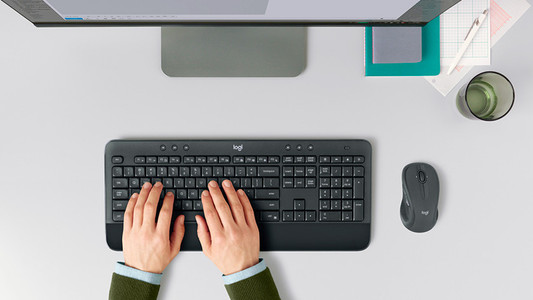
With the Logitech MK295 Wireless Keyboard and Mouse Black BE AZWERTY 2-Pack, you can easily complete 2 workplaces. In this set, you'll get a simple mouse and keyboard which you can use at any workplace. In addition, you don't need cables, because both the keyboard and mouse are wireless. The Silent Touch keys are made so they don't make much noise when you type. That's useful is you don't want to bother your colleagues with your ticking, or if you don't like the sound yourself. You'll also have all sorts of shortcuts within reach. With 1 press of a button, you can boot the calculator, control the volume of your music, or go to your printer options.

Read all tips here

How do I solve problems with my wireless keyboard and mouse?

Is the connection of your wireless keyboard or mouse poor? Or does your peripheral not have any connection at all? Then you can try out a couple of things. You can switch USB ports or put in new batteries, for example. In this article, you can read what you can do to solve problems with your wireless peripherals yourself.

How do I solve problems with my wireless keyboard and mouse?

Is the connection of your wireless keyboard or mouse poor? Or does your peripheral not have any connection at all? Then you can try out a couple of things. You can switch USB ports or put in new batteries, for example. In this article, you can read what you can do to solve problems with your wireless peripherals yourself.

How do I solve problems with my wireless keyboard and mouse?

Is the connection of your wireless keyboard or mouse poor? Or does your peripheral not have any connection at all? Then you can try out a couple of things. You can switch USB ports or put in new batteries, for example. In this article, you can read what you can do to solve problems with your wireless peripherals yourself.

How do I solve problems with my wireless keyboard and mouse?

Is the connection of your wireless keyboard or mouse poor? Or does your peripheral not have any connection at all? Then you can try out a couple of things. You can switch USB ports or put in new batteries, for example. In this article, you can read what you can do to solve problems with your wireless peripherals yourself.

How do I solve problems with my wireless keyboard and mouse?

Is the connection of your wireless keyboard or mouse poor? Or does your peripheral not have any connection at all? Then you can try out a couple of things. You can switch USB ports or put in new batteries, for example. In this article, you can read what you can do to solve problems with your wireless peripherals yourself.

How do I solve problems with my wireless keyboard and mouse?

Is the connection of your wireless keyboard or mouse poor? Or does your peripheral not have any connection at all? Then you can try out a couple of things. You can switch USB ports or put in new batteries, for example. In this article, you can read what you can do to solve problems with your wireless peripherals yourself.

Didn't find your answer?

Find an answer to your question quickly and easily via our customer service.

Coolblue specialist
Personal chat Digitalk.
You're now chatting with Coolblue customer service
This chat is closed
foo
Oeps File size is larger than 5MB. Upload a smaller file.