

Coolblue's Choice Network switches
5 network switches
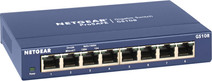

Our choice for a plug and play switch
|
8
Ethernet ports
|
No PoE
|
None managed switch
- You can connect 7 extra devices to your network. This switch is plug and play, so you can use it right away.
- You can mount this switch under a desk or to the wall, so it fits anywhere in a small room.
- We recommend the NETGEAR GS108 if you need Ethernet cables for the devices in 1 room.
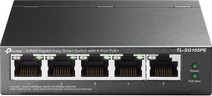
Our choice for a small switch you can install and manage yourself
|
5
Ethernet ports
|
PoE+
|
Managed switch
- With 5 network connectors, you can provide internet to extra fixed spots, such as your PC or console.
- Thanks to the 4 PoE ports, your cameras or access points receive internet and power via 1 cable.
- You can easily expand a small network without extra cables or sockets.
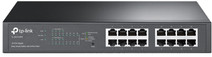
Our choice for a switch for your home office or small workplace
|
16
Ethernet ports
|
PoE+
|
Managed switch
- Thanks to the 16 ports, all your devices in your home office have a fixed network connection.
- Thanks to the PoE ports, access points, cameras, and IP phones receive power via the same cable that supplies internet.
- You can keep your home office tidy because you need fewer separate adapters and cables.

Our choice for a switch that allows you to connect extra devices
|
5
Ethernet ports
|
PoE+
|
None managed switch
- With 5 ports, you can quickly add extra connections for your PC, TV, and console.
- The PoE connectors supply power via the cable, so a camera or access point doesn't need a separate adapter.
- You can turn 1 network cable into a complete area with multiple devices and an access point.

Our choice for a switch when you work with multiple colleagues
|
24
Ethernet ports
|
PoE+
|
Managed switch
- With 24 ports, you can supply every colleague at the office with a fixed network connection.
- PoE supplies power to phones, cameras, and UniFi access points, so you use fewer separate adapters.
- You only use 1 central switch for the entire office.
