Written by Lucinda
Edited on
12 November 2024
·
15:00
How do you choose the color of your Apple iPhone?
After days of weighing the pros and cons, you finally know which Apple iPhone you want to buy. But now there's a new dilemma: which color do you want? In this article, you can read a number of things that will help you choose the right color iPhone.

Choose iPhone color
Choosing the right color for your iPhone can be difficult. With these tips, choosing the right color will be easier.
- Which colors can you choose per iPhone generation?
- What shade of black or gray do you want?
- What color are the bezels?
- How easy is it to resell that color?
- Do you want a case to change the look?
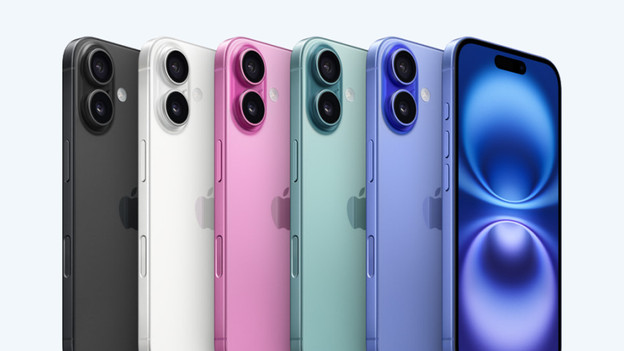
All Apple iPhone colors
The Apple iPhone is available in different colors. You can often choose from 4, 5, or 6 colors. Not every model has that many choices. You can find a list of the Apple iPhone models and their colors below.
- Apple iPhone Xr | White/Black/Blue/Yellow/Coral/Red
- Apple iPhone Xs (Max) | Space Gray/Silver/Gold
- Apple iPhone 11 | White/Black/Red/Yellow/Green/Purple
- Apple iPhone 11 Pro (Max) | Gold/Space Gray/Midnight Green/Silver
- Apple iPhone SE 2020 | White/Black/Red
- Apple iPhone SE 2022 | White/Black/Red
- Apple iPhone 12 (Mini) | White/Black/Blue/Green/Red
- Apple iPhone 12 Pro (Max) | Gold/Graphite/Silver/Surf Blue
- Apple iPhone 13 (Mini) | White/Black/Blue/Pink/Red/Green
- Apple iPhone 13 Pro (Max) | Gold/Graphite/Silver/Blue/Green
- Apple iPhone 14 (Plus) | Midnight/White/Purple/Red/Blue/Yellow
- Apple iPhone 14 Pro (Max) | Space Black/White/Gold/Purple
- Apple iPhone 15 (Plus) | Black/Blue/Green/Yellow/Pink
- Apple iPhone 15 Pro (Max) | Black Titanium/White Titanium/Blue Titaniu/Natural Titanium
- Apple iPhone 16 (Plus) | Black/White/Blue/Pink/Green
- Apple iPhone 16 Pro (Max) | Black/White/Gray/Cream

Different shades of black and gray
Space Gray was always a popular color. This color is no longer available since the iPhone 12. Apple did release other colors that are similar, such as Graphite and Space Black. Since the iPhone 13, there's also the Midnight color. This is more of a very dark blue color that's almost black. With the Apple iPhone 15 Pro (Max), Black Titanium comes close to to Space Gray.

Thicker bezels
Only the iPhone SE 2022 model still has wide bezels. These bezels are always black, even if the back of the device has a different color. You can choose from 3 different colors: red, white, and black.
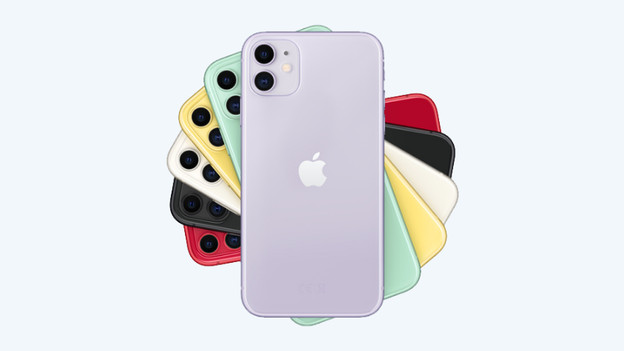
Dark iPhone models are easier to resell
The most popular colors are Midnight, Space Gray, Space Black, and black. Do you want to resell your iPhone? A black iPhone is easier to resell than a yellow or green device. That's why it's smart to decide beforehand if you want to resell the device later on.
If you choose to trade in your iPhone at Coolblue, this won't be a problem. You get the same trade-in value for a black iPhone as for a bright yellow one.
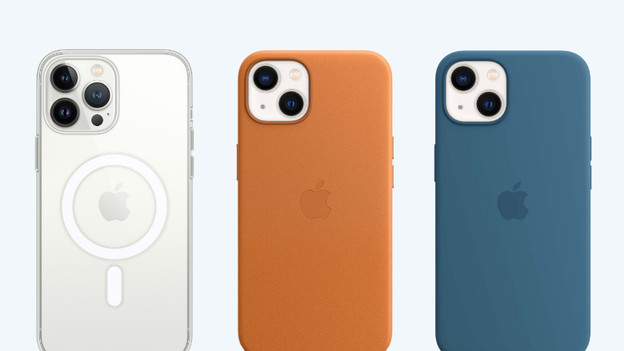
Change the look of your iPhone
Even though you were completely convinced of the color of your iPhone when you bought it, it's possible that you get tired of the color after a while. Purchasing a new device in a different color is an unnecessarily expensive solution. That's why you can easily and relatively affordably brighten up your Apple iPhone with a phone case. In addition to it making your phone look nice, it also protects your device from scratches and dirt.
Article by Lucinda
Apple Expert.