Written by Laszlo
Edited on
23 August 2022
·
12:48
How do you sign up for a 3-year warranty on your Epson printer?
Some Epson EcoTank printers have a 3-year warranty after you register them. So instead of the standard 2-year warranty, you get 1 extra year of warranty. We'll show you in 3 steps how to register the printer. Note: register for this warranty within 30 days after your purchase, or the promotion won't be valid anymore.
Register warranty
Register for the warranty within 30 days after your purchase. The can register for the warranty of the Epson printer via the Epson website. You have to enter the information in 3 windows to get the extra year of warranty. You'll go through these steps:
- Enter your personal information.
- Choose the right product and enter the purchase information.
- Submit the request.
Step 1: go to the promotion page
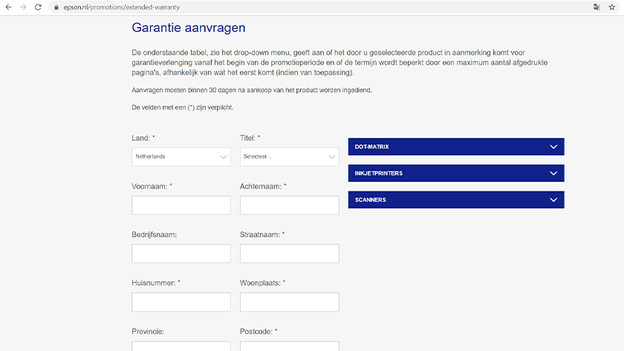
On the Epson promotion page, you can claim the 3-year warranty. It'll take you to the registration page where you have to enter your personal information, such as your name, address, and email address. Do you live in Belgium? Change the country in this window. After filling it out, check the first 2 boxes. If you want to receive more information, check the 3rd box as well. Then, click 'Add product' and go to the second window.
Step 2: add product
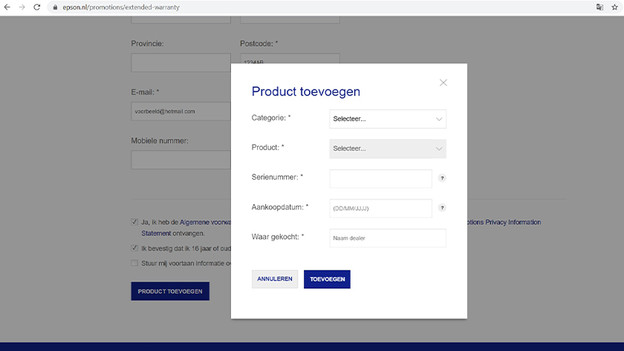
In this window, you can register the printer. Fill out the following fields:
- Under 'Category', choose 'Inkjet printers'.
- Under 'Product', select your specific printer.
- Under 'Serial number', enter the number under the barcode of the sticker.
- Under 'Purchase data', enter the date you've purchased the product on.
- Under 'Purchase location', enter 'Coolblue'.
This window is now complete. Click 'Add' and continue.
Step 3: submit request
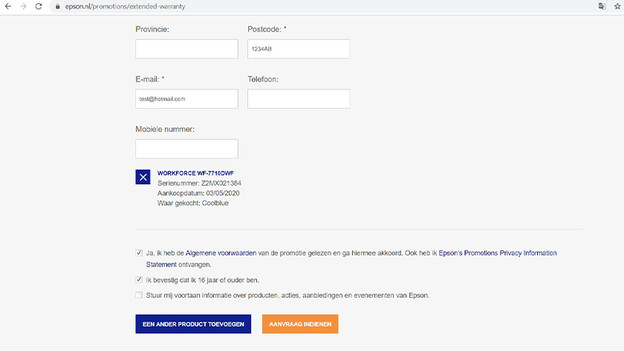
At the last step, you don't have to provide more information. Under the field 'Mobile number', you'll see a short overview of the printer you're requesting the warranty for. Confirm this is right, just to be sure. Then, there's only 1 thing left to do. Click 'Submit request'. After this step, check the email address you entered to see if you've received a confirmation from Epson. Do you have it? That means that your Epson printer now has the 3-year warranty.
Article by Laszlo
Printer Expert.