Docks for a Windows laptop and 2 monitors
Want to connect 2 monitors to your Windows laptop? Choose a docking station that can expand your Windows laptop with 2 screens. This way, you can always work efficiently in multiple windows at the same time. In addition to monitors, you can also connect other peripherals. There are docking stations with extra USB ports, a connector for an internet cable or headphones, or a memory card reader. With a docking station with Power Delivery, you also charge your Windows laptop while working. This means you never have to worry about an empty battery. Keep the extra connectors in mind when choosing a dock, so you choose the best docking station for your Windows laptop.


Our choice for a docking station for 1 extra monitor with your laptop|None power source|Space Gray|Memory card reader
- You can connect an extra 4K monitor to your laptop for more screen space with this docking station.
- You can charge your laptop with this dock via the USB-C port.
- Connect accessories such as a mouse, keyboard, or hard drive to this docking station.
102,-
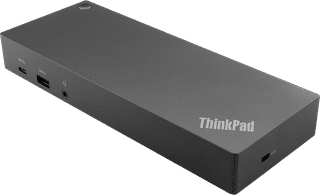

Our choice for a docking station for up to 2 extra monitors with your MacBook|Power source|Standard USB-A, USB-C|USB-A, USB-C
- You can connect 2 extra 4K monitors to your MacBook with this dock, so you can have more screen space.
- You can charge your MacBook with this dock via the USB-C port.
- Work with accessories like a keyboard and an ergonomic mouse that you can connect via the USB-A ports.
183,-

Our choice for a docking station for up to 2 extra monitors with your laptop|Power source|Space Gray|Memory card reader
- With this dock, you can connect 2 extra 4K monitors to your laptop via DisplayPort HDMI.
- You can charge your laptop with this dock if your laptop supports Power Delivery.
- Work with accessories like a keyboard and an ergonomic mouse that you can connect via the USB-A ports.
169,-