Dell Ultrasharp U2715H
Never available again
View alternatives in the sidebar
View alternatives in the sidebar
Product number | 551794 | |
|---|---|---|
Manufacturer code | 210-ADSO | |
Brand | Dell | |
Warranty | 3 years | |
Processing of your defect | Carry-in warranty |
Screen size | 27 inches | |
|---|---|---|
Recommended display resolution | 2560x1440 | |
Sharpness | Quad HD (1440p) | |
Aspect ratio | Standard (16:9) | |
Refresh rate | 60 Hz | |
Response time | 8 ms | |
Panel type | IPS panel | |
Brightness | 350 cd/m2 | |
Local dimming | ||
HDR support | ||
Contrast ratio | 1000 | |
Touchscreen | ||
Screen reflection | Anti-glare | |
Blue light filter | ||
Flicker-free technology | ||
Color space | sRGB | |
sRGB color coverage percentage | 99 % | |
Color depth | 17 million colors (8-bit) | |
Adaptive Sync | ||
Resolution width | 2560 pixels | |
Resolution height | 1440 pixels | |
Anti-reflection type | Anti glare | |
Horizontal viewing angle | 178 ° |
Height | 52,49 cm | |
|---|---|---|
Width | 61,27 cm | |
Depth | 20,5 cm | |
Weight | 4,91 kg | |
Color | Black, Silver | |
Including stand | ||
Material | Plastic | |
Cable management | ||
Curved |
Number of HDMI connectors | 2 | |
|---|---|---|
Number of Female HDMI type A 1.4 ports | 2 | |
Protocol mini DisplayPort port | DisplayPort | |
Number of female mini DisplayPort 1.2 ports | 1 | |
Number of Female Standard DisplayPort 1.2 ports | 2 | |
Number of female standard USB-A ports | 4 | |
Female standard USB-A port version | 3.0 | |
Number of female standard USB-B (3.0 form) ports | 1 | |
Number of female 3.5mm TS Audio Jack ports | 1 | |
Number of USB ports | 5 |
Adjustable in height | ||
|---|---|---|
Tiltable | ||
Pivotable stand | ||
Pivot function | ||
VESA mount option | ||
VESA mount | 100x100mm |
Energy consumption standby | 0,5 W | |
|---|---|---|
Energy consumption active | 36 W |
Built-in speakers | ||
|---|---|---|
Split screen | ||
Kensington lock | ||
Best tested |
Image quality according to customers | Very good | |
|---|---|---|
Design according to customers | Nice |
anything for a smile
Sharpness | Quad HD (1440p) | |
|---|---|---|
Curved | ||
Aspect ratio | Standard (16:9) | |
Refresh rate | 60 Hz | |
Response time | 8 ms | |
Panel type | IPS panel | |
Color depth | 17 million colors (8-bit) | |
Built-in speakers |
According to our monitor expert
The IPS panel displays true-to-life colors from all angles.
Thanks to 99% coverage of the sRGB color space, colors are displayed realistically, which lets you edit your photos and videos with more precision.
The 2560x1440 resolution means this monitor produces sharper and more detailed images than other, comparable models.
An HDMI cable isn't included with this monitor.
This monitor doesn't have integrated speakers to play music.
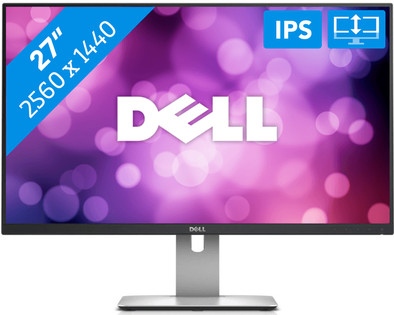
The Dell U2715H is a 27-inch WQHD IPS monitor. The IPS technology allows you to enjoy true-to-life color representation and means that on-screen images are razor-sharp from every angle. Thanks to the 99% coverage of the sRGB color space, this monitor is suitable for photo and video editing. Plus, the 2560x1440 resolution makes this screen much sharper than a Full HD monitor. Because the monitor is height-adjustable, pivotable, tiltable, and rotates 90 degrees, you can always work in the most optimal position. This monitor can be connected via HDMI or DisplayPort. In addition, the Dell U2715H is equipped with an MHL port. Connect your Android phone to the monitor and you can check out apps, games, photos, and movies. The Dell U2715H also has an integrated USB hub, so you can easily connect peripherals.
5 stars
87
4 stars
53
3 stars
0
2 stars
0
1 star
0
I use this monitor professionally. Image/video editing and 3D work. always worked on 24" Dell and HP but wanted a step bigger. First went for a Philips 288P6LJEB (4K) but it was very blurry/blurry and noticed that 4K resolution is not workable at all. Too small letters. Maybe perfect as a TV but certainly not as monitor Returned and of course super service from Coolblue, money back immediately.
Wouter
23 April 2015
Automatically translated from Nederlands
A Dell monitor for my Macbook Pro for GRAPHICS and PHOTO editing.
In addition to a top resolution, the second criterion was well adjustable in height. It has not (yet) become 4K, because then the Mac only works at 30 Hz. This Dell monitor runs at 60 (59.88) HERTZ by default.
Adjusting the HEIGHT is very smooth, don't look for the unlock button (like I did), grab the top and bottom of the screen and gently move it up or down, same for TILT. Rotate, this screen can rotate 90 degrees, I haven't tried it yet (can be set on Mac). I don't feel so invited to do this with all those cables in the back.
The 4 USB ports are great for connecting a printer and USB hub, because on the Mac there are only 2 ports, 1 of which is already occupied with a keyboard.
After unpacking the separate monitor and base, they are attached in 10 seconds. The FOOT is very solid, which I also find a bit of a disadvantage because all CONNECTIONS are placed at the back, and the monitor has to be turned slightly to reach it. An opening on the cables can be neatly concealed in the stand of the foot.
A neat COVER is included to cover the connections on the back, but these connections are already so awkwardly placed, I don't do myself any favors to hide them even more inaccessible.
The monitor from Dell and the Macbook can be set to MIRROR ON (both screens show the same) or mirror off, then you have two different screens next to it, for extra cursor kilometers. Bought an extra keyboard, because the Macbook pro can be closed in mirror on.
During display setup on the Mac, a new Dell settings window appears that sometimes disappears exactly behind the original settings window.
SOUND of the Mac is turned off after connecting the monitor, so turn it back on yourself in Mac settings.
What a space and what a luxury after that suddenly very small 13” Macbook Pro window. I can put not two but three windows side by side! RESOLUTION (scaled) Dell is i.c.w. Macbook Pro 2560x1440 pixels, 2048x1152, 1600x900 or 720p, while Macbook Pro itself reaches a maximum of 1680x1050.
Benefit: Multiple cables included, also standard for the Mac Nice matte screen Four USB ports Color intensity similar to Retina on Macbook Foot stands very firmly on a kind of anti-slip Settings on the monitor are intuitive to use Coolbluer really thinks along to solve USB problem There is a step-by-step plan on the box to unpack Exactly what I needed!
Disadvantage: Foot does not slide Rear connections Manual on CD It was not immediately clear to me which connection cable is needed for the Macbook Pro Do I suddenly have to buy a cinema chair to watch a movie at the desk! Why didn't I buy such a beautiful large screen before!
AD
6 April 2017
Automatically translated from Nederlands
It is an excellent monitor with a nice sharp image Everything is easy to set up
H.P. L.
28 August 2015
Automatically translated from Nederlands
