Never available again
View alternatives in the sidebar
According to our monitor expert
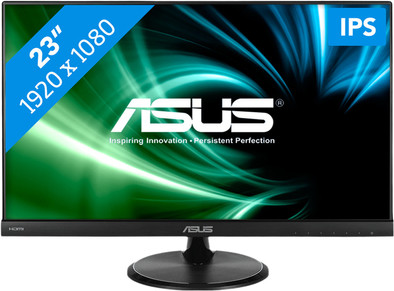
The Asus VC239H is a monitor for everyday use. Watch a movie on the Full HD screen or edit the photos of your last vacation in detail. Feel more like gaming? Thanks to the GamePlus button you can fix a crosshair to the screen to make killstreaks even easier. The bezel is only 0.9 millimeters thick, which means it's less distracting and gives the monitor a compact and stylish design. The screen's flicker-free technology protects you from eye strain when you're working at your monitor for a long time.
Warning! This screen has an integrated screen foil. This foil protects the monitor and should not be removed.
Sharpness | Full HD (1080p) | |
|---|---|---|
Curved | ||
Aspect ratio | Standard (16:9) | |
Refresh rate | 60 Hz | |
Response time | 5 ms | |
Panel type | IPS panel | |
Color depth | Less than 17 million colors (less than 8-bit) | |
Built-in speakers |
5 stars
143
4 stars
139
3 stars
13
2 stars
0
1 star
0
Don't feel like reading the entire review: Best price-quality monitor at the moment. Read on for an in-depth review.
I've worked a lot with second monitors on my desk and had mixed experiences. A poor viewing angle, eye pain after long use and reflection in the screen are among the biggest irritations. With the purchase of the ASUS VC239H, those are a thing of the past.
Price: For starters, the monitor is competitively priced compared to other brands with IPS display. Often they only start from 200 euros.
Viewing angle: IPS is a technology in which all colors are displayed well from every viewing angle. Perfect if you want to let several people watch the screen or if you use multiple screens while gaming.
Matte screen: No reflection of the light from outside during the day and no reflection of interior lighting in the screen at night.
Ghosting: For the gamers among us, the screen has a response time of 5 ms. so it's perfect for gaming and watching HD movies.
Blue light filter: For people who work/game at night, there is an option available to filter blue light. The blue light inhibits the production of sleep hormones, so you don't rest as well at night.
Finally, I can recommend everyone to lower the brightness of the screen. The factory default settings are set in such a way that the screen is an eye-catcher in the showroom, but with a brightness of between 75 I find it a lot more pleasant to work. It is often suggested that you should not set your screen brighter than objects in your immediate vicinity.
Personal settings: Brightness: 75 Contrast: 80 Colors: Red 100, Green 100, Blue 100
Jan Stoop
6 October 2015
Automatically translated from Dutch
It had been a long time since a monitor was purchased, so now it was time for a new one. So the choice fell on the ASUS VC239H, which had no review yet but stood out because of its sleek appearance, the IPS screen and a good price.
I've been using the monitor for 3 weeks now and it definitely meets my expectations. The image is sharp, displays the colors very nicely and is actually easy to read from all angles. The option to reduce the blue light without needing an extra program is also a nice addition and gives the eyes a little more rest.
Although the description states that the 5 ms response time can cause ghosting, I have not been able to observe this in gaming (fps, action-adventure) myself, but this can be observed to a very small extent in a "ghosting benchmark". ”. In practice you will therefore hardly notice this. I also compared the input lag with my old TN panel and even though it has a 2ms response time, the image was exactly the same on both screens.
There are also built-in speakers that I briefly tested for this review, because who doesn't have a nice sound set for a decent sound? The built-in speakers are fine for some basic sound, but don't expect a warm sound when playing music. It is rather close to what a laptop produces in terms of sound.
Two small negatives in conclusion:
The menu buttons on the screen are located at the bottom right, when you want to press them, press the screen slightly up. This is because the screen is very lightweight.
It is also a pity that the monitor is not adjustable in height, but I knew this beforehand and this is less annoying with an IPS screen than with a TN panel. The monitor does have the option of wall mounting or mounting an adjustable monitor base.
Wouter
23 August 2015
Automatically translated from Dutch
Despite it being a 23" screen, the thin bezel around the screen makes it seem smaller than it is. You don't have such a big beast in front of you. The appearance is eg good and with the brushed plastic it certainly does not look cheap. My expectations of the built-in speakers were not high and rightly so. These are indeed not good. But on the other hand, if you want good sound, buy speakers and not a monitor ;-)
There is also an error in the specification here in the webstore, because it states that it would have a headphone output. So there isn't. There is only audio input.
Jeroen
19 August 2015
Automatically translated from Dutch
Product number | 633379 | |
|---|---|---|
Manufacturer code | 90LM01E2-B02470 | |
Brand | ASUS | |
Warranty | 2 years | |
Processing of your defect | Carry-in warranty |
Recommended display resolution | 1920x1080 | |
|---|---|---|
Sharpness | Full HD (1080p) | |
Aspect ratio | Standard (16:9) | |
Refresh rate | 60 Hz | |
Response time | 5 ms | |
Panel type | IPS panel | |
Local dimming | ||
HDR support | ||
Contrast ratio | 1000 | |
Touchscreen | ||
Screen reflection | Anti-glare | |
Blue light filter | ||
Flicker-free technology | ||
Color space | sRGB | |
Color depth | Less than 17 million colors (less than 8-bit) | |
G-sync | ||
G-sync Ultimate | ||
Adaptive Sync | ||
Resolution width | 1920 pixels | |
Resolution height | 1080 pixels | |
Anti-reflection type | Anti glare | |
Horizontal viewing angle | 178 ° | |
Vertical viewing angle | 178 ° |
Height | 37,32 cm | |
|---|---|---|
Width | 53,32 cm | |
Depth | 19,96 cm | |
Weight | 5,2 kg | |
Color | Black | |
Including stand | ||
Material | Plastic | |
Cable management | ||
Appearance | Neutral | |
Curved |
Number of HDMI connectors | 1 | |
|---|---|---|
Number of Female HDMI type A 1.4 ports | 1 | |
Number of headphone jacks | 1 | |
Type of headphone connection | 3.5mm (TRRS) | |
Number of female standard VGA ports | 1 | |
Number of female 3.5mm TS Audio Jack ports | 1 | |
Number of female 3.5mm TRRS Audio Jack ports | 1 | |
Number of Female DVI-D Dual Link ports | 1 |
Adjustable in height | ||
|---|---|---|
Tiltable | ||
Pivotable stand | ||
Pivot function | ||
VESA mount option | ||
VESA mount | 100x100mm |
Energy consumption standby | 0,5 W | |
|---|---|---|
Energy consumption active | 22 W |
Built-in speakers | ||
|---|---|---|
Sound system | Stereo | |
Split screen | ||
Kensington lock | ||
Best tested |
Image quality according to customers | Good | |
|---|---|---|
Design according to customers | Neutral | |
Recommended for use | Basic use |