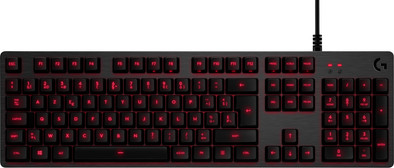
Logitech G413 Mechanical Gaming Keyboard Black AZERTY

Never available again
View alternatives in the sidebar
View alternatives in the sidebar
Product number | 775998 | |
|---|---|---|
Manufacturer code | 920-008518 | |
Brand | Logitech G | |
Warranty | 2 years | |
Processing of your defect | Carry-in warranty |
Keyboard layout | AZERTY | |
|---|---|---|
Geographic keyboard layout | BE layout | |
Physical keyboard layout | ISO | |
Typing comfort | Mid-range | |
Backlit keyboard | ||
Spill-resistant | ||
Color lighting | Red | |
Number of colors lighting | 1 | |
Brightness of backlight adjustable | ||
Programmable keys | ||
Multimedia shortcuts | ||
Flat keys | ||
Suitable for gaming | ||
Recommended for game genre | First Person Shooter, MOBA, RPG | |
Mechanical keyboard | ||
Mechanical key type | Romer-G | |
Type of keycaps | High |
Connection type | Wired | |
|---|---|---|
Type of USB port | Standard USB-A | |
Cable length | 1,8 m |
Keyboard size | 100% (Complete) | |
|---|---|---|
Keyboard composition | Keyboard, Numpad | |
Ergonomic design | ||
Height | 3,4 cm | |
Width | 44,5 cm | |
Depth | 13,2 cm | |
Wrist rest | ||
Color | Black | |
Weight | 1,1 kg |
Power supply type | USB port PC/laptop |
|---|
Connection type | Wired | |
|---|---|---|
Backlit keyboard | ||
Keyboard composition | Keyboard, Numpad | |
Ergonomic design | ||
Mechanical keyboard | ||
Physical keyboard layout | ISO | |
Geographic keyboard layout | BE layout | |
Suitable for gaming |
According to our keyboard expert
With the sensitive Romer-G switches, you don't have to press the keys down all the way before keystrokes are registered.
The red backlight is adjustable. You can for instance adjust the brightness to your preference.
The cover is made from brushed aluminum, making the keyboard sturdy and giving it a high-end look.
The lighted keys only light up red.
You operate the volume with an Fn key, instead of a volume wheel.
The Logitech G413 Mechanical Gaming Keyboard with aluminum finish is aimed at gamers who want quality. The aluminum cover is made from brushed aluminum and won't get damaged easily. It'll also match your high-tech battle station. The silent but responsive Romer G switches ensure good reaction speeds in stressful multiplayer situations. You don't have to rummage under your desk to switch mice, because you can easily connect it to your PC using the G413's USB passthrough port. The design is minimalist; you control your victory music and keyboard lighting via the secondary Fn keys. Think regular keys are boring? Use the included keycaps to let you find your WSAD without even looking.
5 stars
24
4 stars
7
3 stars
0
2 stars
0
1 star
0
Installation ease
Ergonomics
User friendliness
Why did I choose this keyboard? It was new, mechanical and has red LEDs. The looks of this keyboard as well as the build quality and the price appealed to me. It was about time I entered the world of mechanical keyboards and I made a good choice to do so with this keyboard. Priced around $100, this seemed like an ideal keyboard to get into the mechanical world (I first had the Logitech k120, a standard $20 keyboard, so the difference was huge). The keys are very responsive, their short working distance of 1.5 mm makes it very convenient to type. I myself use it for writing long pieces as well as for gaming and it works very well for both. The Romer-G switches (which are also used on more expensive keyboards) are roughly comparable to MX Brown, but give just a little more feedback without the extra noise. Also, the strokes are heavy enough to get good feedback, but light enough not to be tiring (in other words, after long typing sessions, your fingers won't be tired). The default color on this keyboard is red (unless you choose the silver version with white LEDs). With this keyboard model you do not have RGB LEDs. But because of the backlit, the red standard color fits very nicely with the aluminum backplate design. The LEDs also give very bright light, I have set the position to medium because it was so bright at night. You can adjust the brightness as well as the breathing mode effect in Logitech's own software. When opening the software you will see a physical overview of your keyboard in front of you along with a function key 'inversion' button, this ensures that your media buttons (such as pause, stop, next, sound ...) are placed primary instead of secondary . This means that you will not have to click FN before you can use these keys. The macros can be easily assigned (from F1-F12), and Logitech has also left some pre-programmed commands that you can use per key. But you can also adjust tests yourself as well as the assignment of the test. The lighting is limited. Either it is all on/off or the 'breathing' effect with the self-selected speed. The backlighting of the keys is ideal. Only the keys with several letters/numbers on them will not be fully illuminated, but it is clear enough. The keyboard is not light though… Since it is a full-size mechanical keyboard, and together with the metal frame, it is quite heavy (1499 g). The keyboard has rubber feet at the bottom so that it stays firmly in place even during a heavy gaming session. In addition, this keyboard also has a USB 2.0 pass through port on the back of the keyboard (just behind the numpad and Logitech G logo). The location is not ideal in my opinion, because it brings the cable of your mouse together with that of the keyboard, as well as the cable of the connected device in the USB port. As a result, your desk no longer seems so orderly. Included with the keyboard is a non-removable 1.8m braided cable. Also on the keyboard are 12 programmable macro keys (namely the function keys). It can assign and execute your actions via the FN key combination. Some contra key caps are also included with the keyboard, as well as a 'key' to remove it. These are for more grip or for better separation with the other keys. Personally, I don't find this very special nor effective. I personally like it better with the original key caps than with the extra key caps. To start with key caps... I notice that these fly off very quickly. While gaming I had to reposition my key caps several times because they came off so quickly (this was during a heavy gaming session). Especially the left keys (on the WASD side) fly off immediately. My tab flies off daily as well as my caps key.
Lode Debrun
31 May 2017
Automatically translated from Nederlands
It took some getting used to with such a high touch as this is my first mechanical keyboard, but in the end it's not too bad.
Fabio Candel
15 September 2019
Automatically translated from Nederlands
simple but good for gaming
Roy Demeyere
23 February 2020
Automatically translated from Nederlands