Samsung LC24FG73FQUXEN
Never available again
View alternatives in the sidebar
View alternatives in the sidebar
Sharpness | Full HD (1080p) | |
|---|---|---|
Curved | ||
Aspect ratio | Standard (16:9) | |
Refresh rate | 144 Hz | |
Response time | 1 ms | |
Panel type | VA panel | |
Color depth | 17 million colors (8-bit) | |
Built-in speakers |
According to our monitor expert
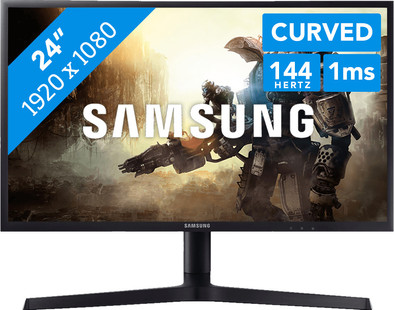
The Samsung LC24FG73FQUXEN is a 24-inch curved QLED monitor that lets you experience your favorite games more intensely than on a flat screen. The screen bends around you, as it were, making the screen look bigger and letting you perceive colors better. The 144Hz refresh rate ensures that images move smoothly, even at high fps in high-speed games such as Overwatch and shooters such as Battlefield 1. In addition, the monitor's FreeSync technology synchronizes the refresh rate with that of your AMD video card, so you won't experience any tearing or stuttering. Thanks to the QLED panel, the monitor can display even more colors than a conventional monitor. This results in 125% coverage of the sRGB color gamut, giving it a lifelike color representation, which is great when you edit photos and videos.
5 stars
53
4 stars
23
3 stars
1
2 stars
0
1 star
0
Installation ease
User friendliness
Image quality
Price-quality ratio
Design
Yes, the Samsung LC24FG73. The successor to the C24FG70. Before this monitor I had a BenQ 120hz gaming monitor. A few weeks ago I wanted a new monitor and so I bought the C24FG70. This monitor received an ultimate award from hardware.info. The screen of the C24FG73 is the same. Samsung has updated the firmware to fix the issues with the previous panel. The FG70 had a lot of problems with the panel. I've had 3 different monitors, all with their own issues. Bought the LC24FG73 now. This one is perfect so far.
The Samsung LC24FG73 is intended as the ultimate compromise between the speed of a TN monitor and the color reproduction of an IPS. Samsung uses a VA panel for this with so-called quantum dot technology. Due to the VA technology, these screens are normally quite slow. However, Samsung has managed to produce a screen with a 144Hz refresh rate and a 1ms input time.
In the box we find a number of objects. Of course there is the monitor itself with the arm attached to it. The stand is also included separately from the monitor. Unlike the older brother of this monitor, this monitor has a smaller base. The monitor can rotate slightly less on its axis than the predecessor. In contrast, the base is much smaller, which is very nice on smaller desks. In addition to the monitor, a DisplayPort cable, HDMI cable, VESA mount, the necessary booklets, warranty cards, power cable and a color calibration report are included. Everything to connect your monitor directly.
After connecting the monitor, it will not start up automatically with the computer. I still have to press a separate button on the monitor to get it on. Not very annoying, but actually I expect more from a monitor of 360€. Samsung's menu is very clear. All settings are easy to find. The menu is easy to operate using the joystick on the back of the monitor. Settings can be saved in three profiles, with the help of buttons on the monitor you can quickly switch between profiles. The brightness of the monitor cannot be adjusted to faster and fastest response time, this is a minus. We recommend that you adjust the color/black equalizer settings to your own taste. I use the following settings:
Picture Mode: Custom Refresh Rate: 144hz Black EQ: 20 Response Time: Fastest FreeSync: Off (on Nvidia) Low Input Lag: On Screen Size: Wide Contrast: 95 Sharpness: 56 Color: Red - 52, Green - 50, Blue 48, Gamma - Mode3
Optionally you can go to this site and calibrate the monitor yourself: http://www.lagom.nl/lcd-test/
The monitor is perfect for gaming. The 144hz refresh rate and the low input lag ensure a smooth experience. Even if the system doesn't reach 144 fps, the gaming feels noticeably smoother. In combination with the phenomenal colors of the monitor, this results in a very pleasant gaming experience. Games like dark souls 3 are a feast for the eyes, but the monitor can also easily handle fast shooters such as CSGO. Something for everyone.
In addition to gaming, I also use the monitor for watching series and movies. During the new episodes of Game of Thrones, the colors splash off the screen. Where the colors on a TN look dull, that is absolutely not the case with this monitor. Black is really pitch black and white is almost completely white. If I'm honest, I think the colors of a perfectly calibrated IPS screen are just a bit nicer. However, these cannot be found in this price range, certainly not with the refresh rate and input times of this Samsung.
All in all, this monitor is the total picture I've been looking for for so long. Great colors and good contrast in combination with a fast refresh rate and low input times. If you can find a good version of this panel, there is currently no better one in this price range. However, it remains that there have been many problems with this panel in the past. If all goes well, all new versions have the most modern software and the problems should therefore be solved.
Dennis Tjeerdsma
27 July 2017
Automatically translated from Dutch
First I want to say something about the packaging. The monitor was delivered in a much too large box from Coolblue, without the empty space being filled with plastic air cushions. This could have been better.
About the monitor itself: I came from a 10 year old TN monitor and it really makes a world of difference. You notice the difference between 60 and 144hz in particular, not just ingame. The high contrast and striking colors ensure that everything looks sharp and '3D'. The good black values also help with that, although I think it's a shame that there is some blacklight bleed in a few places, especially at the bottom left in my case. I understood that this is (unfortunately) normal with these monitors, although it doesn't bother me that much. In addition, I only have the brightness set to 30%, which is high for me since I use it a lot, and then you notice the backlight bleed less, at most in dark rooms.
As mentioned, the colors are fine and very striking, partly due to the Quantum Dot technique, but I have set the red tint back a bit because white pages or scenes had a pink tint. Fortunately, this is easy and fast in the menu.
Then I want to say something about the Backlight Strobing function, in the 'Fastest' response time mode. I think this does add something, because you notice the difference in-game in the sense that everything stays sharper with fast movements. I just think it's a shame that the brightness takes on a fixed value, which you can't change. In my case, I find the brightness too high, so I don't always use this function. Fortunately, there are games where you can adjust the brightness separately in-game.
I got used to the curve quickly and it is not at all disturbing. In-game I notice that you are slightly better in it compared to a flat screen. I had read that there are people who have problems with blurry text on this monitor, but I don't notice that at all, although that may also be due to my Windows settings. I also don't have any purple movement effects of dark parts on the screen, which the previous model had problems with, so this seems to be solved.
I absolutely recommend this monitor for (fast) games, where you want to preserve beautiful colors. Fortunately, you can easily make adjustments in the menu if you do not like something. Furthermore, the monitor itself is very easy to adjust with many swivel and tilt options. The foot is a bit on the large side and I think that the ends at the front could have easily gone 5 cm without the monitor becoming less stable. So all in all very satisfied!
Ralph
12 February 2018
Automatically translated from Dutch
Very satisfied with this monitor. The screen really stands out next to an average tn panel. The price is also worth it, but the VA panel is really worth it in my opinion.
Gaming in 144hz is just wonderful and that with these colors. It's just a shame it's 1920 x 1080, but for a 24-inch screen that's enough.
I also find the design nice and simple and sleek, I like that. Personal taste of course, but I don't need all the gaming rgb nonsense.
Fortunately, I am not bothered by all the quality control issues that you see about this panel.
Luuk Horsmans
4 September 2017
Automatically translated from Dutch
Receive more coverage in case of damage than with your standard warranty. Coolblue takes care of everything: from taking out the insurance to repairs. Is a repair not possible? You receive the purchase price as CoolblueCredit.
XCover is allowed to arrange and process insurances on behalf of the insurer. The insurances are governed by Belgium law. If you have a complaint, you can contact the or our customer service.
First, add your monitor to your shopping cart. On the next page, choose the Protection Plan below. You always have a 30-day return window and pay no deductible in case of damage.
The insurance can be canceled every year, even if you have paid in advance. If you cancel earlier, you will receive a refund for the overpaid amount.
Product number | 779807 | |
|---|---|---|
Manufacturer code | LC24FG73FQUXEN | |
Brand | Samsung | |
Warranty | 2 years | |
Processing of your defect | Carry-in warranty |
Recommended display resolution | 1920x1080 | |
|---|---|---|
Sharpness | Full HD (1080p) | |
Brand-specific image technology | Samsung QLED | |
Aspect ratio | Standard (16:9) | |
Refresh rate | 144 Hz | |
Response time | 1 ms | |
Panel type | VA panel | |
Brightness | 350 cd/m2 | |
Local dimming | ||
HDR support | ||
Contrast ratio | 3000 | |
Touchscreen | ||
Screen reflection | Anti-glare | |
Blue light filter | ||
Flicker-free technology | ||
Color space | sRGB | |
Color depth | 17 million colors (8-bit) | |
Adaptive Sync | ||
Type of adaptive sync | FreeSync | |
Resolution width | 1920 pixels | |
Resolution height | 1080 pixels | |
Anti-reflection type | Matte | |
Horizontal viewing angle | 178 ° |
Height | 51,9 cm | |
|---|---|---|
Width | 54,4 cm | |
Depth | 28,1 cm | |
Weight | 4,4 kg | |
Color | Black | |
Including stand | ||
Material | Plastic | |
Cable management | ||
Appearance | Gaming | |
Curved |
Number of HDMI connectors | 2 | |
|---|---|---|
Number of Female HDMI type A 1.4 ports | 2 | |
Number of headphone jacks | 2 | |
Type of headphone connection | 3.5mm (TRRS) | |
Number of Female Standard DisplayPort 1.2 ports | 1 | |
Number of female 3.5mm TS Audio Jack ports | 2 | |
Number of female 3.5mm TRRS Audio Jack ports | 2 |
Adjustable in height | ||
|---|---|---|
Tiltable | ||
Pivotable stand | ||
Pivot function | ||
VESA mount option | ||
VESA mount | 75x75mm |
Energy consumption standby | 0,3 W | |
|---|---|---|
Energy consumption active | 36 W |
Built-in speakers | ||
|---|---|---|
Split screen | ||
Kensington lock | ||
Best tested |
Image quality according to customers | Very good | |
|---|---|---|
Design according to customers | Nice | |
Recommended for use | Gaming, Office work |
