Never available again
View alternatives in the sidebar
Choose your monitor:
Adjust in height
Choose your monitor
View alternatives in the sidebar
Choose your monitor:
Adjust in height
Choose your monitor
According to our monitor expert
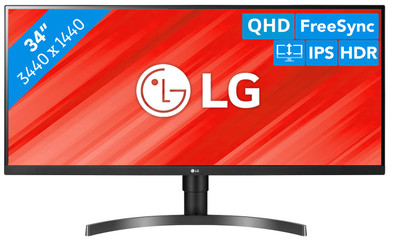
With the LG 34WN750P-B, you can easily work in several windows at the same time. This 34-inch Quad HD monitor has an ultrawide aspect ratio, which provides more space than a regular monitor. This allows you to split the screen into 2 windows and export your data from one sheet to another. Or use the extra space for tools and menus in programs like Photoshop. Thanks to the HDR10 support, the colors of movies and series are displayed the way the director intended. You can adjust this monitor in height for the perfect ergonomic working position. You can also connect accessories such as a mouse or keyboard to the 2 built-in USB ports.
Sharpness | Quad HD (1440p) | |
Curved | ||
Aspect ratio | Ultrawide (21:9) | |
Refresh rate | 75 Hz | |
Response time | 5 ms | |
Panel type | IPS panel | |
Color depth | 17 million colors (8-bit) | |
Built-in speakers |
5 stars
23
4 stars
15
3 stars
1
2 stars
0
1 star
0
Through the Reviewclub I was allowed to test this product for 4 weeks. After a few weeks I got a bit of a mixed opinion about this. The double opinion arises mainly on the practical level of the monitor. Technically speaking, this monitor is very high in quality.
The LG 34WN750 is without a doubt a fantastic monitor, with a very fine resolution. The 3440x1440 resolution gives you so much more options in organizing your screen than 1920x1080/1920x1200 or lower. The so-called IPS glow is situationally present, as is almost always the case with an IPS panel, but I have not yet been able to find it without explicitly looking for it by, among other things, turning off the light and turning off very dark scenes. to choose. All in all, a solid IPS panel. The HDR options of the screen give you color reproductions that you say to you. Rarely seen so beautiful on a PC monitor.
In terms of ease of use, there is also an intuitive OSD that you can easily operate with the joystick at the bottom center of the screen. Pros for that, I can sometimes get annoyed with poorly designed OSDs. LG has done well in that regard. In all technical areas, this monitor is an absolute must.
However, where the conflict begins with this monitor has to do with how this screen is used practically. In certain situations this is not necessarily fantastic and I have 1 point of criticism of LG and 1 point of criticism of the use of UltraWideScreen.
Point 1. If you work with multiple inputs (think of a work PC and a personal PC or a laptop for work and a PC for pleasure) your monitors will have to switch inputs. Normally not a problem as most monitors can do this automatically. However, this basic functionality is missing on the LG34WN750. Because of this you will manually change my input from HDMI -> Displayport every time. However useful LG's OSD is, it remains an annoying point of criticism.
Point 2. Multitasking on an ultrawidescreen is a step backwards compared to multitasking on multiple monitors. Especially when you consider that the bezel is almost absent on modern monitors, you can multitask a lot easier and more pleasantly with 2 monitors than on a widescreen monitor. A simple double click to a full screen browser is often undesirable on a monitor of more than 80 cm wide. If you have 2 videos that you want to play at the same time, you can't fullscreen either one. (known situation at my house: live football match without sound on 1 screen, film/series/youtube/twitch on another screen). It will be a bit of fiddling if you want to multitask this on a widescreen monitor. Something that you have a lot less trouble with with multiple monitors.
Technically a fantastic monitor and without a doubt one of the better monitors out there. In that regard, highly recommended. However, if you want this monitor to replace 2 other monitors, it is not recommended because it works a lot less fine than 2 separate monitors. If you also work with 2 different devices on this screen, such as 2 PCs or a PC and a laptop, the fact that there is no automatic switching is an important point of criticism.
Tim Suichies
9 February 2021
Automatically translated from Dutch
The screen is large enough to open several programs next to each other I personally use about 5 at the same time, but I find it more manageable to have a maximum of 3 open next to each other. The screen is also adjustable in height, so that you can work ergonomically. The leg of the monitor is not very large, leaving enough space on the desk for, for example, a separate mouse, keyboard and other documents.
What I especially like about the monitor is that you can adjust the colors in such a way that you don't get tired eyes when you spend hours staring at the screen. For example, there is a reader mode that makes the screen look like you are reading a book on an e-reader. Personally I think this is too dull and I use the cinema mode (this looks a bit more yellow). The only thing I really miss is a built-in webcam for the online meetings. Now I have to open my laptop again for this.
The Maxx audio should provide good sound quality, but I personally don't think this is the case.
Sam G
9 February 2021
Automatically translated from Dutch
The screen is large enough to comfortably have several applications open side by side. This was very useful when programming and writing reports. It was annoying to get an application in the middle of the screen. Often there were too many pixels available for everything to be on the left side of the screen. The high resolution is also one of the biggest advantages. Everything looked sharp. The monitor is tiltable and adjustable in height, making it very pleasant to work behind it.
The 75Hz refresh rate is also nice, but it was not available by default. It was not available until FreeSync was turned on in the monitor's menu. Once you've done that, you can increase the refresh rate with your GPU's software. The maximum brightness was also on the low side, so I don't recommend this screen if you work in a room with a lot of sunlight.
Tariq Riahi
16 February 2021
Automatically translated from Dutch
Product number | 868724 | |
Manufacturer code | 34WN750P-B.AEU | |
Brand | LG | |
Warranty | 2 years | |
Processing of your defect | Via Coolblue |
Recommended display resolution | 3440x1440 | |
Sharpness | Quad HD (1440p) | |
Aspect ratio | Ultrawide (21:9) | |
Refresh rate | 75 Hz | |
Response time | 5 ms | |
Panel type | IPS panel | |
Local dimming | ||
HDR support | ||
Contrast ratio | 1000 | |
Touchscreen | ||
Type of HDR | HDR10 | |
Screen reflection | Anti-glare | |
Blue light filter | ||
Flicker-free technology | ||
Color space | sRGB | |
Color depth | 17 million colors (8-bit) | |
Adaptive Sync | ||
Type of adaptive sync | FreeSync | |
Resolution width | 3440 pixels | |
Resolution height | 1440 pixels | |
Anti-reflection type | Anti glare | |
Viewing distance | 57 - 153 cm | |
Horizontal viewing angle | 178 ° |
Height | 56,6 cm | |
Width | 81,6 cm | |
Depth | 22,6 cm | |
Weight | 8,6 kg | |
Color | Black | |
Including stand | ||
Material | Plastic | |
Cable management | ||
Appearance | Neutral | |
Curved |
Number of HDMI connectors | 2 | |
Number of Female HDMI type A 2.0b connectors | 2 | |
Number of headphone jacks | 1 | |
Type of headphone connection | 3.5mm (TS) | |
Number of Female Standard DisplayPort 1.4 ports | 1 | |
Number of female standard USB-B (3.0 form) ports | 2 | |
Number of female 3.5mm TS Audio Jack ports | 1 | |
Type of USB port | Standard USB-B (3.0 form) | |
Number of USB ports | 2 | |
Suitable for daisy chaining |
Included by default | HDMI cable | |
Not included by default | USB-C cable |
Adjustable in height | ||
Tiltable | ||
Pivotable stand | ||
Pivot function | ||
VESA mount option | ||
VESA mount | 100x100mm |
Energy label | G | |
Energy consumption standby | 0,3 W | |
Energy consumption active | 45 W | |
Energy consumption per 1000h | 32 kWh | |
Annual energy consumption | 47 kWh | |
Annual energy costs | 18,69 euros |
Built-in speakers | ||
Sound system | Stereo | |
Webcam | ||
Split screen | ||
Kensington lock | ||
Best tested |
Recommended for use | Image editing and graphic design, Video editing |