Never available again
View alternatives in the sidebar
View alternatives in the sidebar
Product number | 917904 | |
|---|---|---|
Manufacturer code | PRO MP341CQ | |
Brand | MSI | |
Warranty | 2 years | |
Processing of your defect | Via Coolblue |
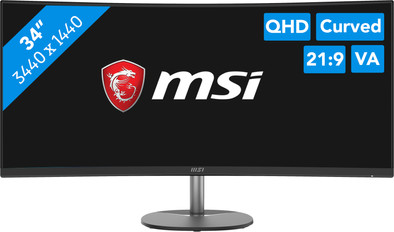
Screen size | 34 inches | |
|---|---|---|
Recommended display resolution | 3440x1440 | |
Sharpness | Quad HD (1440p) | |
Aspect ratio | Ultrawide (21:9) | |
Refresh rate | 100 Hz | |
Response time | 1 ms | |
Panel type | VA panel | |
Brightness | 300 cd/m2 | |
Local dimming | ||
HDR support | ||
Contrast ratio | 3000,01 | |
Touchscreen | ||
Screen reflection | Anti-glare | |
Blue light filter | ||
Flicker-free technology | ||
Color space | Adobe RGB, DCI-P3, sRGB | |
Adobe RGB color coverage percentage | 99,62 % | |
sRGB color coverage percentage | 116,25 % | |
Color depth | 1 billion colors (10-bit) | |
Adaptive Sync | ||
Type of adaptive sync | FreeSync | |
Resolution width | 3440 pixels | |
Resolution height | 1440 pixels | |
Anti-reflection type | Anti glare | |
Horizontal viewing angle | 178 ° |
Height | 46,95 cm | |
|---|---|---|
Width | 80,93 cm | |
Depth | 23,7 cm | |
Weight | 7,7 kg | |
Color | Black | |
Including stand | ||
Material | Plastic | |
Cable management | ||
Appearance | Business, Neutral | |
Curved | ||
Screen curve | 1500 R |
Number of HDMI connectors | 1 | |
|---|---|---|
Number of Female HDMI type A 2.0b connectors | 1 | |
Number of headphone jacks | 1 | |
Type of headphone connection | 3.5mm (TS) | |
Number of Female Standard DisplayPort 1.2a port | 1 | |
Number of female 3.5mm TS Audio Jack ports | 1 | |
Suitable for daisy chaining |
Included by default | HDMI cable | |
|---|---|---|
Not included by default | USB-C cable |
Adjustable in height | ||
|---|---|---|
Tiltable | ||
Pivotable stand | ||
Pivot function | ||
VESA mount option | ||
VESA mount | 100x100mm |
Energy label | G | |
|---|---|---|
Energy consumption standby | 0,5 W | |
Energy consumption per 1000h | 33 kWh | |
Annual energy consumption | 34,18 kWh | |
Annual energy costs | 19,27 euros |
Built-in speakers | ||
|---|---|---|
Sound system | Stereo | |
Split screen | ||
Kensington lock |
Recommended for use | Image editing and graphic design, Internet, email, and text processing, Office work, Photo editing, Watching movies in Full HD |
|---|
anything for a smile
Our digital expert will help you, but it can sometimes make mistakes, like humans do.
According to our monitor expert
Sharp image: you can clearly see small details thanks to the Quad HD resolution.
Comfortable viewing angle: you can tilt the screen into a comfortable position thanks to the tiltable monitor.
Built-in audio: thanks to the built-in speakers, you don't need separate speakers anymore.
No USB-C port: you can't connect your laptop with 1 cable for extra screen space.
Takes up more space: you'll need a larger desk because of the 34-inch screen.
The monitor is mounted on a vesa stand, it is a bit on the heavy side for this. For the price it is a great screen and I can do my office work well on it.
Mark
4 January 2025
Automatically translated from Nederlands
What a luxury, so much space... Multiple windows next to each other is no problem at all. Replaces 2 separate monitors. Games is really next level with this wide field of view. If it's purely for gaming, then maybe it's better to take an IPS panel.
Joey A
30 December 2022
Automatically translated from Nederlands
bit sloppily designed, not a decent screen
Rinke
11 December 2023
Automatically translated from Nederlands
