Samsung Odyssey G85 OLED

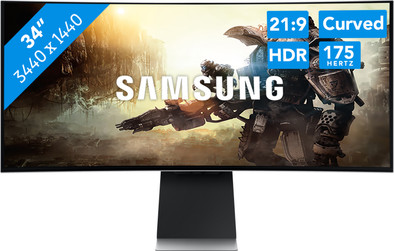
Never available again
View alternatives in the sidebar
View alternatives in the sidebar
Product number | 918587 | |
|---|---|---|
Manufacturer code | LS34BG850SUXEN | |
Brand | Samsung | |
Warranty | 2 years | |
Processing of your defect | Via Coolblue |
Screen size | 34 inches | |
|---|---|---|
Recommended display resolution | 3440x1440 | |
Sharpness | Quad HD (1440p) | |
Brand-specific image technology | Samsung QLED | |
Aspect ratio | Ultrawide (21:9) | |
Refresh rate | 175 Hz | |
Response time | 0,03 ms | |
Panel type | OLED | |
Brightness | 250 cd/m2 | |
Local dimming | ||
HDR support | ||
Contrast ratio | 1000 | |
Touchscreen | ||
Type of HDR | DisplayHDR 400 | |
Screen reflection | Anti-glare | |
Blue light filter | ||
Flicker-free technology | ||
Color space | DCI-P3 | |
Color depth | 1 billion colors (10-bit) | |
Adaptive Sync | ||
Type of adaptive sync | FreeSync 2 | |
Resolution width | 3440 pixels | |
Resolution height | 1440 pixels | |
Anti-reflection type | Matte | |
Horizontal viewing angle | 178 ° |
Height | 52,2 cm | |
|---|---|---|
Width | 81,7 cm | |
Depth | 19,2 cm | |
Weight | 7,5 kg | |
Color | Silver | |
Including stand | ||
Material | Plastic | |
Cable management | ||
Appearance | Gaming, Neutral | |
Curved | ||
Screen curve | 1800 R |
Number of HDMI connectors | 1 | |
|---|---|---|
Number of USB-C ports | 2 | |
Protocol mini DisplayPort port | DisplayPort | |
Type of USB port | USB-C | |
Number of USB ports | 2 | |
USB-C dock | ||
Maximum USB-C dock power | 65 W |
Included by default | DisplayPort cable | |
|---|---|---|
Not included by default | HDMI cable, USB-C cable |
Adjustable in height | ||
|---|---|---|
Tiltable | ||
Pivotable stand | ||
Pivot function | ||
VESA mount option | ||
VESA mount | 100x100mm |
Energy label | G | |
|---|---|---|
Energy consumption standby | 5 W | |
Energy consumption active | 50 W | |
Energy consumption per 1000h | 50 kWh | |
Annual energy consumption | 73 kWh | |
Annual energy costs | 29,2 euros |
Built-in speakers | ||
|---|---|---|
Sound system | Stereo | |
Split screen | ||
Kensington lock |
Recommended for use | Gaming, Image editing and graphic design, Internet, email, and text processing, Photo editing, Video editing, Watching movies in Full HD |
|---|
anything for a smile
Sharpness | Quad HD (1440p) | |
|---|---|---|
Curved | ||
Aspect ratio | Ultrawide (21:9) | |
Refresh rate | 175 Hz | |
Response time | 0,03 ms | |
Panel type | OLED | |
Color depth | 1 billion colors (10-bit) | |
Built-in speakers |
According to our monitor expert
Thanks to the 175Hz refresh rate and 0.03ms response time, you can game with very smooth images that are suitable for esports.
Colors, shadows, and other graphics come into their own better on the OLED screen.
You can connect other smart devices with this gaming monitor and control them via the Bixby voice control.
With this monitor, you'll only receive a DisplayPort cable, you need to purchase an HDMI or USB-C cable separately.
This monitor takes up a lot of space and is fairly heavy, so make sure you have a large and sturdy desk.
Enjoy razor-sharp graphics during gaming with the Samsung Odyssey G85 OLED QHD 34-inch 175Hz curved gaming monitor. This gaming monitor has an OLED panel, so colors, shadows, and graphics come into their own. You can try it out with a green landscape. Thanks to the combination of the 175Hz refresh rate and 0.03ms response time, you experience the most smooth movements on a gaming monitor. So this monitor is also suitable for graphic intensive games and competitive gaming. Thanks to the QHD resolution, DisplayHDR 400 support, and the DCI-P3 color space, your graphics come into their own. This way, you see skylines and other surroundings in an extra detailed way. Combine this with a curved screen, so it feels like you're in the middle of the action and you enjoy a unique gaming experience. Don't forget to turn on the AMD FreeSync Premium technology when you play with an AMD video card. This way, you prevent screen tear and slowing down, even when you play in HDR. Besides gaming, this monitor also has a SmartThings hub. With this, you can connect all your smart devices to your monitor and control them with a push of the button. Don't have any fingers available? Use the Bixby Voice Assistant to carry out orders. In addition, you can tilt, turn, or adjust the monitor in height to get the right ergonomic sitting posture. This way, you sit comfortably and you also prevent neck and back problems. Do you use the monitor for more than gaming? Connect your laptop via USB-C and easily switch between your tasks via Auto Source Switch.
Note: For 4K gaming, you need a very powerful video card, such as an NVIDIA GeForce RTX 3080, 3080 Ti, 3090, or AMD Radeon RX 6000-serie GPU. Next generation consoles, such as the PlayStation 5 and Xbox Series X|S don't support ultrawide resolutions.
5 stars
95
4 stars
68
3 stars
9
2 stars
3
1 star
0
Installation ease
Image quality
Price-quality ratio
Design
During the installation, had the necessary problems, Monitor got "no" signal from my RTX-3080-TI via DP or HDMI 2.1 cable. First updated Bios from 1004.0 to 1007.3, it didn't help. Finally got a picture via the Picture in picture option.
Jeroen Lansink
10 October 2021
Automatically translated from Nederlands
I looked at multiple screens for my PC, looked at multiple sites what the best PC screens are and then I came across this one, I may be just one person in the reviews for this screen but believe me when I say I'm really happy am that I bought this one, this is my first time making a review and I think it's because I think this screen deserves it, I can easily get rid of the cables, the screen is really easy to operate and no screen problems , I'm someone who really likes gaming and I think this screen is perfect for that.
Ritchie van Rheenen
6 October 2022
Automatically translated from Nederlands
Likes it. I read in other reviews that the menu is slow, but not bothered by this.
Johannes Schroeder
18 January 2023
Automatically translated from Nederlands
