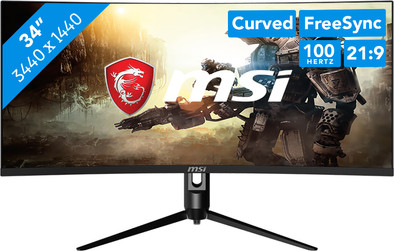
Never available again
View alternatives in the sidebar
View alternatives in the sidebar
Product number | 923850 | |
|---|---|---|
Manufacturer code | MAG342CQPV | |
Brand | MSI | |
Warranty | 3 years | |
Processing of your defect | Via Coolblue |
Screen size | 34 inches | |
|---|---|---|
Recommended display resolution | 3440x1440 | |
Sharpness | Quad HD (1440p) | |
Aspect ratio | Ultrawide (21:9) | |
Refresh rate | 100 Hz | |
Response time | 1 ms | |
Panel type | VA panel | |
Brightness | 250 cd/m2 | |
Local dimming | ||
HDR support | ||
Contrast ratio | 3000 | |
Touchscreen | ||
Screen reflection | Anti-glare | |
Blue light filter | ||
Flicker-free technology | ||
Color space | Adobe RGB, DCI-P3, sRGB | |
Adobe RGB color coverage percentage | 87 % | |
sRGB color coverage percentage | 110 % | |
Color depth | Less than 17 million colors (less than 8-bit) | |
Adaptive Sync | ||
Type of adaptive sync | FreeSync | |
Resolution width | 3440 pixels | |
Resolution height | 1440 pixels | |
Anti-reflection type | Anti glare | |
Horizontal viewing angle | 178 ° |
Height | 40,25 cm | |
|---|---|---|
Width | 87 cm | |
Depth | 26,9 cm | |
Weight | 6,92 kg | |
Color | Black | |
Including stand | ||
Material | Plastic | |
Cable management | ||
Appearance | Gaming | |
Curved | ||
Screen curve | 1500 R |
Number of HDMI connectors | 2 | |
|---|---|---|
Number of Female HDMI type A 1.4b ports | 1 | |
Number of Female HDMI type A 2.0b connectors | 1 | |
Number of headphone jacks | 1 | |
Type of headphone connection | 3.5mm (TRS) | |
Number of Female Standard DisplayPort 1.2a port | 1 | |
Number of female 3.5mm TRS Audio Jack ports | 1 | |
Suitable for daisy chaining | ||
USB-C dock |
Not included by default | USB-C cable |
|---|
Adjustable in height | ||
|---|---|---|
Tiltable | ||
Pivotable stand | ||
Pivot function | ||
VESA mount option | ||
VESA mount | 75x75mm |
Energy label | G | |
|---|---|---|
Energy consumption standby | 0,5 W | |
Energy consumption active | 26 W | |
Energy consumption per 1000h | 39 kWh | |
Annual energy consumption | 56,94 kWh | |
Annual energy costs | 35,59 euros |
Built-in speakers | ||
|---|---|---|
Split screen | ||
Kensington lock |
Recommended for use | Gaming, Image editing and graphic design, Internet, email, and text processing, Photo editing, Video editing, Watching movies in Full HD |
|---|
anything for a smile
Sharpness | Quad HD (1440p) | |
|---|---|---|
Curved | ||
Aspect ratio | Ultrawide (21:9) | |
Refresh rate | 100 Hz | |
Response time | 1 ms | |
Panel type | VA panel | |
Color depth | Less than 17 million colors (less than 8-bit) | |
Built-in speakers |
According to our monitor expert
Thanks to the 170Hz refresh rate, you always game with smooth images even in graphically demanding games.
You can enjoy extra sharp images while you game thanks to the QHD resolution.
You can game in QHD or Full HD at 120Hz when you connect your console, like the PlayStation 5 or Xbox Series X|S.
The PlayStation 5 and Xbox series X|S don't support ultrawide settings, so the image scales down automatically.
A 34-inch ultrawide monitor takes up a lot of space on your desk, so make sure it fits.
The MSI Optix MAG342QPV is a 34-inch QHD ultrawide 100Hz curved gaming monitor. Thanks to the aspect ratio, you have a third more screen space than on a regular monitor. You can enjoy more screen space that way, which is useful for games like shooters or strategy games. This provides a better overview of the playing field, and you can see opponents before they see you. Ghosting is a thing of the past thanks to the 1ms response time, while the 100Hz refresh rate ensures smooth-moving images. AMD FreeSync also synchronizes the framerate of your AMD video card with that of the monitor, so there's no screen tearing. The high coverage in all 3 color spaces ensures you can enjoy bright and vibrant colors. For example, turn on DCI-P3 while you play an open world game and immerse yourself in the lively and colorful gaming world. More of a console gamer? No worries, you can also use the monitor in combination with the PlayStation 5 and Xbox consoles. Connect your console via the HDMI 1.4 or 2.0 ports and game at 60Hz in Full HD or QHD. That way, you can also game with smooth images on your console. You can also tilt, turn, rotate, or adjust the monitor in height to create an ergonomic sitting position. This prevents neck and back complaints after long gaming sessions.
Top
Alex
7 September 2023
Automatically translated from Nederlands
Missing the DP cable, the HDMI cable is only short
peet
29 October 2023
Automatically translated from Nederlands
I use it for private and work and it works fine
Marco
17 November 2023
Automatically translated from Nederlands