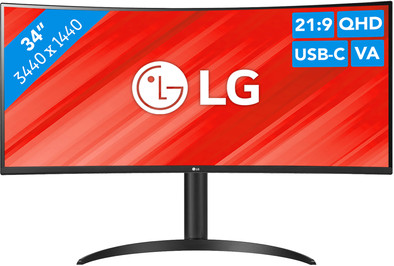
Never available again
View alternatives in the sidebar
View alternatives in the sidebar
Product number | 944677 | |
|---|---|---|
Manufacturer code | 34WR55QK-B.AEU | |
Brand | LG | |
Warranty | 2 years | |
Processing of your defect | Via Coolblue |
Screen size | 34 inches | |
|---|---|---|
Recommended display resolution | 3440x1440 | |
Sharpness | Quad HD (1440p) | |
Aspect ratio | Ultrawide (21:9) | |
Refresh rate | 100 Hz | |
Response time | 5 ms | |
Panel type | VA panel | |
Brightness | 300 cd/m2 | |
Local dimming | ||
HDR support | ||
Contrast ratio | 3000 | |
Touchscreen | ||
Type of HDR | HDR10 | |
Screen reflection | Anti-glare | |
Blue light filter | ||
Flicker-free technology | ||
Color space | sRGB | |
sRGB color coverage percentage | 99 % | |
Color depth | Less than 17 million colors (less than 8-bit) | |
Adaptive Sync | ||
Type of adaptive sync | FreeSync | |
Resolution width | 3440 pixels | |
Resolution height | 1440 pixels | |
Anti-reflection type | Anti glare | |
Horizontal viewing angle | 178 ° |
Height | 56,83 cm | |
|---|---|---|
Width | 80,9 cm | |
Depth | 26 cm | |
Weight | 6,9 kg | |
Color | Black | |
Including stand | ||
Material | Plastic | |
Cable management | ||
Appearance | Business, Neutral | |
Curved | ||
Screen curve | 1800 R |
Number of HDMI connectors | 2 | |
|---|---|---|
Number of Female HDMI type A 2.0a port | 2 | |
Number of headphone jacks | 1 | |
Type of headphone connection | 3.5mm (TRS) | |
Number of USB-C ports | 1 | |
Number of USB 3.1 Female USB-C port | 1 | |
Number of Female Standard DisplayPort 1.4 ports | 1 | |
Number of female standard USB-A ports | 2 | |
Female standard USB-A port version | 3.0 | |
Number of female 3.5mm TRS Audio Jack ports | 1 | |
Type of USB port | Standard USB-A, USB-C | |
Number of USB ports | 3 | |
Suitable for daisy chaining | ||
USB-C dock | ||
Maximum USB-C dock power | 65 W |
Included by default | HDMI cable, USB-C cable |
|---|
Adjustable in height | ||
|---|---|---|
Tiltable | ||
Pivotable stand | ||
Pivot function | ||
VESA mount option | ||
VESA mount | 100x100mm |
Energy label | F | |
|---|---|---|
Energy consumption standby | 0,5 W | |
Energy consumption active | 48 W | |
Energy consumption per 1000h | 31 kWh | |
Annual energy consumption | 45,26 kWh | |
Annual energy costs | 18,1 euros |
Built-in speakers | ||
|---|---|---|
Webcam | ||
Split screen | ||
Kensington lock |
Recommended for use | Internet, email, and text processing, Office work, Photo editing, Video editing, Watching movies in Full HD |
|---|
anything for a smile
Our digital expert will help you, but it can sometimes make mistakes, like humans do.
According to our monitor expert
Sharp image: enjoy a sharp image thanks to the Quad HD resolution.
Charge your laptop: the 65-watt USB-C dock lets you charge your laptop via the monitor.
Work ergonomically: the height-adjustable screen lets you create an ergonomic posture.
No built-in speakers: this monitor doesn’t have built-in speakers for your music or other audio.
No built-in webcam: because the monitor doesn’t have a built-in webcam, you’ll need a separate one if you want to make video calls.
Installation ease
Image quality
Price-quality ratio
Design
Nice monitor, but after a few months the USB-C port stopped working and I could not connect my macbook anymore. If you google this problem you will find many topics with the same problems. Sometimes it works to remove the power cable for a few minutes, but for me the USB-C port seems to be broken unfortunately...
Niels
12 September 2024
Automatically translated from Nederlands
I was skeptical about the curved screen, but after 1 day I got used to it. 100 HRZ, excellent, quiet image. easy to adjust the contrast and colors big enough for my games. in short, I am very satisfied price-quality ratio more than excellent
gerard
27 May 2024
Automatically translated from Nederlands
As a Mac user switched from a Thunderbolt screen to this one. Colors may be even better on this screen, I had to turn the brightness down a bit. A tip if you want to control your screen with your mac, download the MonitorControl app. Very convenient now that you only need 1 plug to connect the MacBook to the screen
The sound is very bad but maybe I was used to too much from my previous monitor. The stand feels a bit cheap, the screen moves with keystrokes. The finish of the screen is poor, I initially thought it was a protective layer that could be removed, but the screen is simply sloppily finished.
Sander
10 September 2023
Automatically translated from Nederlands