Never available again
View alternatives in the sidebar
Choose your monitor
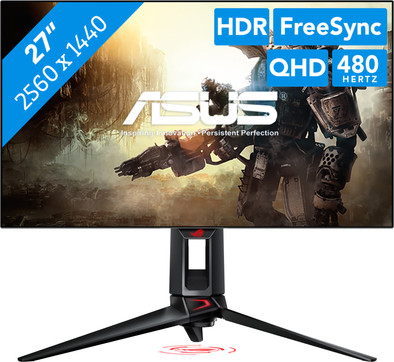
27 inches - Quad HD - 480Hz - OLED
Choose your monitor
View alternatives in the sidebar
27 inches - Quad HD - 480Hz - OLED
Choose your monitor
Product number | 957104 | |
|---|---|---|
Manufacturer code | 90LM0A20-B01A70 | |
Brand | ASUS | |
Warranty | 3 years | |
Processing of your defect | Via Coolblue |
Screen size | 26,5 inches | |
|---|---|---|
Recommended display resolution | 2560x1440 | |
Sharpness | Quad HD (1440p) | |
Aspect ratio | Standard (16:9) | |
Refresh rate | 480 Hz | |
Response time | 0,03 ms | |
Panel type | OLED | |
Brightness | 450 cd/m2 | |
Local dimming | ||
HDR support | ||
Contrast ratio | 1500000 | |
Touchscreen | ||
Type of HDR | DisplayHDR 400 True Black | |
Screen reflection | Anti-glare | |
Blue light filter | ||
Flicker-free technology | ||
Color space | DCI-P3, sRGB | |
sRGB color coverage percentage | 135 % | |
Color depth | 1 billion colors (10-bit) | |
Adaptive Sync | ||
Type of adaptive sync | Freesync Premium Pro, G-Sync Compatible | |
Resolution width | 2560 pixels | |
Resolution height | 1440 pixels | |
Anti-reflection type | Anti glare | |
Horizontal viewing angle | 178 ° |
Height | 54,8 cm | |
|---|---|---|
Width | 60,5 cm | |
Depth | 27,4 cm | |
Weight | 6,2 kg | |
Color | Black | |
Including stand | ||
Material | Plastic | |
Cable management | ||
Appearance | Gaming | |
Curved |
Number of HDMI connectors | 2 | |
|---|---|---|
Number of Female HDMI type A 2.1 ports | 2 | |
Number of headphone jacks | 1 | |
Type of headphone connection | 3.5mm (TRS) | |
Number of Female Standard DisplayPort 1.4 ports | 1 | |
Number of female standard USB-A ports | 2 | |
Female standard USB-A port version | 3.2 | |
Number of female 3.5mm TRS Audio Jack ports | 1 | |
Type of USB port | Standard USB-A | |
Number of USB ports | 2 | |
Suitable for daisy chaining | ||
USB-C dock |
Included by default | DisplayPort cable, HDMI cable, USB cable | |
|---|---|---|
Not included by default | USB-C cable |
Adjustable in height | ||
|---|---|---|
Tiltable | ||
Pivotable stand | ||
Pivot function | ||
VESA mount option | ||
VESA mount | 100x100mm |
Energy label | F | |
|---|---|---|
Energy consumption standby | 0,5 W | |
Energy consumption active | 24,5 W | |
Energy consumption per 1000h | 25 kWh | |
Annual energy consumption | 36,5 kWh | |
Annual energy costs | 14,6 euros |
Built-in speakers | ||
|---|---|---|
Webcam | ||
Split screen | ||
Kensington lock |
Recommended for use | Gaming, Image editing and graphic design, Internet, email, and text processing, Photo editing, Video editing, Watching movies in Full HD |
|---|
anything for a smile
Our digital expert will help you, but it can sometimes make mistakes, like humans do.
According to our monitor expert
Sharp image: you can clearly see small details on the screen thanks to the Quad HD resolution.
Play smoothly: you can see fast-moving images without stuttering thanks to the 480Hz refresh rate.
Quick on screen: you can see fast motion sharply thanks to the 0.4-millisecond response time.
DisplayPort required: for 480-hertz gaming, you use a DisplayPort cable instead of an HDMI cable.
Less immersive: your gameplay is less immersive without a curved screen.
Installation ease
Image quality
Price-quality ratio
Design
I was just hesitating between 3 monitors. The consideration was: do I go for the best picture or for competitive play + excellent picture (balanced)?
ASUS ROG Swift OLED PG27UCDM MSI MPG 272URX QD-OLED Gigabyte AORUS FO27Q5P
Ultimately, I ruled out the MSI, even though it was cheaper but used older OLED technology.
I didn't choose the 2K 500Hz 0.3ms Gigabyte because I considered picture quality to be very important, and 240Hz 0.3ms is actually sufficient for competitive play, but I am still curious about the Gigabyte since the difference between 2K and 4K ultimately doesn't seem that big. However, 2K is easier to render at higher frames, whereas with 4K I have to upscale everything with FSR4 (because I use AMD). I am finally getting the most out of my GPU and am less CPU-bound due to the higher resolution, and ultimately the FPS doesn't differ that much.
Regarding the AMD 9070XT, I do have to warn that the card does not support 80GB/s and only achieves 54GB/s, meaning DSC is used and subsequently operates at 40GB/s with compression, but this shouldn't matter for latency or image quality.
My hardware:
5950X running PBO with negative voltage curve (230W)
9070XT +10% Pwr (370W), VRAM on fast timings + increased memory clock and negative voltage (roughly comparable to an Nvidia RTX 5080)
I think this is the minimum required to get the most out of this monitor, and I recommend going with Nvidia if you want to reach the full 80GB/s on the DP port, but unfortunately, they are currently a lot more expensive. The included cables are of mediocre quality, so pay close attention to this.
Lester
7 May 2026
Automatically translated from Nederlands
I'm coming from an IPS monitor myself, huge difference
Justin
6 January 2026
Automatically translated from Nederlands
I like the monitor in itself, I tried 500hz and is soo smooth, in the beginning like 4k user was difficult to play in 2k as a downgrade but after a few match and some monitor settings is ok , 2k is perfect for competitive gaming and 4k for Singleplayer or Story mode games.
Inf3cted
11 September 2025